Components
This section shows the different technical components, their names, as well as where they are deployed.
Components
flowchart LR
    AS/400-->Azure
    Microsoft_Cloud-->Azure
    Shared_Drive-->Azure
    Sharepoint-->Azure
    Azure-->PowerBI_Service
    PowerBI_Service
NOTE: Shared_Drive is currently replaced by Sharepoint, but it has not yet been fully migrated.
NOTE: There is currently not a great integration between sharepoint online libraries and Azure. Options are: Power Automate. Or then integrate it directly in Power BI.
Containers
flowchart LR
    Oculus-->|ODBC|IntegrationRuntime;
    AS/400_Code-->|ODBC|IntegrationRuntime;
    AAA-->|ODBC|IntegrationRuntime;
    Shared_Drive-->IntegrationRuntime
    Sharepoint-->|Power Automate|AzureStorage;
    IntegrationRuntime-->|Azure Data Factory|SQL_DWH
    Dynamics-->|Azure Data Factory|SQL_DWH;
    BC-->|Azure Data Factory|SQL_DWH;
    SQL_DWH-->|PowerQuery|PowerBI_Dataset;
    AzureStorage-->|PowerQuery|PowerBI_Dataset;
Configuration and Code
Azure Data Factory (ADF)
IntegrationRuntime
ODBC
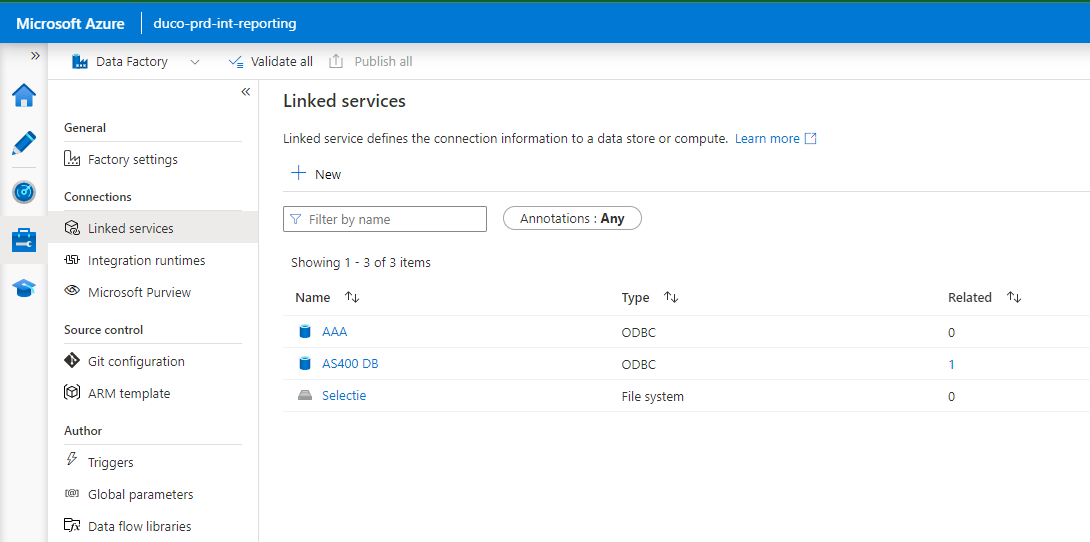
All ODBC connections to AS/400 are accessible through the Integration Runtime.
In ADF, they are configured as Linked services. The names are self-explaining: