DWH (BC): Technical Reference
Overview
The DWH (BC) allows reporting from BC as a turnkey solution.
It allows aggregating numbers over multiple companies.
The following overview shows the components involved:
flowchart TD

 subgraph BC["BC"]

        BCDB["fa:fa-1 fa:fa-database BC"]

        E2["fa:fa-2 fa:fa-book BC Extension<br>Customer Specific"]

        WS["fa:fa-3 fa:fa-cloud OData<br>WebService"]

  end

  subgraph ADF["fa:fa-4 Azure Data Factory<br>Orchestration"]

        AF["fa:fa-5 fa:fa-chevron-circle-right<br>Azure<br>Function"]

  end

 subgraph Azure["Azure"]

        ADF

        DWH["fa:fa-6 fa:fa-database DWH<br>Azure SQL"]

        KV["fa:fa-7 fa:fa-key Key Vault"]

 end

 subgraph PBI["Power BI Service"]

        DS["fa:fa-8 fa:fa-star-of-life<br>Semantic Model"]

        R["fa:fa-9 fa:fa-chart-pie Report"]

  end

    BCDB --> E2

    E2 --> WS

    WS --> AF

    AF --> DWH

    DWH --> DS

    DS --> R


    style ADF fill:#FFFFFF
AL Extension
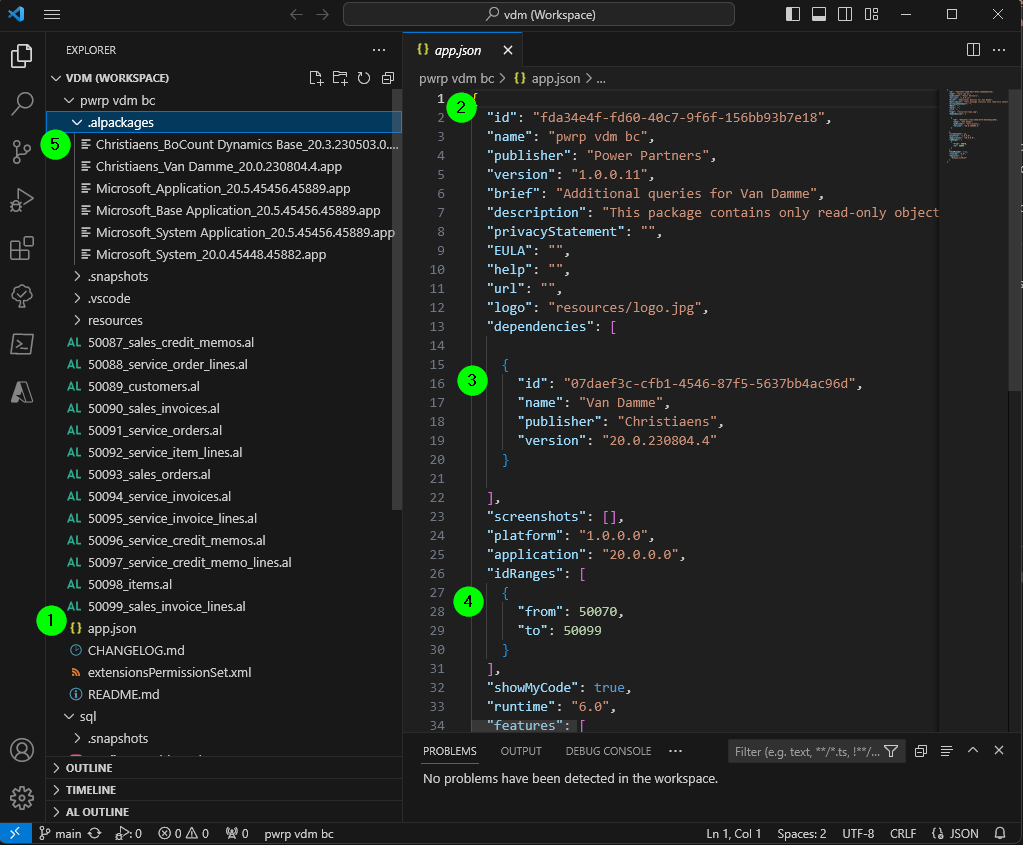
There are a couple of things you need to consider when you create a custom-extension:
-
Most things are configured in
app.json -
The id must be unique. The easiest is to set up a new project using
Ctrl+Shift+Pand thenAL:Go! -
You can look up the dependency from the BC application, using
Extensionsand thenUninstall(of course without then actually uninstalling) -
The idRange must be within the limit of the dependency
-
To download the symbols of the dependency, use the normal
Ctrl+Shift+Pand thenDownload Symbols. -
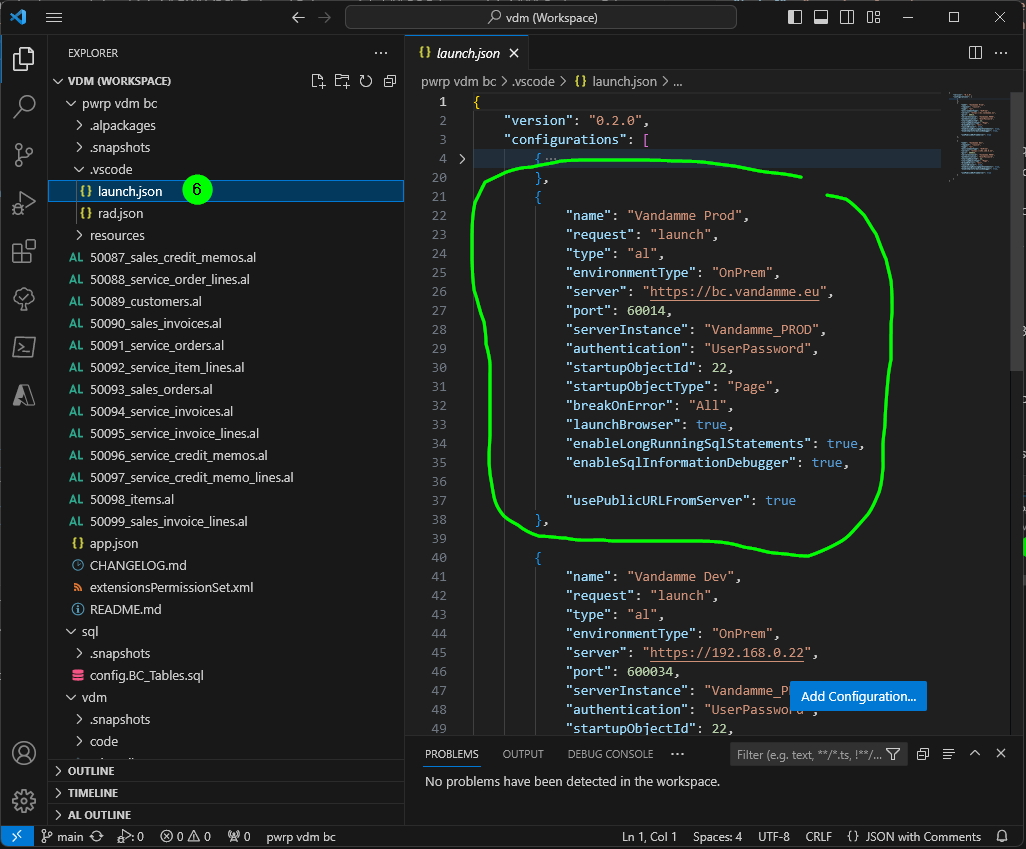
To be able to download symbols of a custom extensions, you need to consider the following:
- configure a configuration in
.vscode/lanuch.json. - The configuration must point to the development endpoint of BC.
- You might need a VPN to access it for on-prem installations.
- The development endpoint is only accessible for Sandbox environment, thus typically a UAT environment.
- You might have to clear the credentials cache. Use
Ctrl+Shift+Pand thenAL: Clear cache
- configure a configuration in
API Queries (apic)
The preferred is API defined by Power Partners queries. The header of an al file defining such a query looks for example like this:
//Original Object ID: 17

//Mode = 'incremental'

query 65000 "pwrp GLEntries"

{

    APIGroup = 'finance';
    APIPublisher = 'pwrp';
    APIVersion = 'v1.0';
    EntityName = 'GLEntry';
    EntitySetName = 'GLEntries';
    QueryType = API;

    DataAccessIntent = ReadOnly;
    OrderBy = ascending("SystemRowVersion");

    elements
    {
        dataitem(GL; "G/L Entry")
        {
            // System fields first

            column(SystemId; SystemId) { }
            column(SystemCreatedAt; SystemCreatedAt) { }
            column(SystemModifiedAt; SystemModifiedAt) { }
            column(SystemRowVersion; SystemRowVersion) { }

            // Standard G/L Entry table fields in Field ID order

            column(entryNo; "Entry No.") { }
            column(glAccountNo; "G/L Account No.") { }
            ...

            // Custom fields (not in standard G/L Entry table)
            ...
        }
    }
}
The advantage of the API over the WS is that you do not need to configure it in the Web Services section of the BC GUI. All API queries are automatically published as OData endpoints.
The URL structure is:
https://api.businesscentral.dynamics.com/v2.0/{{tenant}}/{{environment}}/api/{{APIPublisher}}/{{APIGroup}}/{{APIVersion}}/companies({{company_id}})/{{EntitySetName}}'
For example:
https://api.businesscentral.dynamics.com/v2.0/9384ae5-c096-4e72-8d84-166fcacaccb7/Huber_Production/api/pwrp/sales/v1.0/companies(a49d458a-e538-ed11-97e8-0022486126a2)/OngoingSalesLines'
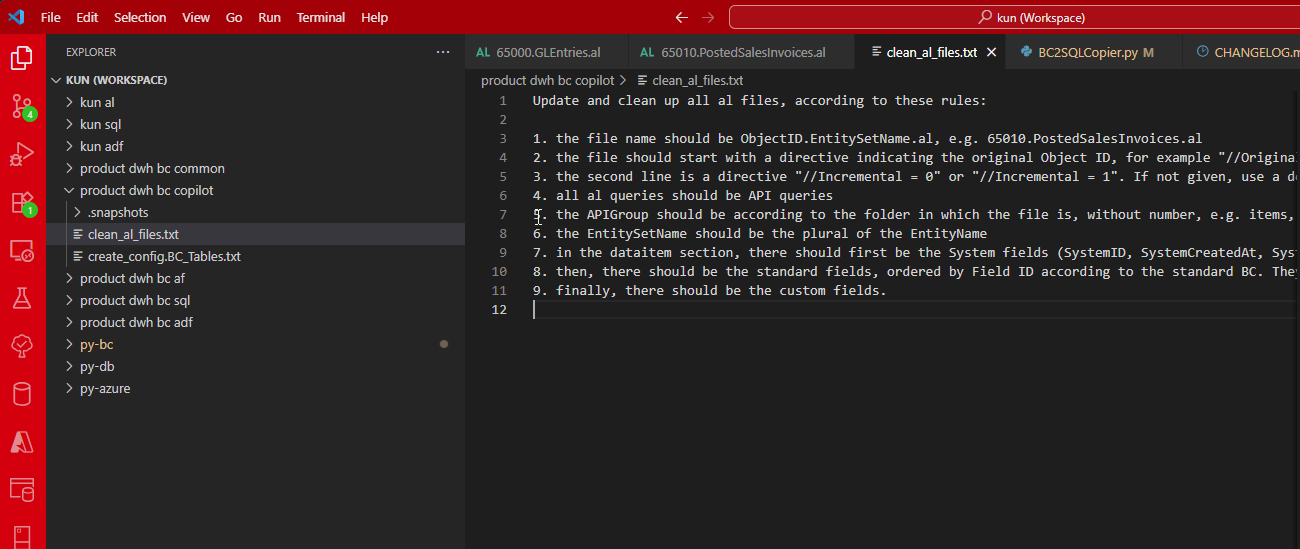
Note that we also created a prompt for Copilot to clean up files:
WS Query (ws)
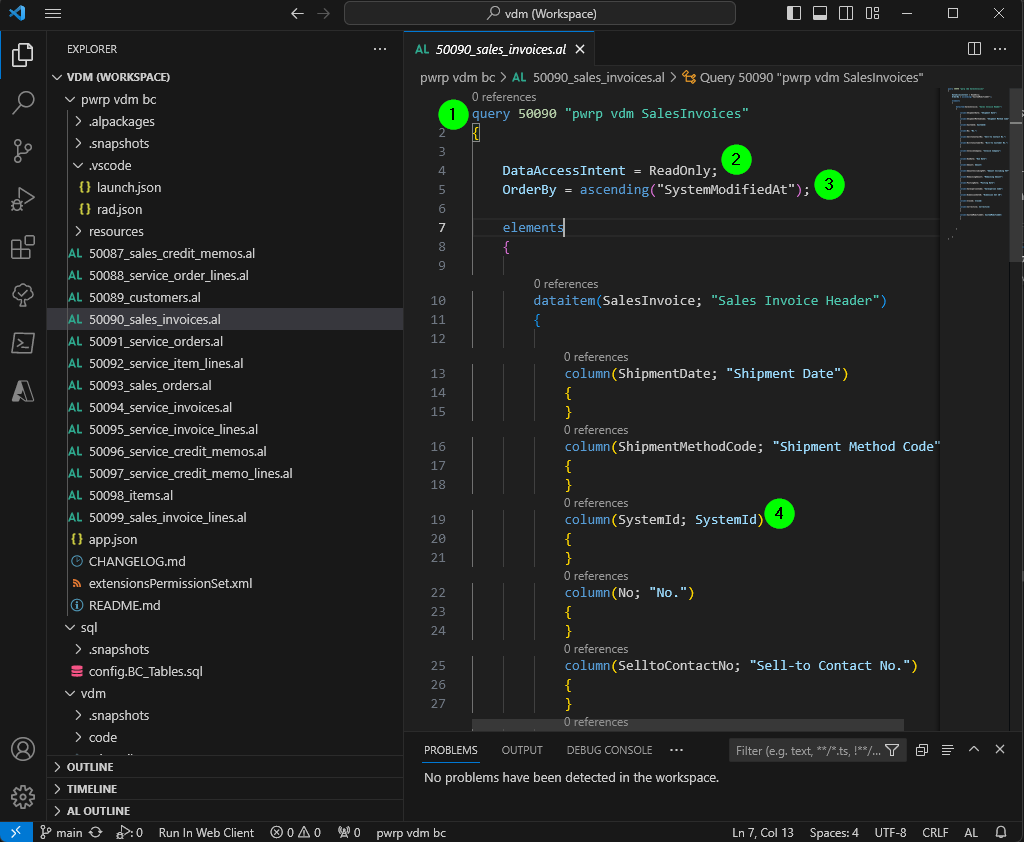
Each Query is defined in an AL file. Each file should adhere to the following specifications:
-
ObjectId: The object ID needs to be unique per BC Installation per type. It also needs to be in the range defined inapp.json -
ReadOnly: In order to avoid impact on the prod system, we promise our clients to deploy ReadOnly extensions only. To enforce this - but also for performance reasons - you need to set theDataAccessIntenttoReadOnly. -
OrderBy: The Azure Function supports two Incremental Download modes:
SystemRowVersion: this mode is strictly preferrable, as it is unique and thus allows for small page sizes.SystemModifiedAt
-
Required Fields:
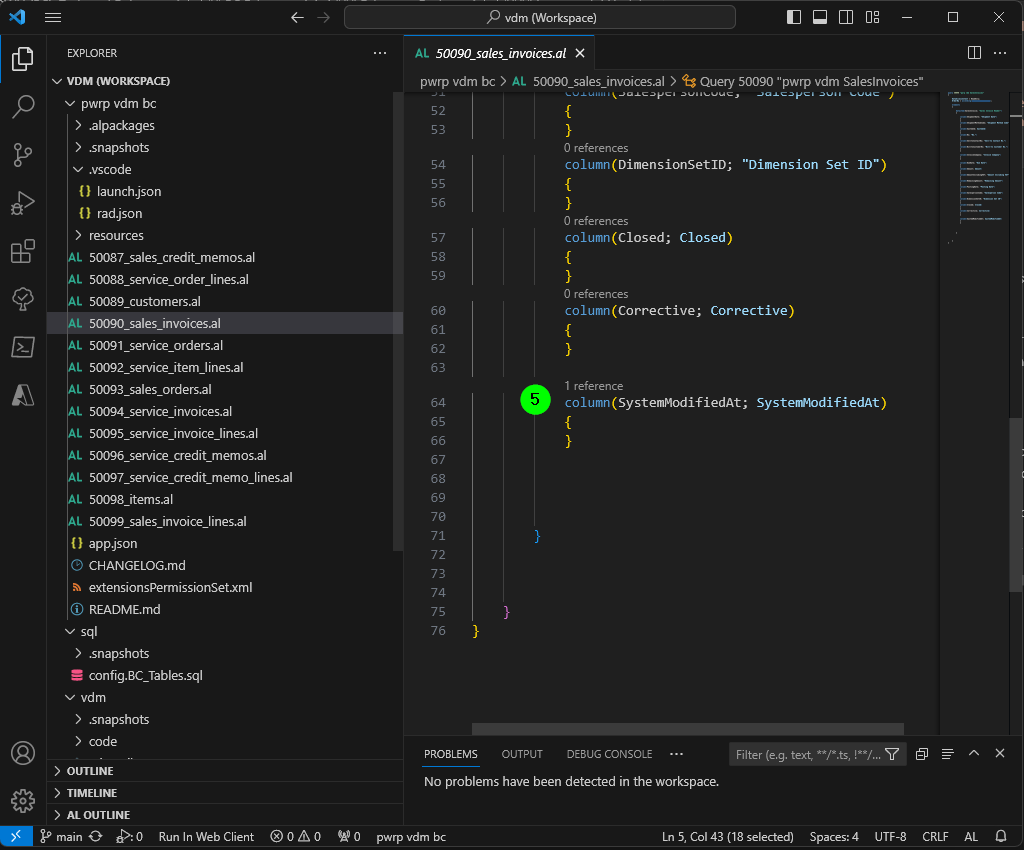
SystemId: This is the unique id of each record. It's unique across companies in a BC installation. The AF depends on the availability of theSystemIdto work.SystemModifiedAt: In order to check download actuality, we need a field calledSystemModifiedAt. Each query should contain this field. It will be automatically converted to a SystemModifiedAtTimestamp and added as a column to each table.SystemRowVersion: This field allows running incremental download in the preferred way.
Installation/Deployment
Cloud
For the cloud installation, you can use the browser application.
Search for Manage Extensions.
On Premise
To install the extension on an on-prem installation, you need to have access to the developer endpoint. It is defined in the launch.json (see above).
Once you have access, you can run Ctrl+Shift+P and AL: Publish without Debugging.
Typically, you will want to coordinate this with the BC implementation partner, as they will need to re-deploy when they do an upgrade.
Also, you can only publish with scope DEV. This means that your extension will be deleted whenever a new version of BC is installed. If this happens, you need to re-deploy the extension.
API Access
Business Central in the Cloud
We access the API with an app identity. You can find it in Azure AD:
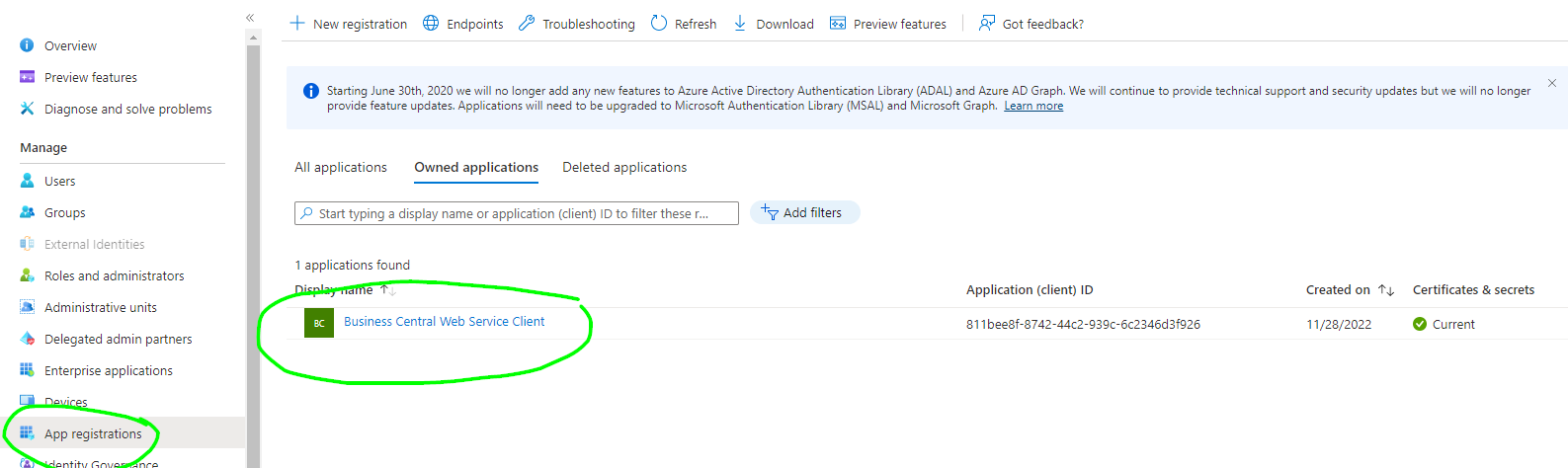
It needs the following permissions:
The API authentication is with a Client ID.
The APP must have access to the desired companies.
The solution requires the client secret to be stored in the key vault (see below).
On Premise
The authentication is typically done via Basic Authentication. In case the service layer is accessible only from within the on-premise network, we need to install the HCM to allow the Azure Function to tunnel through the firewall. This component allows secure access of on-premise resources from outside the Firewall.
Azure Function
The core features of the function are:
- support for paging
- support for incremental download
- aggregating tables for multiple companies
- security
- automatic SQL table creation
- customization of data types
- support of various operations, e.g. to delete temporary tables
Azure Function Service Plan
Most clients have a consumption plan (Y1). The maximum run-time for such a function is 10:00 minutes. The default timeout of the Azure Function is 360s.
Full Downloads
A full table download needs to happen within a single invocation of the Azure Function. If it's too big, you have the following options:
-
Change the Mode to
incremental— works well for tables withSystemModifiedAtorSystemRowVersion. -
Use Mode
resumable— designed for very large tables. It counts the existing rows for the company in the DWH and uses$skipto continue from that offset. Safe to re-run without dropping existing data. -
Upgrade to a B1 service plan, which has no timeout limits. However, this requires some reconfiguration that will be overwritten with the next deployment and is therefore not recommended.
Incremental Downloads
If you use SystemModifiedAt as a discriminator, a single AF invocation might not be enough to download all records of a table having the same SystemModifiedAt. If this is the case, then the system gets in an endless loop. The reason is that the SystemModifiedAt is not unique. So, we cannot be sure that the latest SystemModifiedAt contains all records in the DWH. As a result, we must re-download the records with the last SystemModifiedAt at each AF invocation.
For this reason, using SystemRowVersion is highly preferrable over using SystemModifiedAt, because the row version is unique. If your query contains SystemRowVersion and is sorted by SystemRowVersion, the system will behave as expected, even if you are running on a Y1 service plan.
Azure Function Parameters
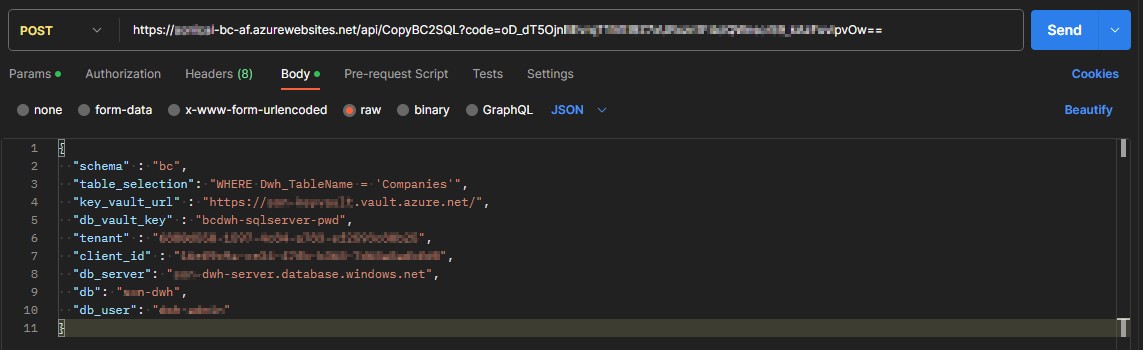
The AF can be called with a JSON body, or with parameters. You will need the code to call it. Typically, we call it as a POST.
The parameters are:
| Name | Description | Default | Used for | Possible Values |
|---|---|---|---|---|
| schema | The name of the schema | bc | all | |
| table_selection | The WHERE clause to select the tables. | WHERE Active = 'True' |
all | WHERE Dwh_TableName = 'Companies' |
| key_vault_url | The URL of the key vault | all | ||
| db_vault_key | The key of the secret that stores the SQL Server pwd. | bcdwh-sqlserver-pwd | all | |
| db_server | The URL of the SQL Server | all | ||
| db | The db name | all | ||
| db_user | The name of the db user (SQL Authentication) | all | ||
| tenant | The BC tenant ID (for cloud) | None |
cloud | |
| client_id | The client_id of the app (for cloud) | None |
cloud | |
| auth_type | The authentication type | OAuth2 | all | Basic, OAuth2 |
| base_url | The base URL of the Web Service layer. | https://api.businesscentral.dynamics.com/v2.0/$tenant$/Production |
all |
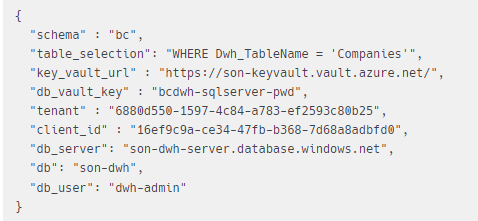
A typical body for a cloud BC is:
A typical body for an on-prem installation is:
{
  "schema" : "test",
  "table_selection": "WHERE Dwh_TableName = 'Vendors'",
  "key_vault_url" : "https://xyz-keyvault.vault.azure.net/",
  "db_vault_key" : "bcdwh-sqlserver-pwd",
  "db_server": "xyz-dwh-server.database.windows.net",
  "db": "xyz-dwh",
  "db_user": "dwh-user",
  "auth_type": "Basic",
  "base_url": "https://bc.vandamme.eu:60013/Vandamme_PROD"
}
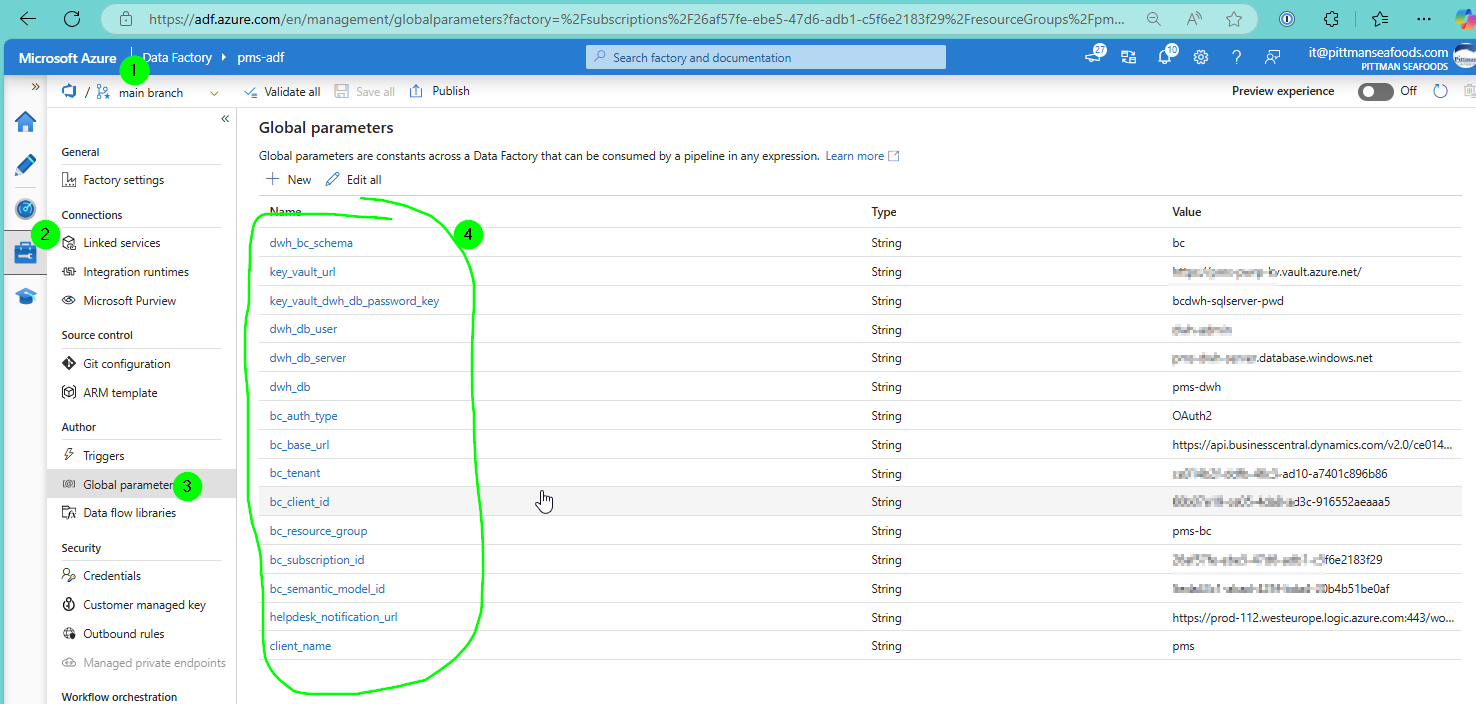
The parameters should be configured as Global Parameters in the Azure Data Factory:
Environment Variables (.env)
The following environment variables can be set for the Azure Function:
-
LOG_LEVEL
- "CRITICAL": logging.CRITICAL
- "ERROR": logging.ERROR
- "WARNING": logging.WARNING
- "INFO": logging.INFO
- "DEBUG": logging.DEBUG
- "NOTSET": logging.NOTSET,
-
FEATURE_CHANGE_LOG_DELETIONS_HOUSEKEEPING: this is a feature toggle that can be set to 'FALSE' or to 'TRUE'. The ChangeLogDeletions table in the DWH can get very big. For this reason, the
DROP_TEMP_TABLESoperation will delete old records. However, as change log deletion is tricky to set up, one might want to turn house-keeping off initially to better track functioning of the system. -
DB_PERFORMANCE_LEVEL_HIBERNATE: this will determine the hibernate level. The lowest permissible level depends on the DWH features, as well as on the data size in the DWH. You can check the lowest permissible level in the Azure console by trying to downsize the database manually. Allowed levels are:
- Basic: 5 DTUs
- Standard
- S0: 10 DTUs
- S1: 20 DTUs
- S2: 50 DTUs
- S3: 100 DTUs
- S4: 200 DTUs
- S6: 400 DTUs
- S7: 800 DTUs
- S9: 1600 DTUs
- S12: 3000 DTUs
- Premium
- P1: 125 DTUs
- P2: 250 DTUs
- P4: 500 DTUs
- P6: 1000 DTUs
- P11: 1750 DTUs
- P15: 4000 DTUs
We typically useBasicorS0as hibernate setting.
-
DB_PERFORMANCE_LEVEL_RUN: the db performance when the pipeline is running. Same as above. We typically use S2 or S3.
-
CLIENT_ID_POWERBI: The client id of the App used to connect via API with the Power BI service.
-
REDIRECT_URI_POWERBI: The Redirect URI of the app
-
HTTP_CONNECTION_TIMEOUT_DATA
- Default: 20, 120
- The first value is the connect timeout
- The second value is the read timeout
-
HTTP_CONNECTION_TIMEOUT_STATS
- Default: 10 (for both connect and read)
App Key
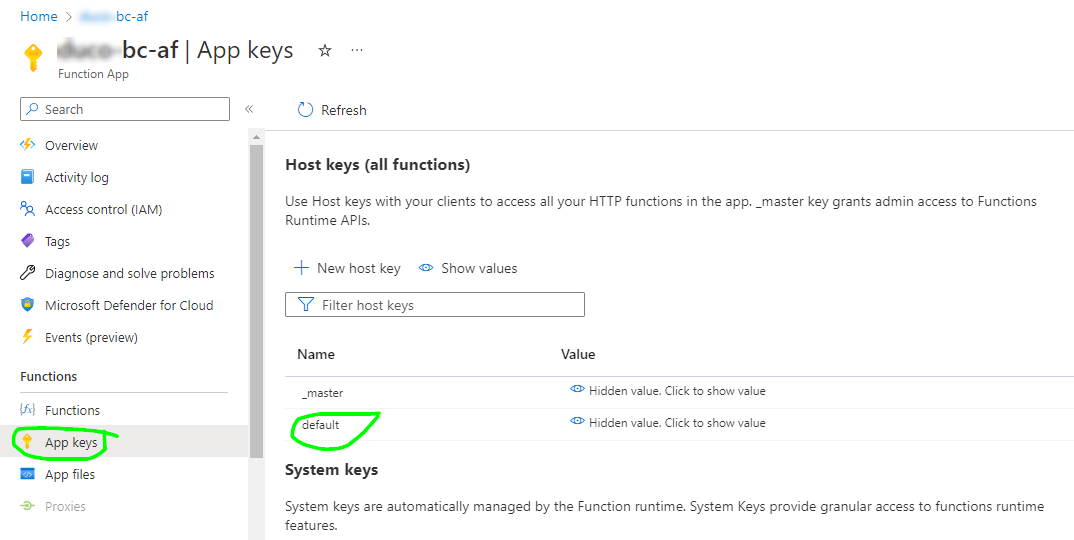
The function is protected with an App key. You will find the app key here:
Parameters
Cloud
For cloud, we have:
We can check it out in Postman:
-
Body
-
raw > JSON
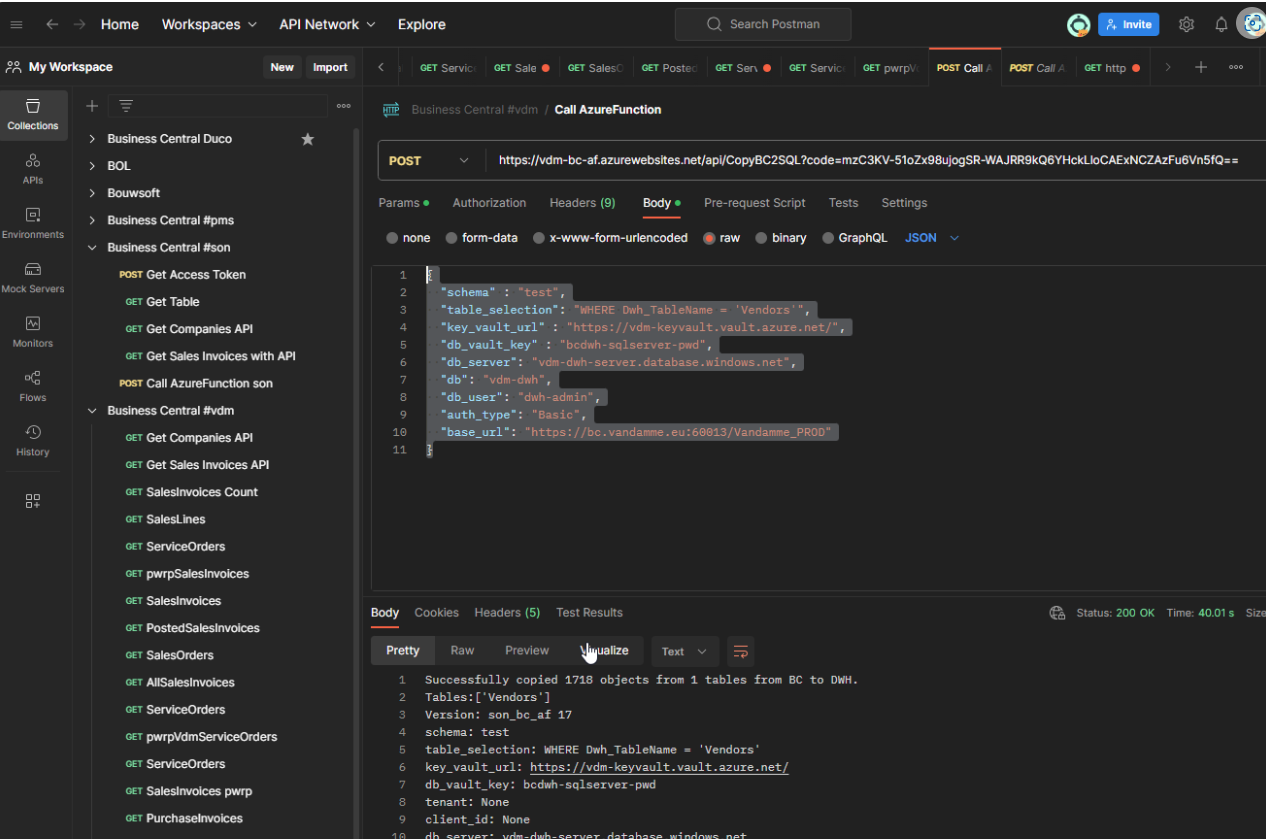
For auth_type="Basic", we need a new parameter in the key-vault
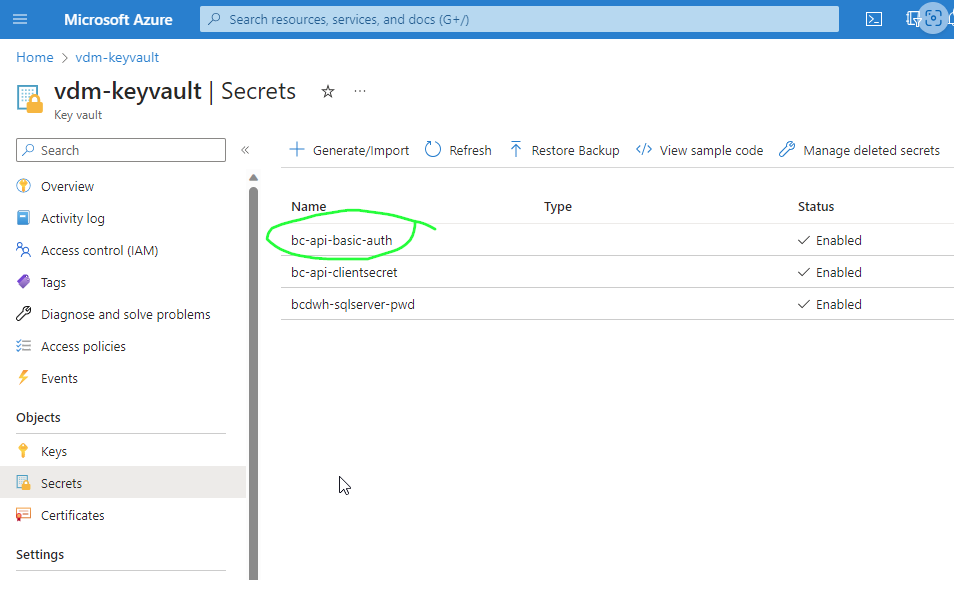
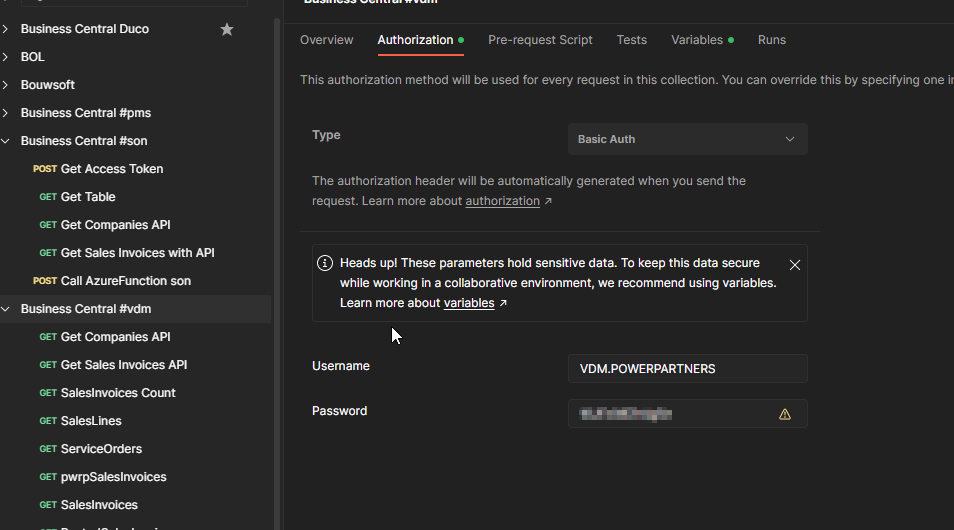
The secret value is the encoded user/password. You can get it in Postman
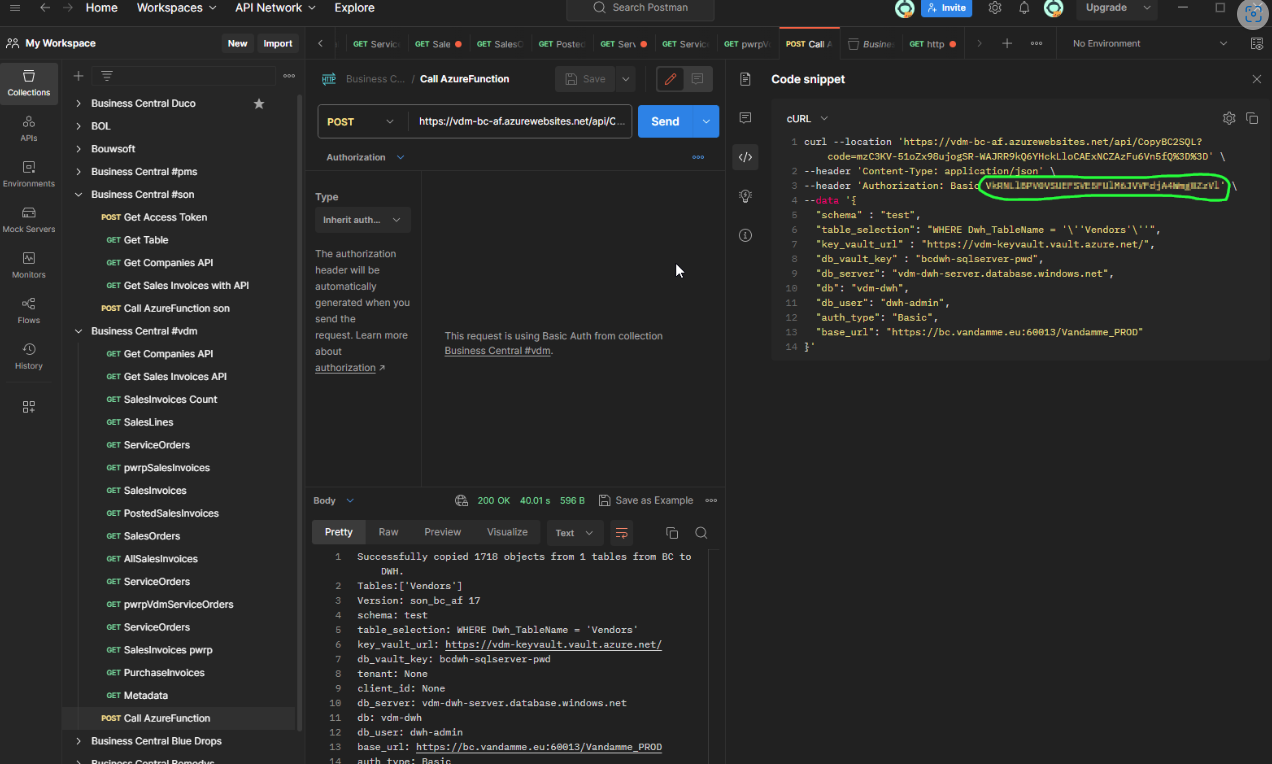
And the code snippet looks like this in Postman:
On-Prem
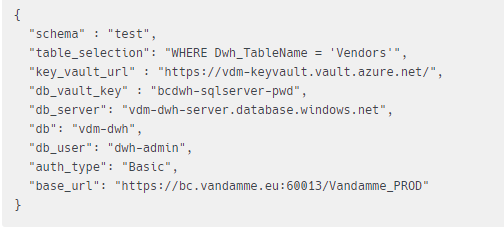
For on-prem, we have:
Operations
Each function call downloads one or more tables.
The function supports the following operations:
DOWNLOAD: this is the normal download mode. Depending on the configuration of the table, it will download the table incrementally or fully.DOWNLOAD_IDS_ONLY: this is needed because BC does not support soft deletes, or another mechanism that will tell us which records have been deleted. With incremental downloads, to make sure that deleted records will be deleted in the DWH, we thus need another mechanism. See below for details.DELETE: this will delete deleted records (if called afterDOWNLOAD_IDS_ONLY). This step can be avoided for some tables, namely if business entities cannot be deleted (e.g. posted invoices)DELETE_USING_CHANGELOGS: this will delete deleted records using the changelog records as downloaded in the ChangelogDeletions table.DROP_TEMP_TABLES: this will perform some house-keeping routinesCHECK_RECORD_COUNT: this will run checks to see if the state of the DWH is healthy. This is typically invoked after a download.DB_PERFORMANCE_LEVEL_HIBERNATE: This will set the Azure SQL database into hibernate mode.DB_PERFORMANCE_LEVEL_RUN: This will increase the DTU performance level of the Azure SQL database. It is typically called at the beginning of a pipeline.REFRESH_PBI: This will refresh a Power BI semantic model of your choice. It is typically called before the database is set into hibernate mode.
The operations are also added as a parameter to the payload (body) of the POST request.
Azure Data Factory
The data ingestion into the DWH is orchestrated by the Azure Data Factory.
git
The ADF artefacts are stored with a git repository on GitHub.
Azure Factory Name: ask your representative in case you don't know
Git Repo: see Data Factory > Manage > Git configuration
Collaboration Branch: main
Publish Branch: adf_publish
Warning
You need to log into GitHub when opening an ADF that someone else created.
Else, your changes will not be saved and will not accessible by other team members.
Orchestration
The Azure Data Factory orchestrates the Azure Function calls. You can find this in the
Pipelines in the Author section.
BC2DWH_daily_all
This pipeline is typically triggered daily by a scheduled trigger.
It will:
-
set the database into high performance mode
-
download all tables that have
Mode = 'incremental'by callingBC2DWH_full_all -
look up the tables to download from
config.BC_Tableshaving Mode = 'incremental' -
for each incremental table
- call
BC2DWH_incremental_table -
if the table is configured for DeleteUsingChangelogs, then the deletion is performed right away.
-
look up the tables for which deleted records need to be deleted (using Delete mode, and not DeleteUsingChangelogs)
-
call the AF with operation
DELETEin order -
Drop temp tables
-
set the database to hibernate
-
refresh the Semantic Model
The parameters are:
- delete_tables: if
truethen existing tables will be deleted. This might be necessary after adding attributes, but is normally false. - where_clause_full: which tables are loaded fully. This is in relation to the
config.BC_Tablesconfiguration - where_clause_incremental: same, but for incremental tables.
- where_clause_delete: same, but for deletes.
BC2DWH_single_table
This pipeline is intended for manual triggering, e.g. to re-load a table after an additional attribute has been added to the web service query. It will identify
the right sub-pipeline to be called.
The parameters are:
- DWH_Table_Name: the name of the table to be deleted, as defined in
config.BC_Tables - MaxLoopCount: The system is smart enough to understand how many subsequent calls of the AF have to be made until all data of a given table is downloaded. The reason why we need to bulk the downloads and spread them over multiple AF calls is that the AF has a timeout limit of 5 minutes. The MaxLoopCount is a security if that mechanism goes wrong, e.g. for misconfiguration. In that case, the Pipeline stops after n iterations and will not continue running indefinitely.
- delete_tables: if
true, the pipeline will delete existing tables before starting the download. This is useful e.g. if you need to add an attribute.
BC2DWH_full_all
As the name suggests, this will download all tables that have Mode = 'full'. You typically do not call this pipeline manually.
BC2DWH_incremental_table
This pipeline is intended to download a single incremental table until there is no more new data. Internally, it is used for two operations:
- DOWNLOAD: downloads attributes as define in
config.BC_Tables.Columns - DOWNLOAD_IDS_ONLY: downloads the ids of a service only, to implement pseudo-deletion of deleted records.
Installation
The default pipelines are installed from product-dwh-bc\code\templates\adf\BC2DWH_daily_all.zip.
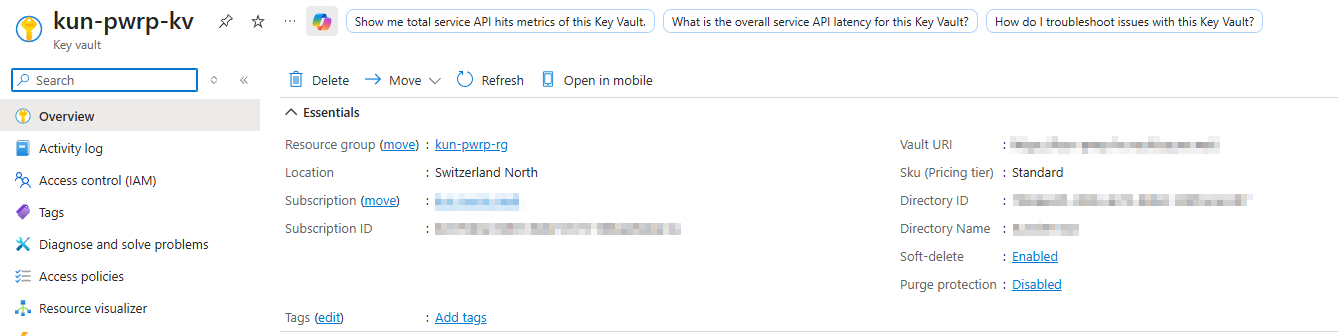
Key Vault
To store secrets, we use an Azure Key Vault.
Access
We require the Azure function to have access to the key vault. This is configured in the AccessPolicies
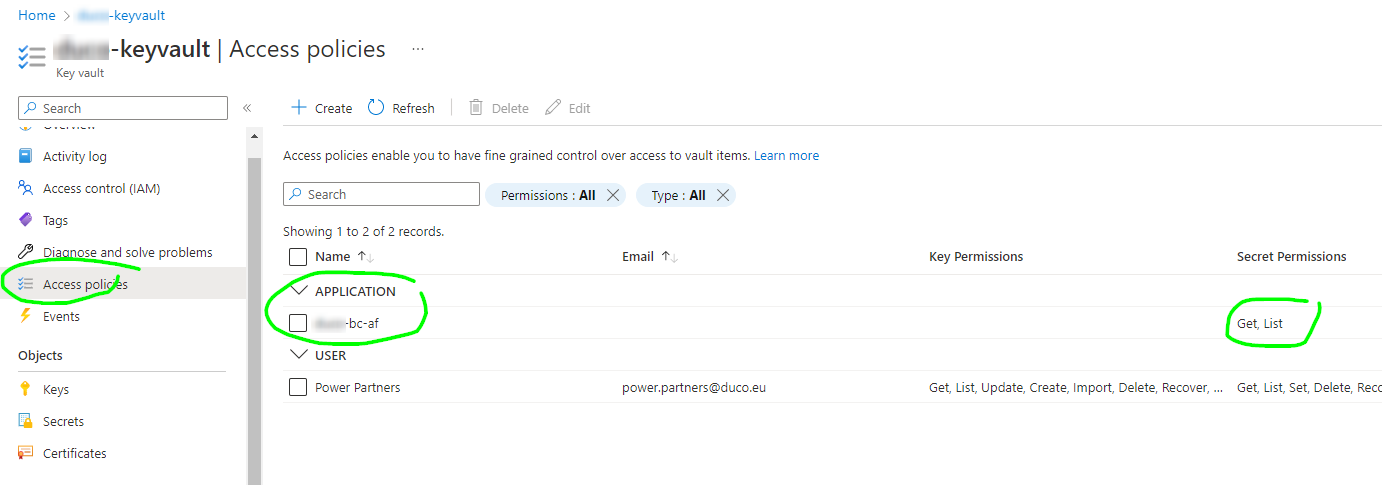
Secrets
The keyvault requires the following secrets:
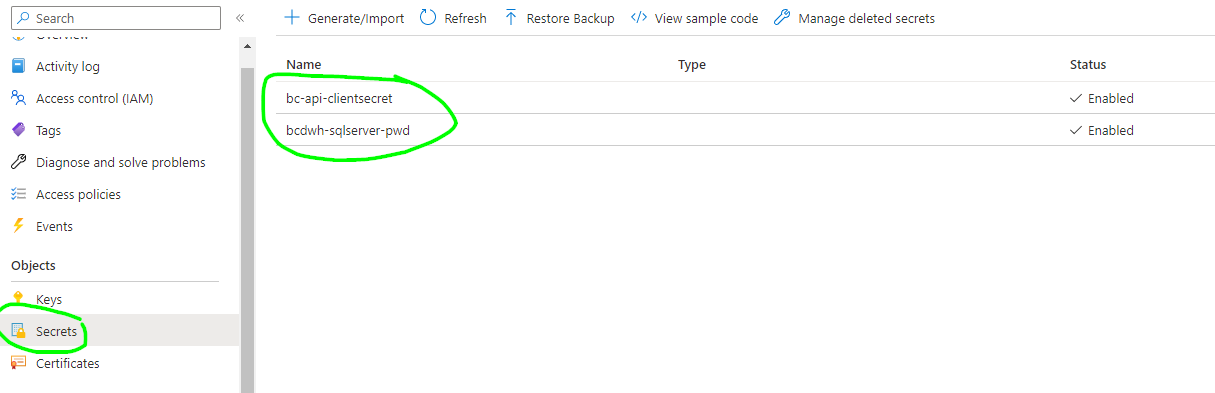
-
BC API access
- bc-api-clientsecret
- bcdwh-sqlserver-pwd
-
Power BI API access
- powerbi-analysis-access-token
- powerbi-analysis-refresh-token
- powerbi-azure-access-token
- powerbi-azure-refresh-token
- powerbi-client-secret
SQL DWH
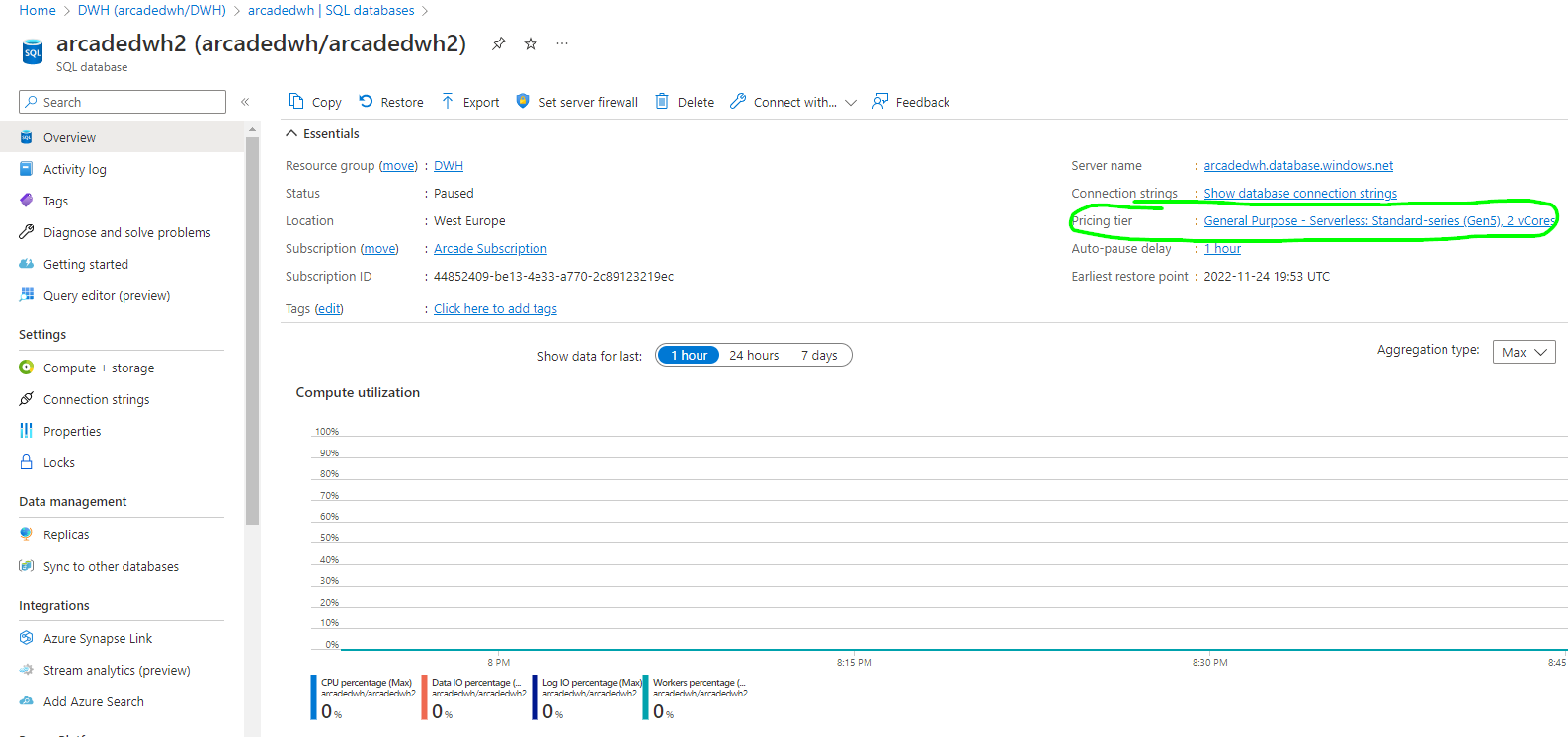
The DWH database is running on a standard Azure SQL Server, typically with DTU quota or a serverless general purpose instance.
You will find the configuration inside the SQL server and the SQL database:
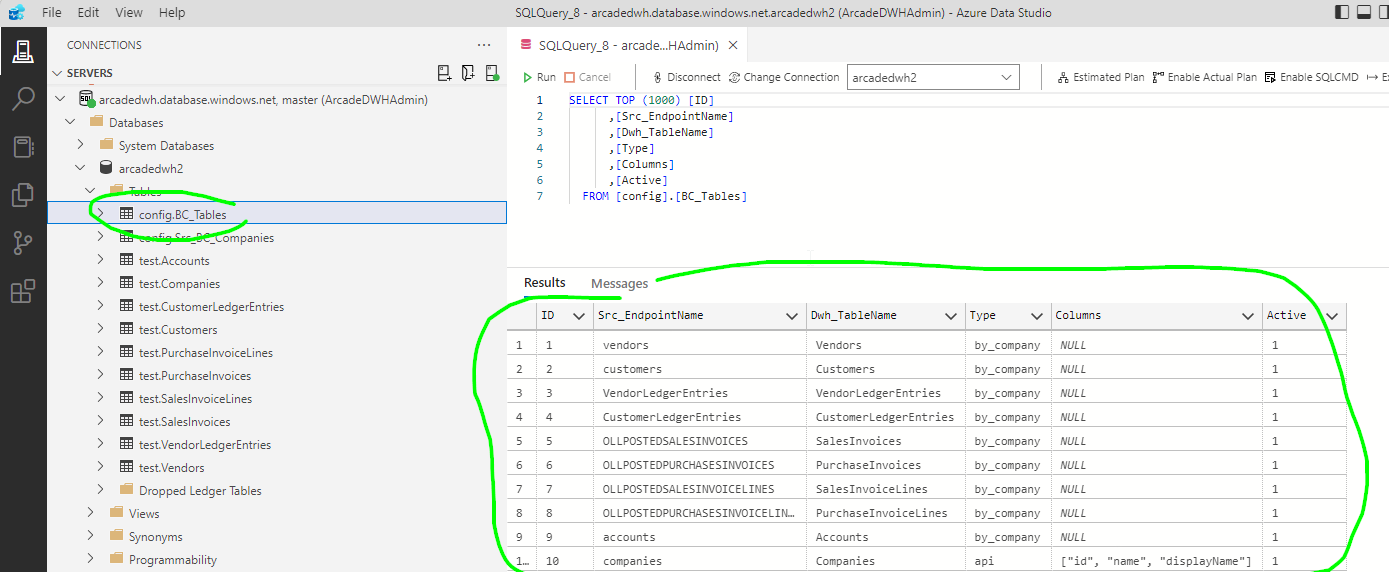
config.BC_Tables
This configuration table stores the BC endpoints where data is fetched, and the table name in the DWH where data is staged.
ID
Technical key, no semantic meaning.
Area
This column is for information and logging purposes only, but has no business logic/semantic.
Sort
This column is for information and logging purposes only, but has no business logic/semantic.
ObjectID
This column is for information and logging purposes only, but has no business logic/semantic.
Type
This can take two values:
- api: the standard BC api is used
- ws: a web service configured in BC is used (in previous versions, this was called
by_company) - apic: this is for API queries, they are api per company
Src_EndpointName
This is the name of the endpoint, as defined in the Web Services module of Business Central.
ExtraApiFilter
An optional OData $filter expression that is AND-combined with any mode-specific filter and applied to every request (count, probe, and data). For example: Sales_Type eq 'Customer Price Group'. Works for all download modes (full, incremental, snapshot, resumable).
Api_Publisher
The API Publisher from the query, as defined in the al file. This will be used for the URI of the endpoint. It is mandatory only for Type = apic.
Api_Group
The API Group, as defined in the al file. This will be used for the URI of the endpoint. It is mandatory only for Type = apic.
Api_Version
The API version, as defined in the al file. This will be used for the URI of the endpoint. It is mandatory only for Type = apic.
Note that the BC platform does not enforce versioning, so this is just an additional element to the URI.
Dwh_TableName
The name of the table, as it will be created in the DWH by the AF.
Columns
A string that will be appended as a $select clause to the URL. For example "Id, No, SystemId, SystemModifiedAt"
Active
Whether ADF considers the table for downloading. This is a switch that can take 0 or 1. If 0, then the table will not be downloaded.
Mode
Can take any of the following values:
full— Downloads all records and replaces existing table content according toRecreationType. Use for small-to-medium tables.incremental— Downloads only records changed since the last run, identified bySystemModifiedAtorSystemRowVersion.snapshot— Likefull, but never deletes old data. Each download appends a new snapshot withDownloadDateandRunIDcolumns added automatically.resumable— For very large tables where a single full download would time out. Counts the existing rows for the company in the DWH and uses$skipto resume from that offset, then appends the remaining records. Safe to re-run.
Delete
A switch that can take 0 or 1.
This only has an effect if the mode is Incremental.
If Mode = 'incremental', and if Delete = 1, then deleted records are deleted using the ID method. The ID method downloads all SystemIds of a table and deletes the differential. This is relatively safe, but slow. For faster performance, consider the ChangeLog method, which is harder to set up.
DeleteChangeLogs
A switch That can take 0 or 1.
If Mode = 'incremental', and if DeleteChangeLogs = 1, then deleted records are deleted using the Changelog method. This method only works if:
-
BC is properly set up, namely
- the ChangeLogs are turned on in BC
- the respective tables are configured for changelog deletions on the business key (e.g. No)
-
The respective table numbers are configured in config.BC_Tables.BC_TableID (see below)
BC_TableID
This is required if DeleteChangeLogs = 1. Configure the table ID that contains the respective changelog records. See DeleteChangeLogs.
RecreationType
This defines the deletion behaviour of full downloads. It has no effect for incremental or resumable modes.
Can take one of the following values:
truncate— (Recommended for most full tables.) Removes all rows by deallocating data pages with minimal transaction log writes. Preserves the table structure, all indexes, and column defaults. Indexes added automatically by Azure's query performance advisor are kept across reloads, avoiding the cost of rediscovery after every download.delete— Issues aDELETE FROMstatement, which logs every deleted row individually. Slow on large tables. Use only if row-level triggers must fire on delete, or if foreign key constraints prevent truncation.drop— Drops and implicitly recreates the table on the next download. All indexes and column definitions are rebuilt from the incoming data. Use when the BC schema has changed (columns added or removed) and the existing table definition must be discarded.none— Does not clear the table. Subsequent full downloads append data without removing existing rows. Only recommended for append-only patterns or when table clearing is managed externally.
Companies
The config.BC_Tables table can contain a column Companies. It allows filtering companies per table, so that not all tables are downloaded for all companies in config.Src_BC_Companies. You can add a list of config.Src_BC_Companies.DWH_IDs.
The BC2SQLCopier will then only copy companies in the list. If the list is empty (NULL) or if the column doesn't exist, all companies will be downloaded.
The list needs to be a comma-separated list of ints (no spaces), where each int is a DWH_ID from config.Src_BC_Companies.
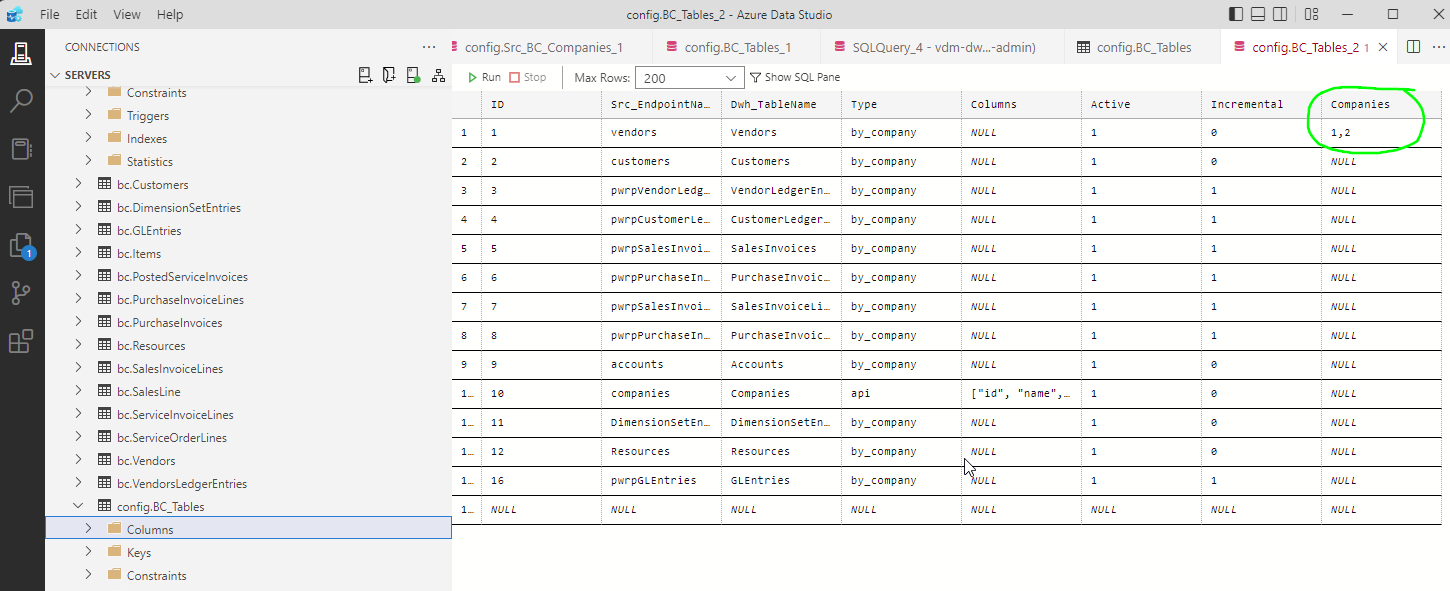
The column Companies is not mandatory.
TypeOverwrites
The config.BC_Tables table can contain a column TypeOverwrites. It allows overwriting types, e.g. setting the length of VarChars.
The column is optional. The value is also optional for each row. If the column is not available, or if the row values is NULL, then we let SqlAlchemy decide what is the best type. A problem may arise if the data typically is short, with occasional long strings. Specifically, if SqlAlchemy infers the type from the first page, and then additional pages contain longer texts.
If provided, the value is a JSON string that maps column names to (sqlalchemy) types.
For example, the argument could be:
{
  "WorkDescription" : "sqlalchemy.types.NVARCHAR(length=2000)",
  "NoteText": "sqlalchemy.types.UnicodeText",
  "WorkerCode" : "sqlalchemy.types.NCHAR(length=3)",
  "Age": "sqlalchemy.types.INTEGER()",
  "StartDateTime": "sqlalchemy.types.DateTime(timezone=False)",
  "Amount": "sqlalchemy.types.NUMERIC(10,2)"
}
-
NVARCHAR(MAX) is defined by
sqlalchemy.types.UnicodeText -
Decimals are defined by sqlalchemy.types.NUMERIC(10,2)
The full list of SqlAlchemy types and construction parameters can be found here: https://docs.sqlalchemy.org/en/20/core/type_basics.html.
PageSize
The config.BC_Tables table can contain a column PageSize. It allows limiting the number of records downloaded per page. This is useful if your BC instance is very slow, or if your query is very complex. If that's the case, then you can set the page size e.g. to 200.
config.Src_BC_Companies
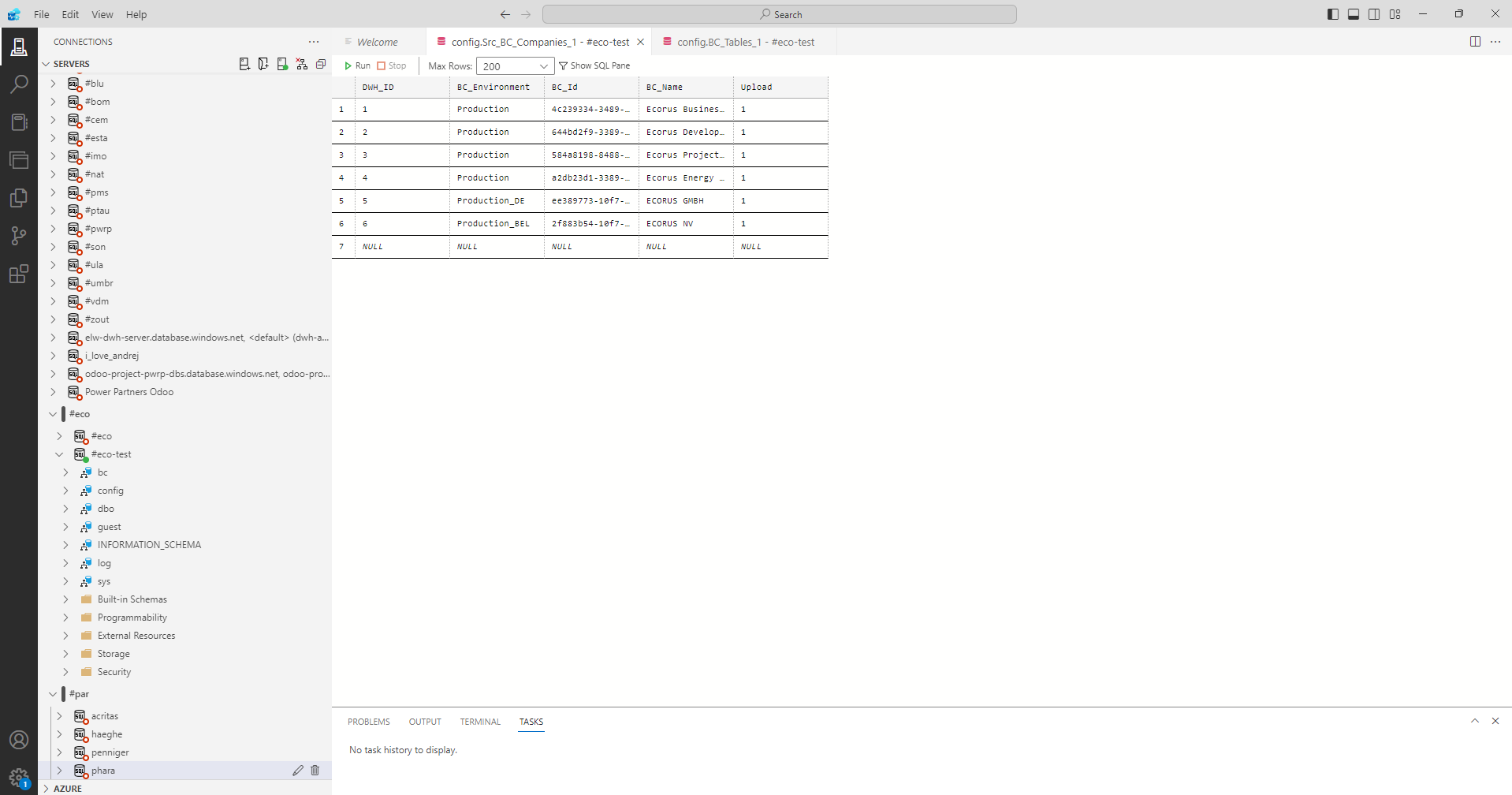
This config table allows to configure the companies you want to download from BC. Note that the BC_Id must be exactly the company id of BC.
The DWH_ID will be used as a DWH key in the DWH.
The BC_Environment will be used to specify the environment on BC that points to a company under BC_Id. This column allows us to have multi-environment configurations in our DWH product for BC. Typically, BC_Environment is set as 'Production'.
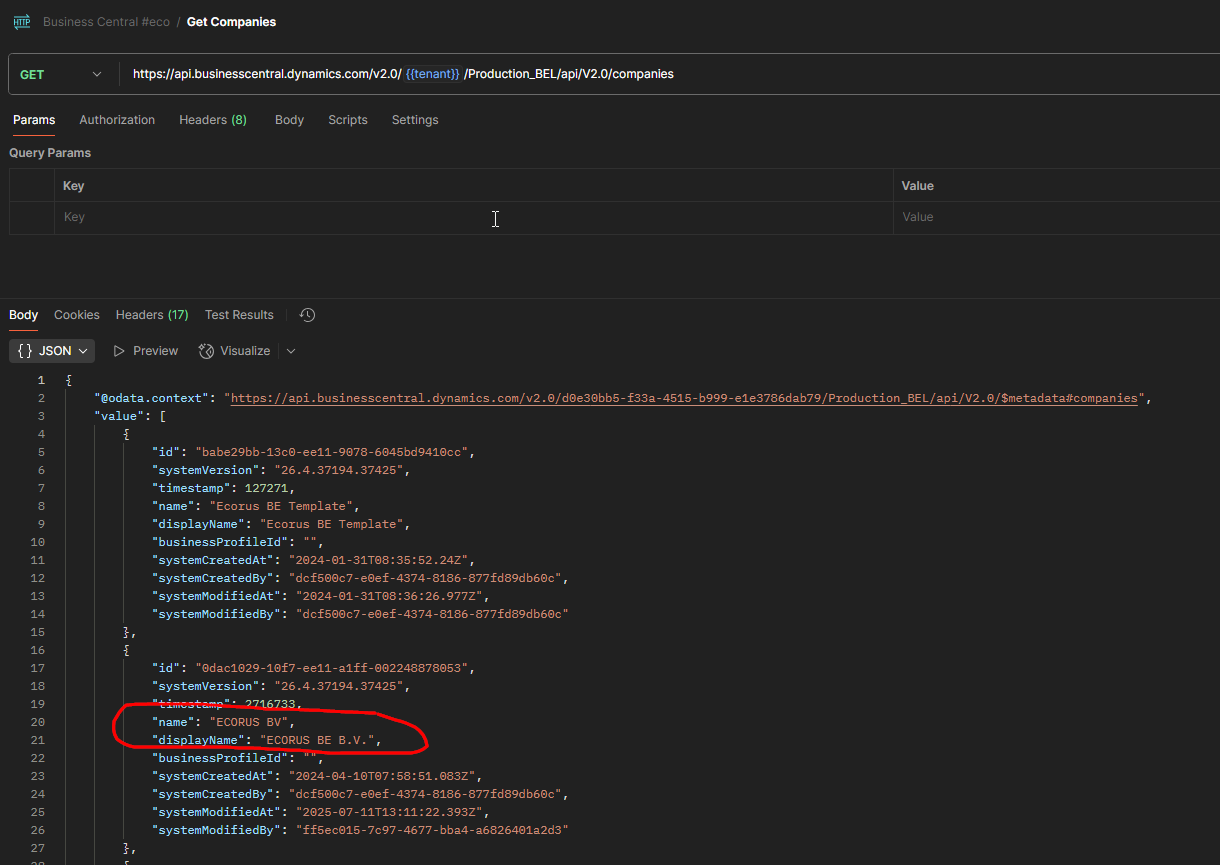
Note that there is a difference between the Company Name and the Company Display Name:
DWH Tables
The DWH tables are typically stored in the bc schema.
The DWH is self-building. When a table is deleted, it will be re-created with the next run.
In case you see a test schema, then you can ignore it. This is used to run test and replicate problems without affecting the productive data.
Power BI
There are two distinct pbix files that are used for the solution:
- BC_dataset.pbix
- BC_reports.pbix
The lineage is:
flowchart LR

    DWH[fa:fa-database DWH<br>SQL Server]
    DS((fa:fa-star-of-life<br>BC_dataset.pbix))
    R(fa:fa-chart-pie BC_reports.pbix)
    U[fa:fa-user User]

    DWH-->DS;
    DS-->R;
    R-->U;

    style DWH fill:#007fff
   style DS fill:#FFD700,color:#fff
   style R fill:#FFD700,color:#fff
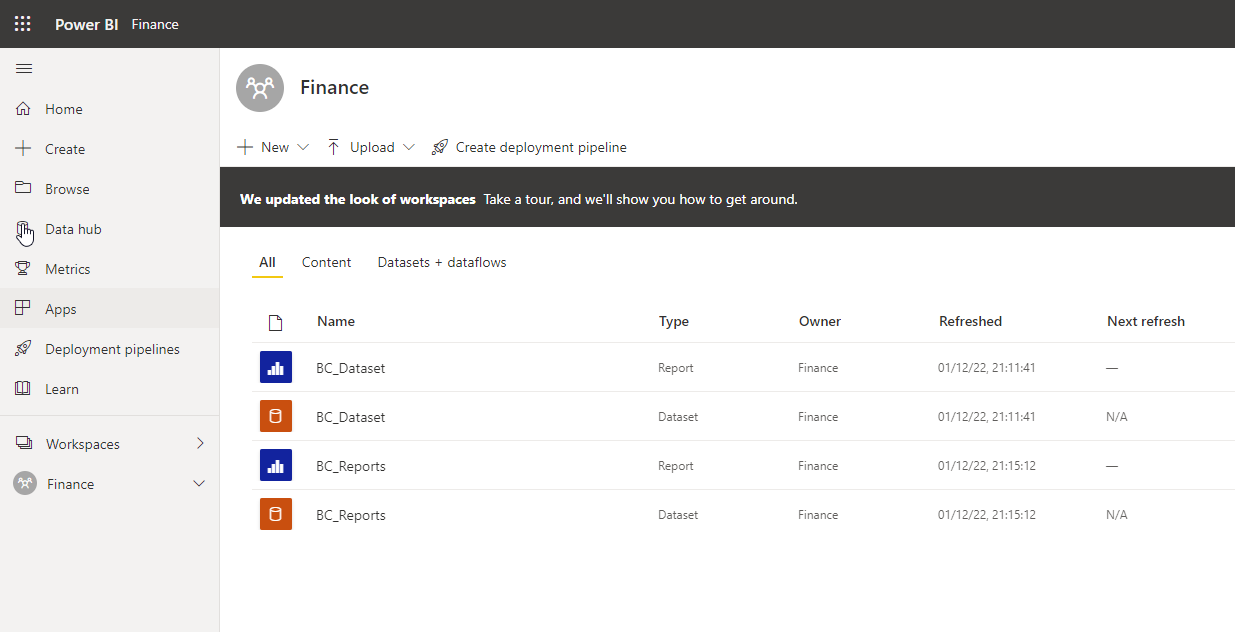
Workspace
The artefacts are typically deployed to a dedicated, single workspace.
Sharepoint
We need one Excel file to map the accounts to reporting lines.
This file is stored in Sharepoint. You can find the configuration under dataset > Settings > Parameters > SharepointURL
PowerQuery
PowerBI_Dataset
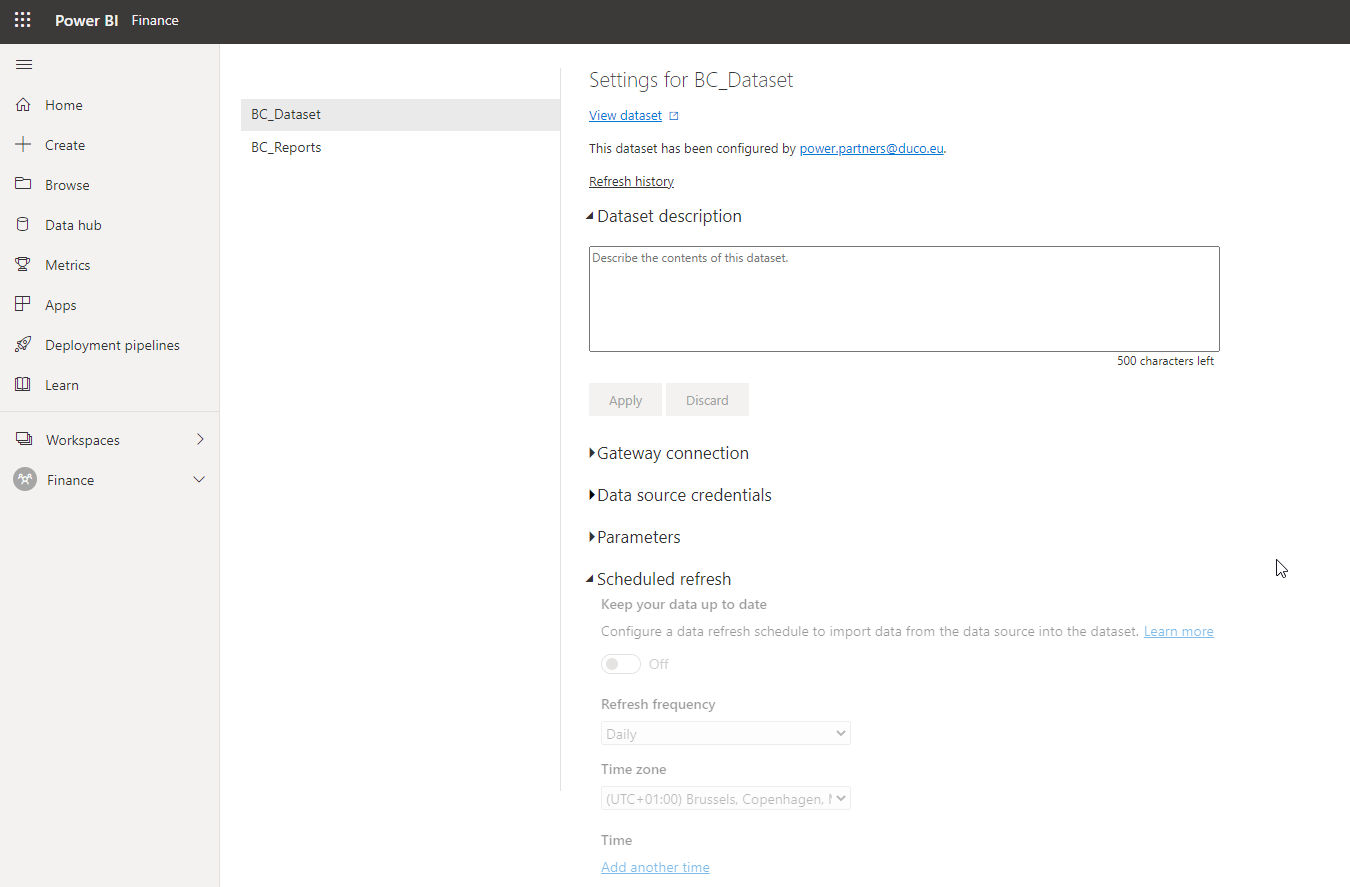
The dataset is usually configured to load nightly. You can find the configuration of your dataset under settings:
Monitoring
Pipeline Runs
TODO
Function Calls
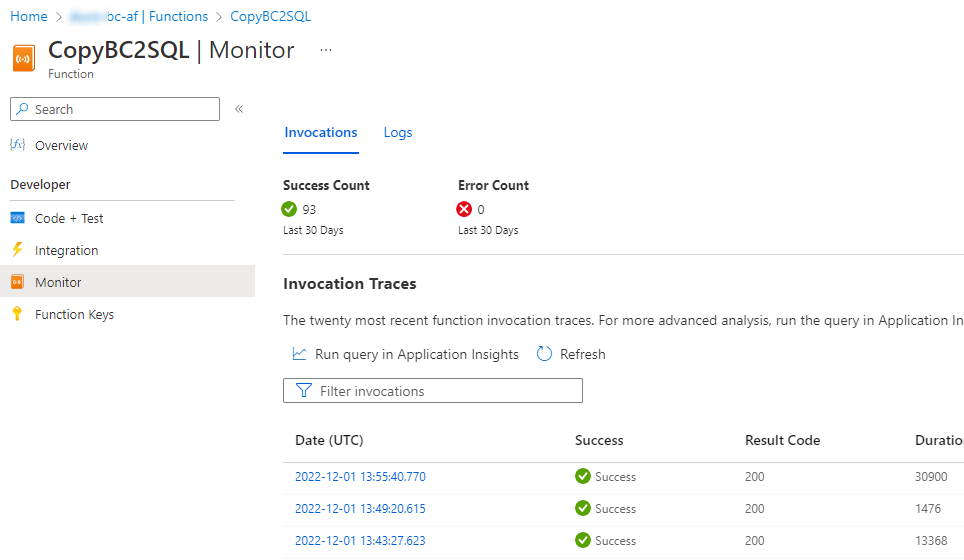
You can find the function calls and the logs under Monitor
Log Tables
TODO
Annexes
A: Azure Components
Refer to the Overview for the numbers.
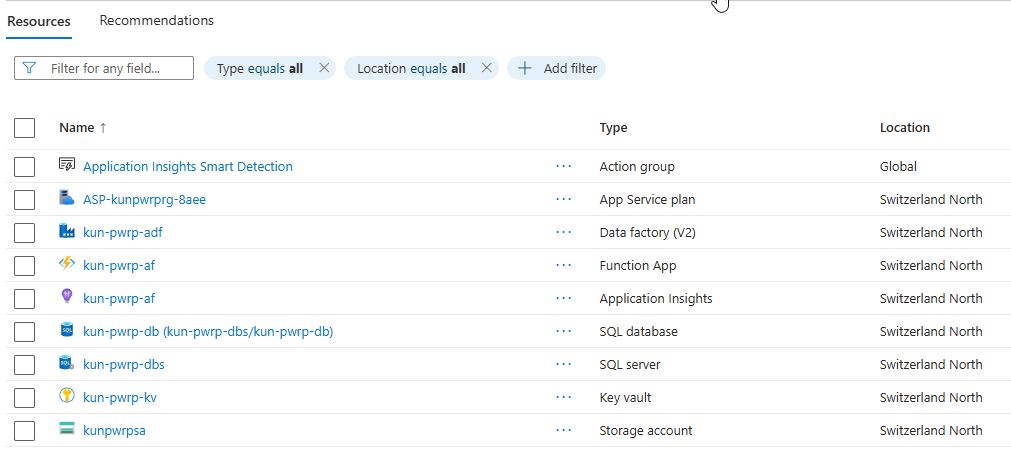
Ideally, all components are in the same Azure region.
4 Azure Data Factory
We need:
-
Azure Data Factory V2
-
In case of private network, it will need to be able to access to Azure Function endpoint.

5 Azure Function
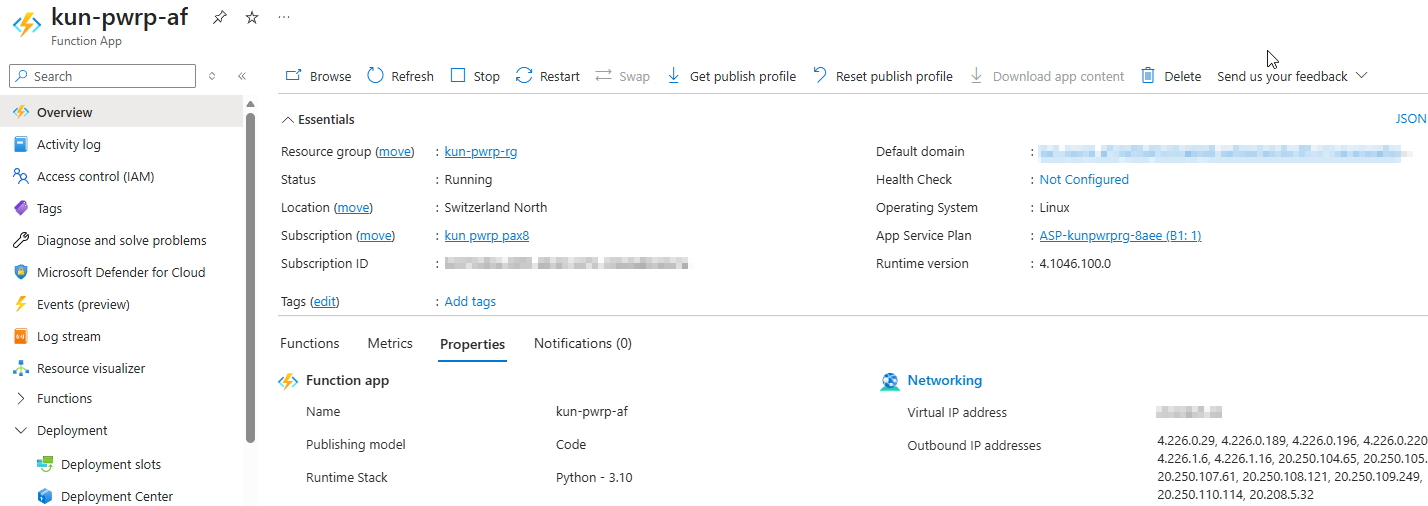
We need a Azure Function with:
-
Runtime 4
-
Python 3.10 or higher (3.12 is supported and recommended — the SQL driver issue with newer Python versions has been resolved)
-
Service Plan: minimum Y, B1 recommended
-
NOTE: for BC on-prem, an IR Integration Runtime and configuration thereof is required
-
Application Insights is recommended
-
A Storage Account (either dedicated or shared, dedicated is preferred)
The function endpoints need to be accessible from:
- ADF
The function needs to be able to access:
- BC OData endpoints
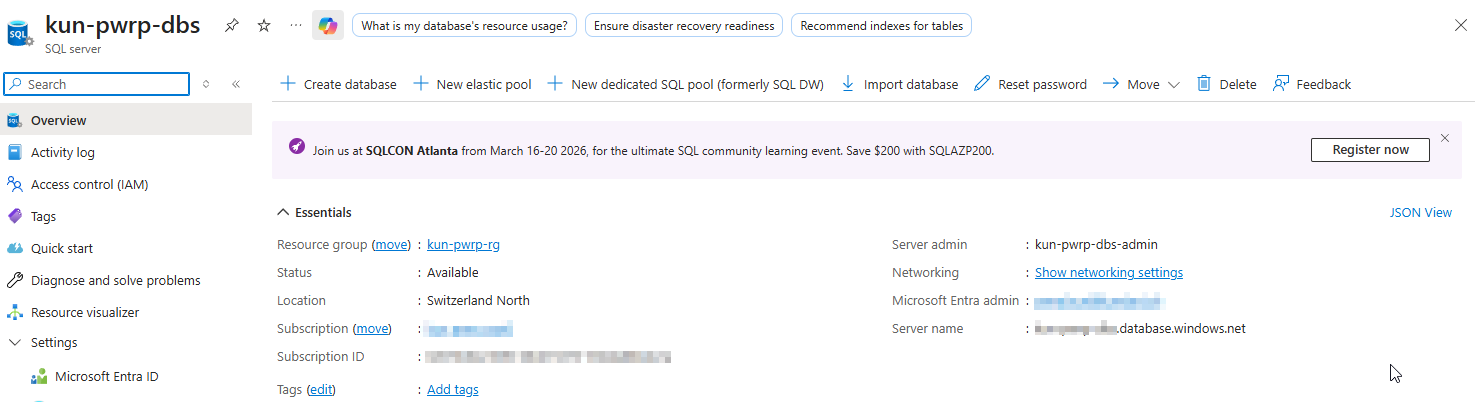
6 Azure SQL
6.1 SQL Server
We need:
-
An Azure SQL Server
-
NOTE: this can be an existing instance that we can co-use
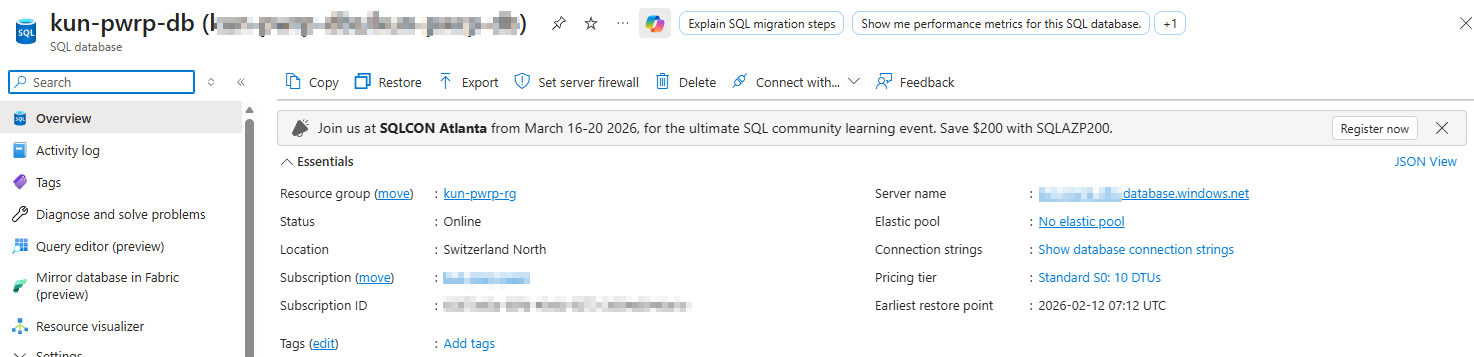
6.2. SQL Database
We need:
-
An Azure SQL Database
-
10 DTUs
-
2 GB space
-
Backup: default
Network Requirements: This component needs to be accessible from:
-
the Azure Function
-
the Azure Data Factory
-
Power BI Service (the client's tenant)
-
Power Partner's office IPs (for report development, maintenance and support), i.e. currently:
- 154.47.27.145 (Belgium)
- 149.88.27.84 (Switzerland)
IAM/Azure Access Requirements:
-
SQL access
-
if performance management is deployed, the AF's identity needs to be able to set the DTUs
Key Vault
We need:
- SKU: Standard
Network Access:
-
AF
-
ADF
Access policies:
-
AF
-
ADF