Client Delivery Onboarding
Info
This was previously known as Tenant Onboarding
Background Info
This process allows us to get access to the Microsoft 365 tenant of the client. We create a tech user.
There are two versions:
-
the client has a tenant: we need to get access to it
-
the client doesn't have a tenant yet: we need to create one on behalf of the client, and give him access to it
Working with 3rd parties
Mandatory Guideline
When working with third parties, you need to follow-up by phone if there is no response within 24 hours.
Reasons:
- Our projects are blocked. For us it might look like we did our job, but the client just sees delays. The client will associate the bad service with Power Partners, and we cannot blame him.
- They have support desks with friendly staff.
- They charge this time anyway.
Planio Checklist
See planio checkbox template: https://pwrp.plan.io/checklist_templates/18/edit
Process Details
- Owner: as assigned by project-manager
- Participants: delivery-team-member
- Frequency: Once, for a new client
- Trigger: as assigned by project-manager in the planio sprint
Pre-requisites
- new-client-onboarding has been done by the sales-manager
- It has been established with the client if they have already a tenant or not
- If the client has a tenant, we received the Tenant ID (from Entra)
Process
1Password
Prerequisites:
- You need to be a 1Password admin. If you are not, ask the security-officer to perform this for you.
-
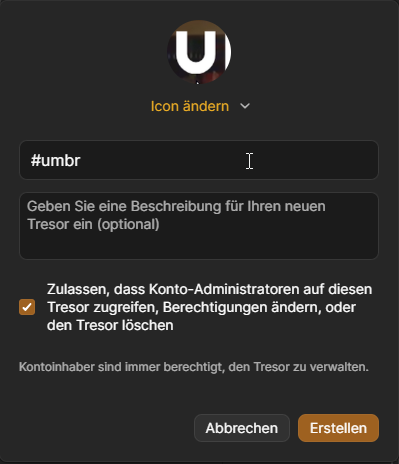
in the 1Password desktop app, create vault
- name it
#xxx - set the icon by clicking on the + (only available in Desktop app) to something that relates to the client (e.g. take screenshot or download logo from website)
- name it
-
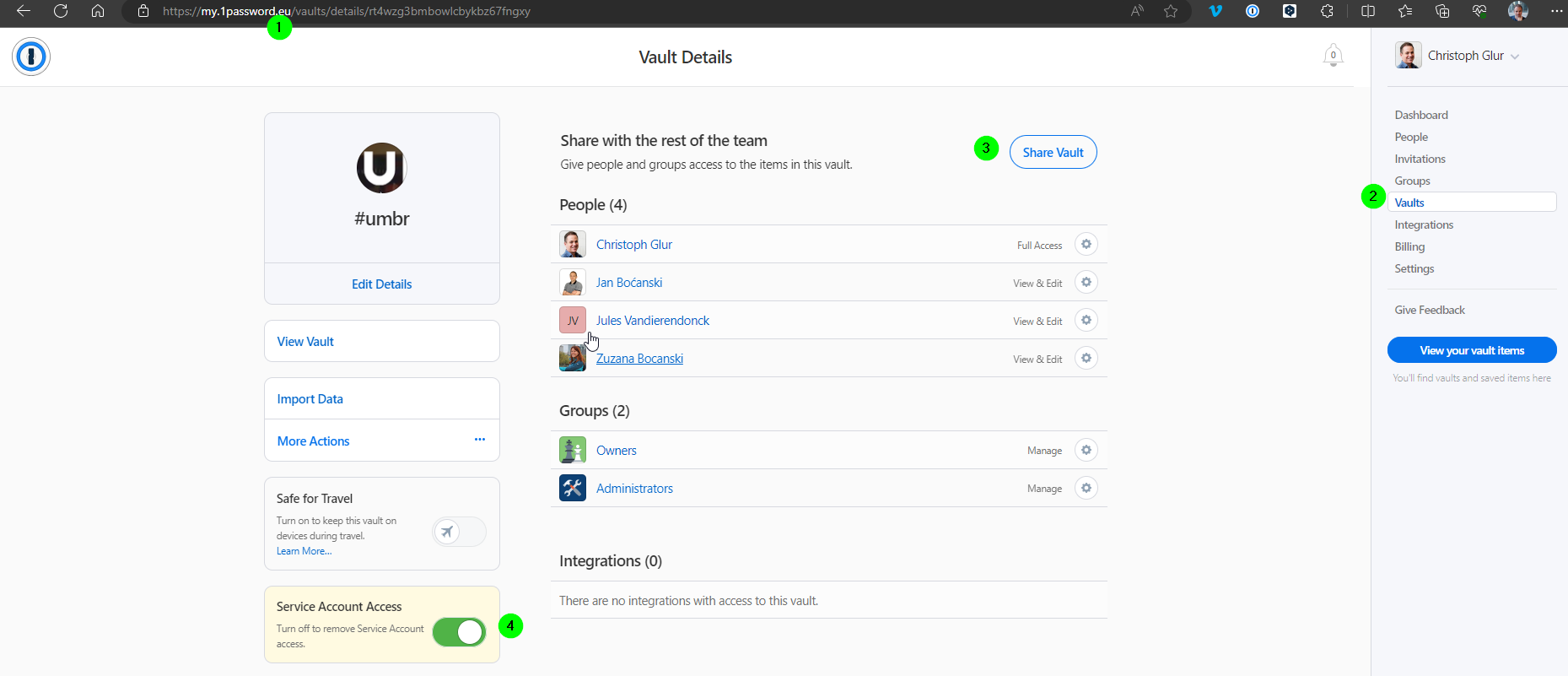
in the 1Password Web App
- share with relevant people
- make sure admin access is granted
Create GitHub Repository
Prerequisites:
- You need to be an administrator on https://github.com/pwrp
- You must be a planio administrator
GitHub
-
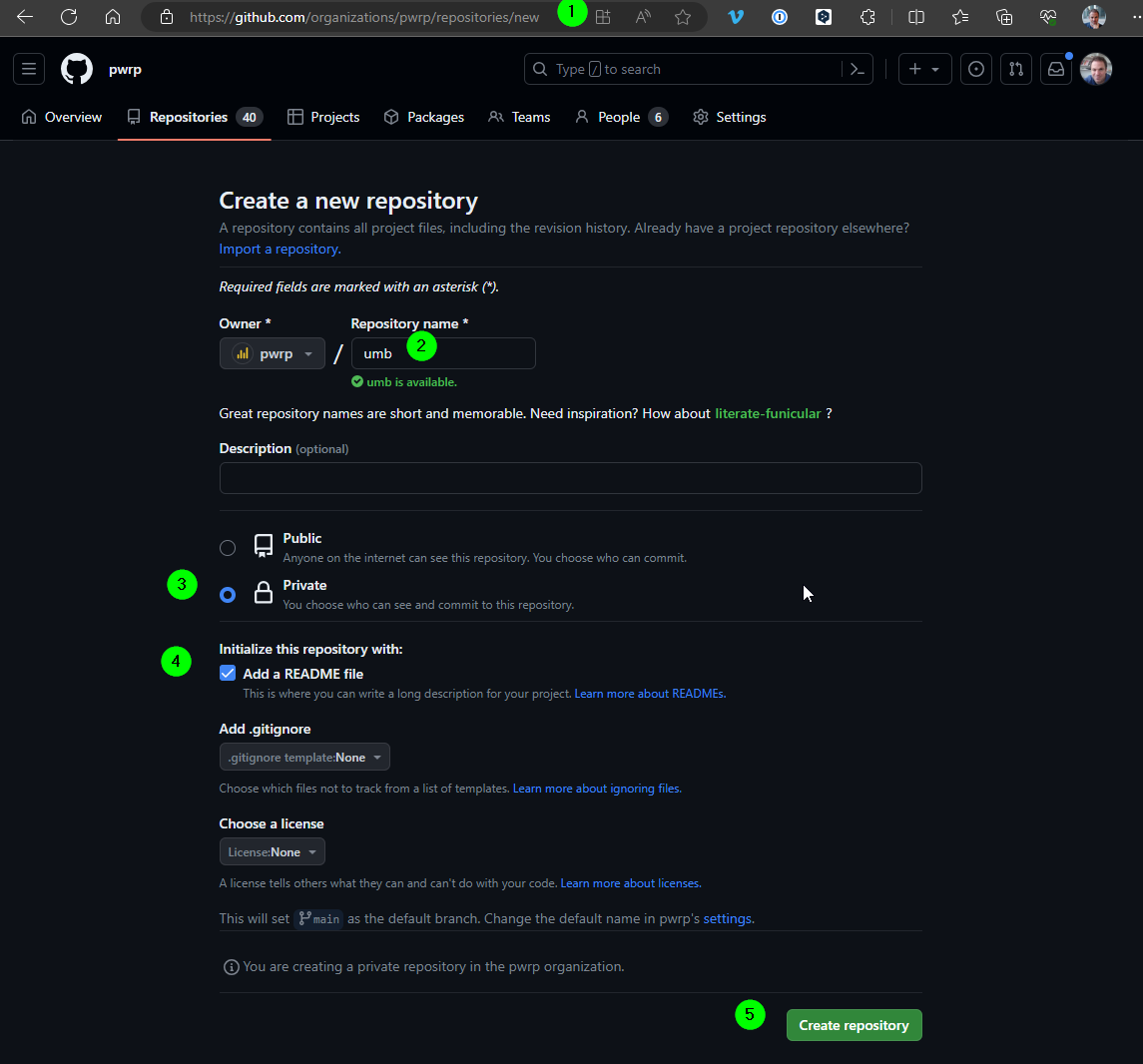
Go to https://github.com/organizations/pwrp/repositories/new
-
Double-check the Owner is
pwrpand name it like the client code (e.g.hbr) -
Double-check that it's private
-
Add a README file
-
Create repository
-
Clone repository
-
Open command line and configure LFS by executing the commands, as described in git-lfs
Planio
Prerequisites:
- You need to be a
Client Delivery Onboarderin planio. Ask the security-officer if you are not.
In Planio
-
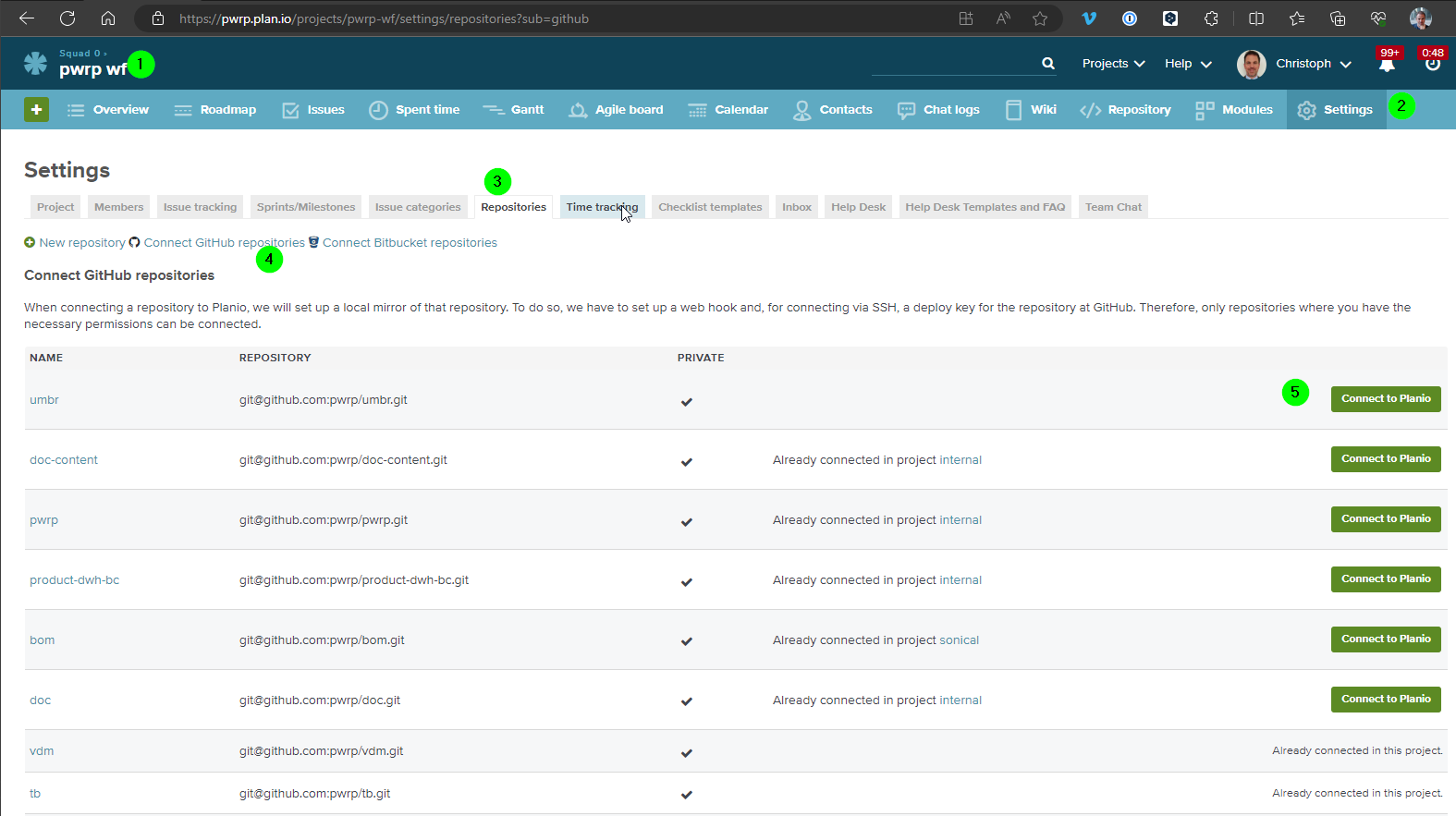
got to Squad 0 (and not pwrp wf as in the screenshot below)
-
go to Settings
-
go to Repositories -> provide your Planio password again if prompted
-
click on "Connect GitHub repositories" -> log into github if necessary
-
connect the newly added repository by clicking on "Connect to Planio"
Pax8 - Customer Creation
Prerequisites:
- Pax8 access
- Contact Details of client are known (ask Account Manager if not)
-
in Pax8, go to
Companies -
Create Company -
Enter details
- Name, Address, etc., make sure that you add the company code at the end, e.g.
528 Productions | #ice - Phone:
- Domain: must be the client's domain (e.g.
tunap.be) - Contact: Christoph Glur
- Name, Address, etc., make sure that you add the company code at the end, e.g.
Microsoft Tenant Setup
There are 3 different cases:
-
pwrp provides the licenses
- Case 1: Partner onboarding to existing tenant
- Case 2: Partner onboarding to New Tenant
-
pwrp does not provide the licenses
- Case 3: Getting access without Partner onboarding
We prefere Case 1 or 2. Case 3 happens when the client has an exclusive agreement with an IT partner.
Case 1: Partner onboarding to existing tenant
Background:
We need to send 4 different links to the client. He has to accept all of them.
- Reseller Link: static link, see email template below
- Power Partners Reseller Link
- Pax8 Reseller Link
- GDAP: Granular access rights You cannot re-use the same link, but you need to generate the link for each client
- Power Partners GDAP: generated through Partner Center.
- Pax8 GDAP
Prerequisites:
- Access to the Partner Center of Power Partners (this is done here: https://partner.microsoft.com/dashboard/v2/account-settings/usermanagement. Ask an admin to select the user and tick "Assists your customers as Admin agent".
- Client has been set up in Pax8
- Client technical contact is known
Get Tenant ID from Client
Prerequisites:
- Client Technical contact is know. Ask the Account Manager if not.
Steps:
-
Write a mail to the technical contact. See template below.
-
CC the account-manager.
Email Template DE Sie
Lieber Name,
wir freuen uns darauf, mit Ihnen an dem Projekt Data zu arbeiten!
Um loslegen zu können, benötigen wir Zugang zu Ihrem Microsoft Tenant.
Um alles einzurichten, benötigen wir Ihre Tenant ID.
Sie finden die Tenant ID in MS Entra unter folgendem Link: https://entra.microsoft.com/
Wenn Sie keinen Zugang zu MS Entra haben, fragen Sie bitte einen IT-Administrator in Ihrem Unternehmen.
Nächste Schritte: Sobald wir Ihre Tenant ID haben, werden wir eine Reihe von sogenannten "Relationship-Links" erstellen, die Sie (oder ein Administrator) akzeptieren müssen. Mehr dazu später.
Wie auch immer, lassen Sie es uns wissen, wenn Sie Fragen haben. Vielen Dank für Ihre Mitarbeit!
Mit freundlichen Grüßen,
Name
Email Template Tenant ID EN
Subject: Power Partners project: Tenant ID
Dear Name,
We are looking forward to work with you on the Data project!
In order to get started, we need access to your Microsoft Tenant.
To set up everything, we need to know your Tenant ID.
You will find the tenant ID in MS Entra, under the following link: https://entra.microsoft.com/
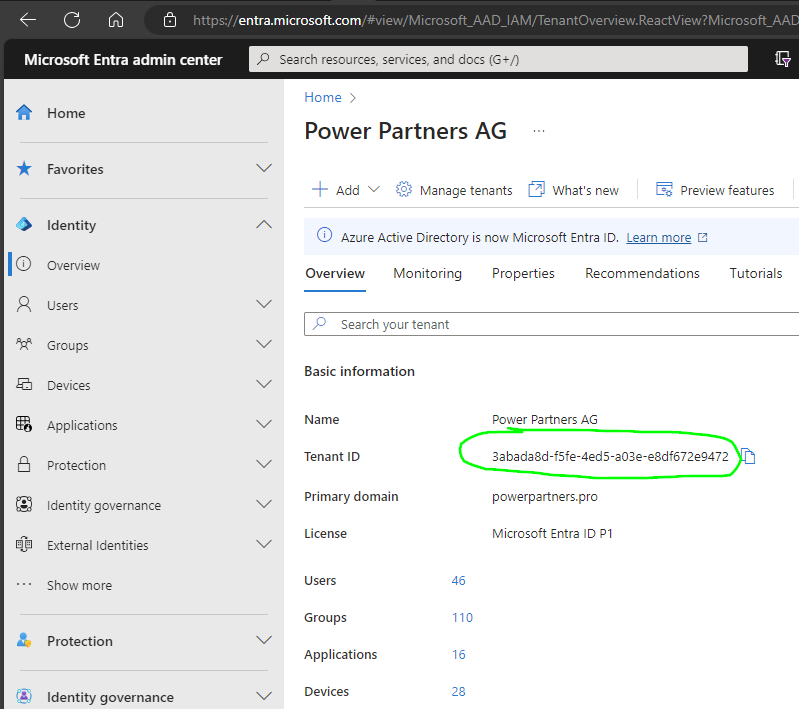
If you do not have access to MS Entra, please ask an IT administrator at your organization.
Next Steps: Once we have your Tenant ID, we will create a set of so-called "Relationship-Links" that you (or an admin) will have to accept. More on that later.
Either way, let us know if you have questions. Thank you so much for your collaboration!
Best Regards,
Name
NOTE: it seems that the Tenant ID is not necessary for the next step (GDAP Link). So we should probably combine the two mails into a single one.
Create GDAP Link Power Partners
NOTE: don't do this with the VPN, it will not work and fail with a generic error message!
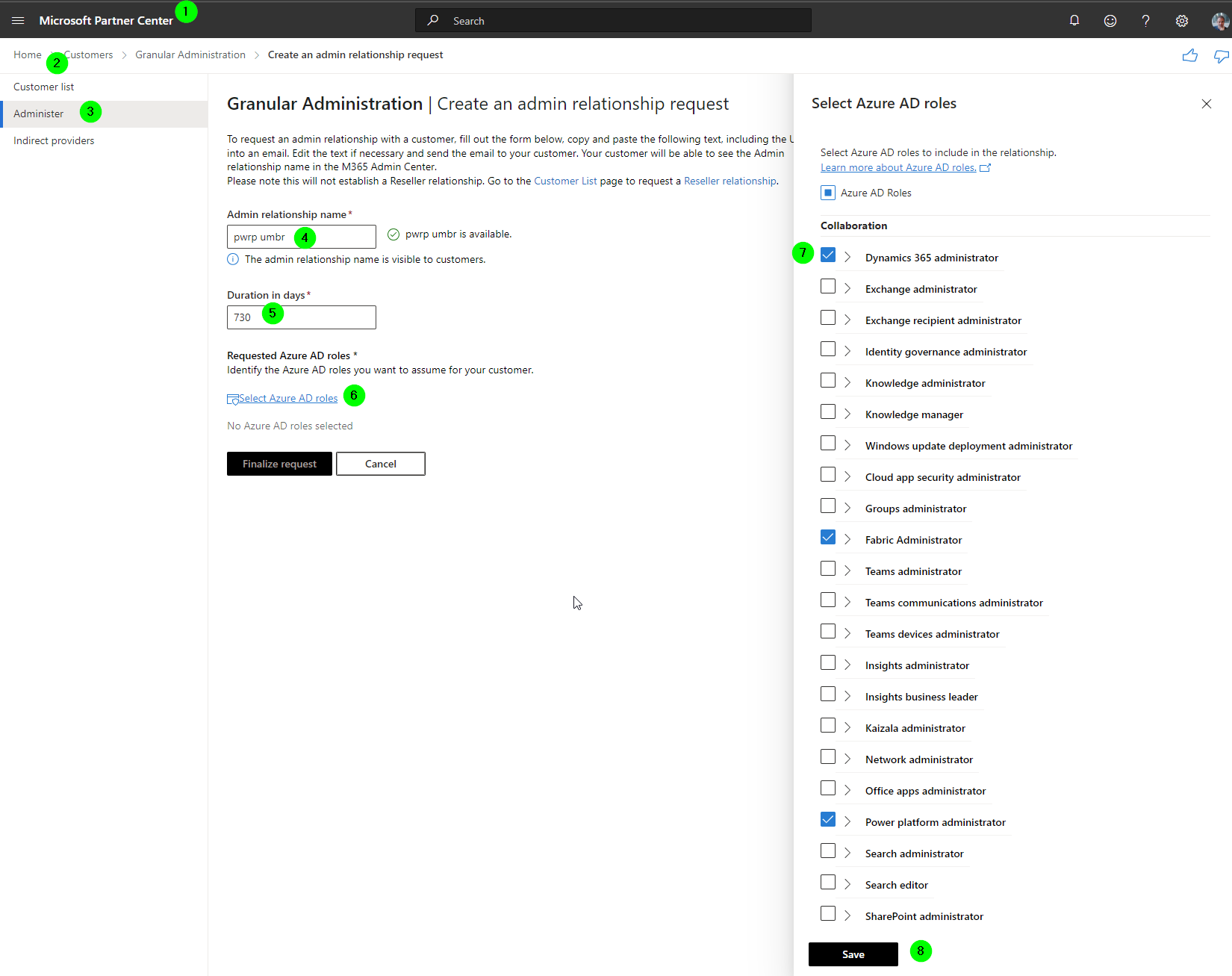
-
Go to the Partner Center
-
Customers
-
Administer > Request admin relationship: https://partner.microsoft.com/en-us/dashboard/commerce2/granularadminaccess/newadminrelationshiprequest
-
Name:
pwrp xxx -
Duration 730,
-
Microsoft Entra roles
- Collaboration
- Azure DevOps administrator
- (Dynamics 365 administrator)
- Fabric Administrator
- Groups administrator
- Power platform administrator
- Identity
- Application administrator
- Application developer
- Authentication administrator
- Guest Inviter
- Helpdesk administrator
- License administrator
- Password administrator
- Privileged authentication administrator
- Privileged role administrator
- User administrator
- Other
- Directory writers
- Service support administrator
- Read Only
- Directory readers
- Global reader
- Security reader
- Security & Compliance
- Security administrator
- Collaboration
-
Save
-
Auto extend -> Yes
-
Finalize request
-
Copy the link from the request mail and save it to Notepad++ for later use
Get Azure Subscription
NOTE: This step makes sure the client appears in Pax8 under the Microsoft GDAP Tool.
In Pax8
-
go to the client company
-
click on
Order -
search
Microsoft Azure Planand click on it -
Checkout -
Continue -
Technical Contact = Christoph Glur
-
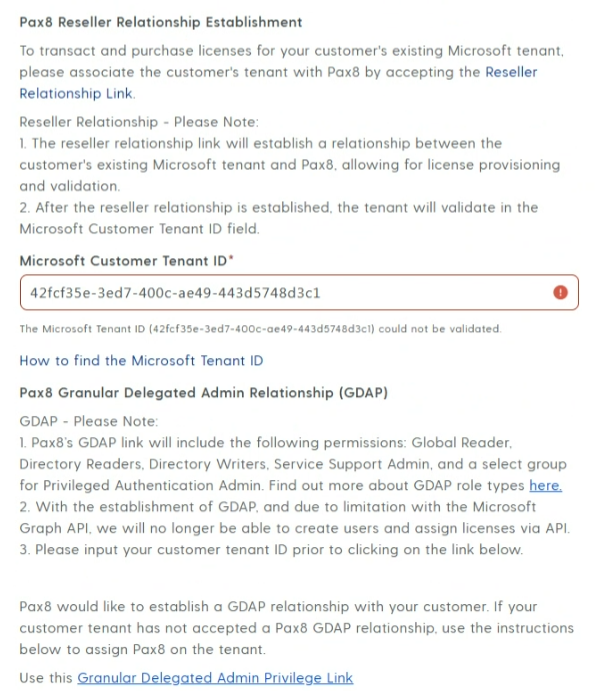
Enter the Microsoft Customer Tenant ID (it will be red, ignore) NOTE: I think this cannot be ignored. This requires the "Reseller Relationship of Resello/Pax8" to be accepted first.
-
Click on
Use this Granular Delegated Admin Privilege Link
- Click on
Request Relationship
- Click on
-
Accept Request
-
Select "Copy Link" in the same row as your customer.
Send Mail to Technical Contact
- Create an email
-
Use below template and replace the marked content especially the links
-
Send email to the technical contact
Email Template EN
Subject: Power Partners Project: Relationship Links
Dear Name,
As discussed, we need access to your Microsoft tenant in order to develop, deploy and maintain your data and reports.
We are asking you to accept the following links, which will give us the required access:
- Reseller Relationship: https://admin.microsoft.com/Adminportal/Home?invType=IndirectResellerRelationship&partnerId=3abada8d-f5fe-4ed5-a03e-e8df672e9472&msppId=6131897&DAP=false&indirectCSPId=461f18ea-bdcf-49ea-b647-8133695fe420#/BillingAccounts/partner-invitation
- Reseller Relationship of Resello/Pax8: https://admin.microsoft.com/Adminportal/Home?invType=ResellerRelationship&partnerId=461f18ea-bdcf-49ea-b647-8133695fe420&msppId=0&DAP=false#/BillingAccounts/partner-invitation
- GDAP Link Power Partners: GDAP LINK
- GDAP Link Pax8: GDAP LINK
If you are not a Global Administrator, please ask a Global Administrator (possibly your IT provider) to accept the link.
Please let us know once done, or do not hesitate to get back if you have questions.
Thank you so much in advance!
Best Regards,
Your Name
Email Template DE Sie
Subject: Power Partners Project: Relationship Links
Sehr geehrter Name,
Wie beim Kick-Off besprochen, brauchen wir Zugang zur Microsoft Umgebung von Name der Organisation, um das Data Warehouse und die Reports aufzusetzen und zu unterhalten.
Wir bitten Sie, folgende Links zu akzeptieren:
- Reseller Relationship: https://admin.microsoft.com/Adminportal/Home?invType=IndirectResellerRelationship&partnerId=3abada8d-f5fe-4ed5-a03e-e8df672e9472&msppId=6131897&DAP=false&indirectCSPId=461f18ea-bdcf-49ea-b647-8133695fe420#/BillingAccounts/partner-invitation
- Reseller Relationship of Resello/Pax8: https://admin.microsoft.com/Adminportal/Home?invType=ResellerRelationship&partnerId=461f18ea-bdcf-49ea-b647-8133695fe420&msppId=0&DAP=false#/BillingAccounts/partner-invitation
- GDAP Link Power Partners: GDAP LINK
- GDAP Link Pax 8: GDAP LINK
Falls Sie nicht ein Global Administrator des Microsoft Tenants sind bitten wir Sie, diese Mail an den Global Administrator Ihres Tenants weiterzuleiten.
Bitte lassen Sie uns wissen, falls Sie Fragen haben. Ansonsten bitten wir Sie, und das Akzeptieren der Links kurz zu bestätigen.
Herzlichen Dank!
Freundliche Grüsse
Your Name
Email Template NL
Subject: Power Partners Project: Relationship Links
Beste Naam,
Zoals besproken, hebben we toegang nodig tot uw Microsoft-tenant om uw gegevens en rapporten te ontwikkelen, implementeren en onderhouden.
De reseller koppelingen stellen ons in staat om licenties te beheren (Azure, Power BI).
De GDAP-koppelingen stellen ons in staat Azure en Power BI te beheren, bijvoorbeeld om databronnen te definiëren, workspaces te maken, u toegang te verlenen, enzovoort.
We vragen je ook om Pax8 (voorheen Resello) GDAP-toegang te geven. Hierdoor kunnen zij ons ondersteunen als we een technisch probleem hebben.
We vragen je om de volgende koppelingen te accepteren:
- Reseller-relatie: https://admin.microsoft.com/Adminportal/Home?invType=IndirectResellerRelationship&partnerId=3abada8d-f5fe-4ed5-a03e-e8df672e9472&msppId=6131897&DAP=false&indirectCSPId=461f18ea-bdcf-49ea-b647-8133695fe420#/BillingAccounts/partner-invitation
- Reseller-relatie van Resello/Pax8: https://admin.microsoft.com/Adminportal/Home?invType=ResellerRelationship&partnerId=461f18ea-bdcf-49ea-b647-8133695fe420&msppId=0&DAP=false#/BillingAccounts/partner-invitation.
- GDAP Link Power Partners: GDAP LINK
- GDAP Link Pax8: GDAP LINK
Als u geen Global Administrator bent, vraag dan een Global Administrator (mogelijk uw IT-provider) om de koppeling te accepteren.
Laat het ons weten zodra dit is gebeurd.
Bij voorbaat hartelijk dank!
Met vriendelijke groet,
Uw naam
Add Security Groups
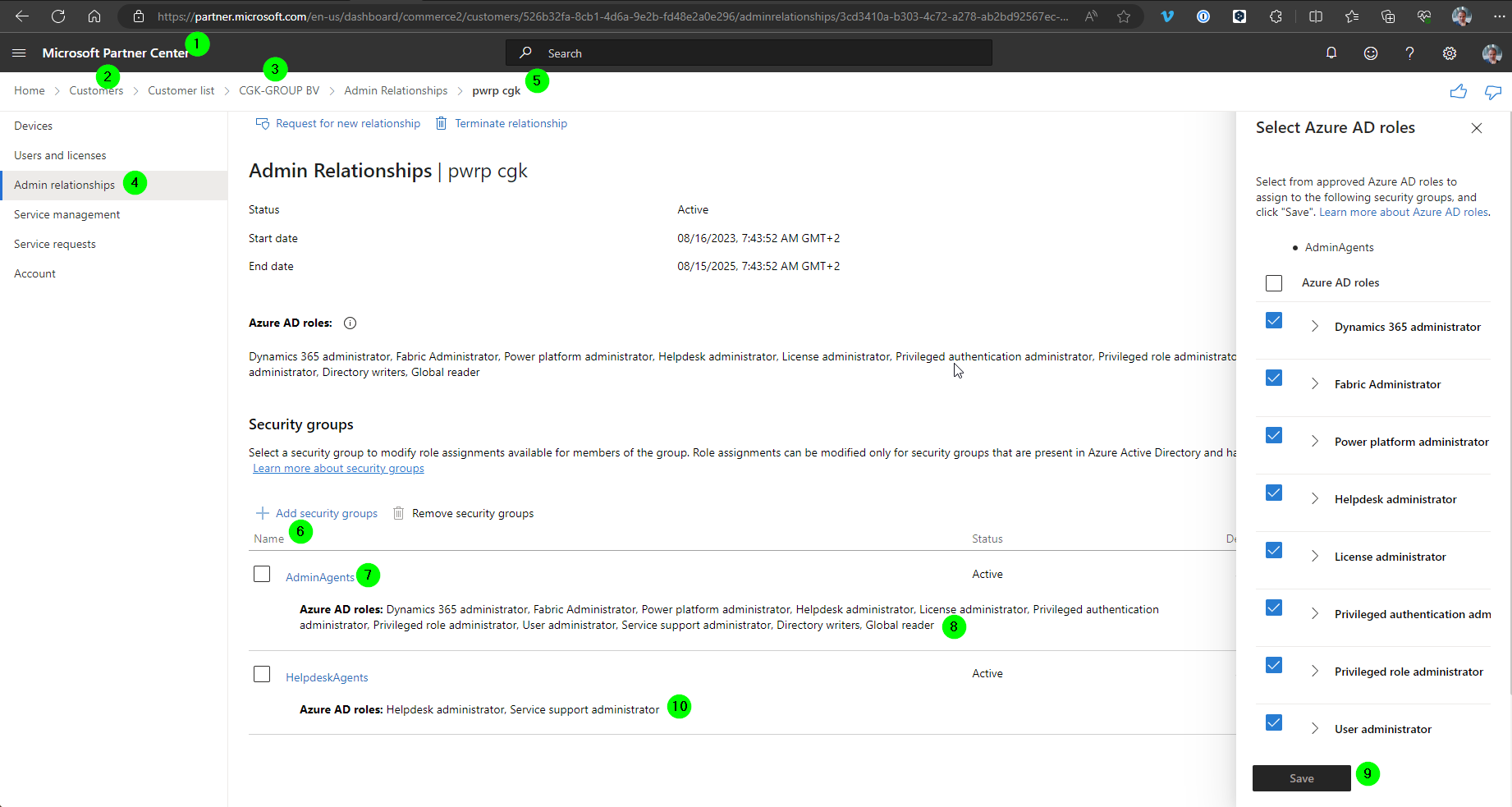
-
Go to the Partner Center
-
Go to "Customers"
-
Go to "Administer" , select the client
-
Go to "Admin relationships"
-
Find the customer
-
Click on the customer relationship
-
Click on "+ Add security groups"
-
Select "AdminAgents" and click "Next"
-
Select all possible Microsoft Entra Roles
-
Save
-
Repeat for HelpdeskAgents, but only for roles "Helpdesk administrator" and "Service support administrator"
Case 2: Partner onboarding to New Tenant
IMPORTANT: Next time you run this, make sure you include Christoph, so we can update the documentation!
In cases where the client does not have a tenant, this becomes simpler. If we create the tenant, we get full control.
Buy Azure License
In Pax8
-
Go to the client
-
Buy an Azure subscription
-
In the Pax8 wizard, select "new tenant". Provide a nice name for the tenant that is as close as possible to the client's company name.
-
fill in all fields
-
-> an admin will be created. The logon details will be sent to pwr@powerpartners.pro
-
log on with the admin.
-
Change the password.
-
Store the pw in 1pw
-
set MFA = enforce for the admin user
-
set "another authenticator app", set it to default
-
store the one-time-password for the user in 1pw
Onboarding Mail
- send a mail to the client's tech contact
Email Template DE
Liebe Name,
Wir haben das Onboarding für euren Tenant abgeschlossen. Im Moment gibt es keinen Handlungsbedarf für dich. Aber es ist uns wichtig, transparent zu sein bei dem was wir tun.
- Wir haben einen sogenannten Microsoft 365 Tenant erstellt. Dabei handelt es sich um ein Geschäftskonto, das wir im Namen von Company Name für euch erstellt haben. Das Konto, und die darunter gespeicherten Daten, gehören euch.
- Wir haben einen Administratoren erstellt. Wir brauchen diesen, um z.B. neue Benutzer anzulegen und den Zugriff auf eueren neuen Microsoft 365 Tenant zu erlauben.
- Wir haben einen Benutzer powerbi.xxx@destin-air.com erstellt. Dieser wird von Power Partners benutzt. Dieser Benutzer ist Power BI Administrator und hat Zugriff auf Power BI und die darunterliegenden Daten. Sonst hat dieser User allerdings keine Berechtigungen.
- Wir haben den Gast-User support-zh@powerpartners.pro auf eurem Tenant erstellt. Dieser wird benutzt, um unser Support Team zu informieren, wenn ein Fehler vorliegt.
- Wir haben ein MS Team "Finanzreporting" erstellt:
- Den Kanal Allgemein werden wir selten benutzen. Falls überhaupt, dann um Fragen zu klären und Files auszutauschen, die euren Tenant nicht verlassen sollten.
- Den Kanal Prod benutzen wir ausschliesslich als Speicherort für Dateien, die von PowerBI benötigt werden. Hier wirst du also zukünftig die Excel Files hochladen, die sich Power BI holt.
- Wir haben einen Power BI Workspace "Power Partners" erstellt. Dieser ist momentan noch leer, aber hier kommen dann die Power BI Reports hin. Im Moment haben alle, die Zugriff auf oben erwähntes MS Team haben, auch Zugriff auf den Workspace und die Reports. Zukünftig werden wir dann allerdings auch die Power BI Reports ins MS Teams integrieren.
- Wir haben folgende Lizenzen zugewiesen:
- powerpartners@destin-air.com : Power PPU
- leo.barth@destin-air.com: Power BI Pro
- Wir haben ein Azure Directory erstellt. Hier laufen die Python Skripte. Ebenfalls werden hier die Rohdaten in einem Datalake gespeichert.
Wie gesagt, im Moment besteht kein Handlungsbedarf eurerseits. Aber natürlich darfst du dich auch jetzt schon sehr gerne melden, falls duFragen hast.
Als nächsten Schritt werden wir ....
Liebe Grüsse
Christoph
Email Template EN
Dear Name ,
We have completed the tenant onboarding for Client. There is no action required from your side at this point. But we'd like to be transparent in what we do, so here's a quick summary for your future reference.
- We have created a so-called Microsoft 365 tenant. This is a Microsoft business subscription that we have opened in the name of company name.
- We have created a user xxx-pwrp-tu@client.com. This will be used by Power Partners to run Azure jobs and refresh the dataset in Power BI. It has Power BI Admin rights, but no Global Admin rights. It is also the owner of the Azure subscription (see below).
- We have assigned a Power BI Pro license to the user.
- We have created a guest user support-be@powerpartners.pro on your tenant. It will be used to inform the Power Partners support team in case of data load failures.
- We have created a Power BI workspace called "Power Partners". It is currently empty, but will be used to deploy the Dashboards.
- We have created an Azure Subscription. This will host all Azure resources we will use for the project.
Again, there is no action required from your side right now. But please do not hesitate to get back if you would like more information on any of the above points.
As a next step, we will ....
Best Regards,
Christoph
Case 3: Getting access without Partner onboarding
In this case, we get access to the required ressources with the help of the client's primary IT partner (or their internal IT).
Depending on what we will deploy and use at the client, we need access to the following ressources:
-
Power BI
-
Azure
Email Template EN
Dear NAME,
As you may have heard from tech contact at client, we are working with client on Power BI reporting. To that end, we need access to the tenant and to some ressources.
As a first step, we would like you to help us with getting access to the tenant and to azure. To this end, please create and configure the following:
- Service User: we need this for example to refresh the semantic models.
- Email: pwrp.xxx@client.com
- MFA: enforced
- Roles:
- Fabric Administrator
- Power Platform Administrator
- Assign it a Power BI Pro license
- Guest User: we need this to notify our helpdesk in case e.g. a semantic model refresh fails.
- Email: Helpdesk Email depending on channel
- Microsoft Teams:
- Name: Power Partners
- Make our service user an Owner of the team
- Azure Subscription: We need access to an azure subscription and resource group:
- Decide if you want to run our activities on an existing subscription, or if you want to create a new one
- Create a resource group
<mark>xxx</mark>-pwrp-rg - Make our service user pwrp.xxx@client.com has the following roles:
- it is an
Ownerof the resource group - It is a
Billing Reader
- it is an
- Enable the following resource providers on the subscription:
- Microsoft.ADHybridHealthService
- Microsoft.Advisor
- Microsoft.AlertsManagement
- Microsoft.Authorization
- Microsoft.ChangeAnalysis
- Microsoft.Consumption
- Microsoft.CostManagement
- Microsoft.DataFactory
- Microsoft.Features
- Microsoft.GuestConfiguration
- Microsoft.KeyVault
- Microsoft.Maintenance
- Microsoft.ManagedIdentity
- Microsoft.MarketplaceNotifications
- Microsoft.MarketplaceOrdering
- Microsoft.OperationalInsights
- Microsoft.PolicyInsights
- Microsoft.Portal
- Microsoft.PowerBIDedicated
- Microsoft.Relay
- Microsoft.ResourceGraph
- Microsoft.ResourceHealth
- Microsoft.ResourceNotifications
- Microsoft.Resources
- Microsoft.Security
- Microsoft.SerialConsole
- Microsoft.Sql
- Microsoft.Storage
- Microsoft.Web
- microsoft.insights
- microsoft.support
Please let us know in case of questions by replying to this message. Also, please share the access details in a secure way (e.g. https://onetimesecret.com/ directly by replying to this email.
Thank you so much in advance!
Best Regards,
Name
Instructions:
-
Find out who the right technical contact is, typically either:
- the technical contact of the client
- or to the support email of the client's IT provider.
-
Add these as contacts in your planio ticket
-
Add the template to a note
-
Replace the marked names, email addresses, etc.
-
make the note external
-
send it to the contact by saving the external note
Tech User
Create Tech User
-
Go to https://portal.azure.com and select the customer by clicking on your account icon top right, and selecting "Switch". Alternatively, you can access the Entra ID from the partner center https://partner.microsoft.com/
Customers > your customer > Service management > Entra ID -
Go to Entra
-
Go to Users
-
Add
-
User > Create new user
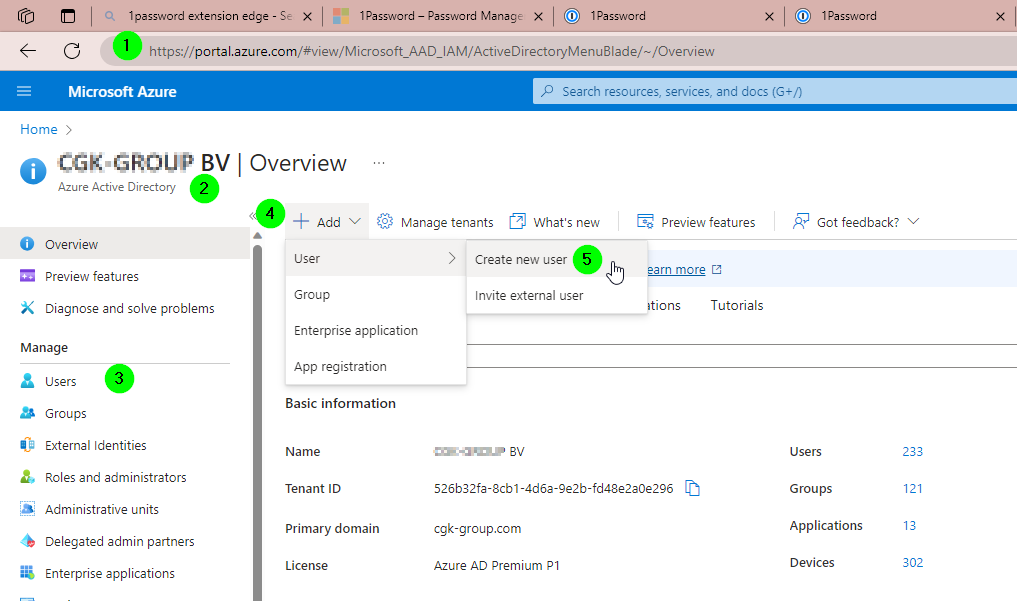
pwrp.xxx@client.com- Display Name: Power Partners XXX
- Properties > Usage Location: the client's domicile (e.g. Belgium)
Roles
Give the user the following roles:
-
Fabric Administrator
-
Power Platform Administrator
Photo
- In Entra, give the user a photo that corresponds to the client logo. This will allow the synced Edge profile to be easy recognizable
MFA Policies
-
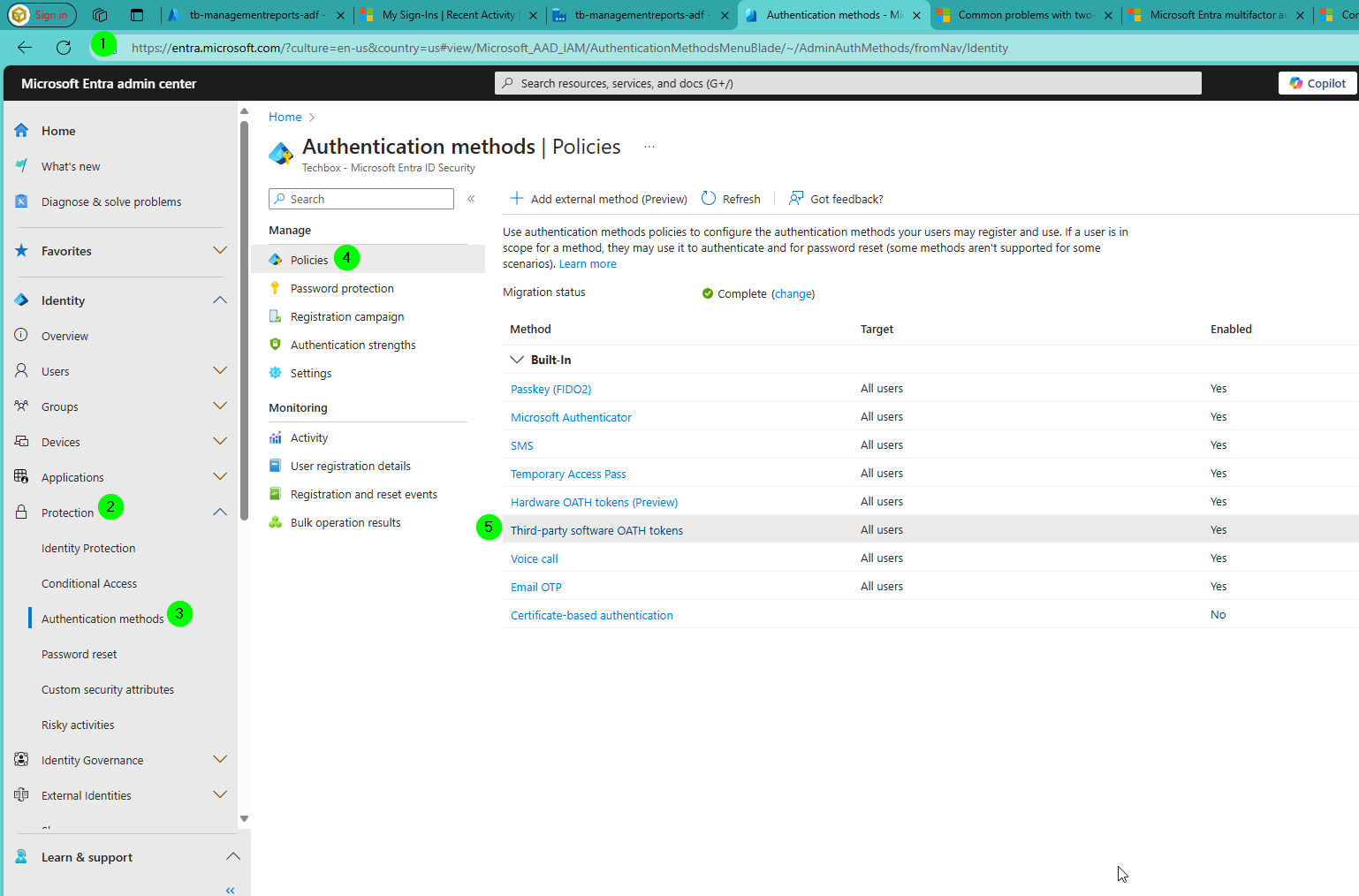
With your Power Partners user, log into https://partner.microsoft.com/ and go to Administration > Entra ID
-
Protection
-
Authentication methods
-
Policies
-
Turn on "Third-party software OATH tokens"
MFA
Important
If you cannot do the following steps because we don't have sufficient rights on the tenant, make sure this is done by a global administrator.
RULE: all of our tech users have MFA enforced.
-
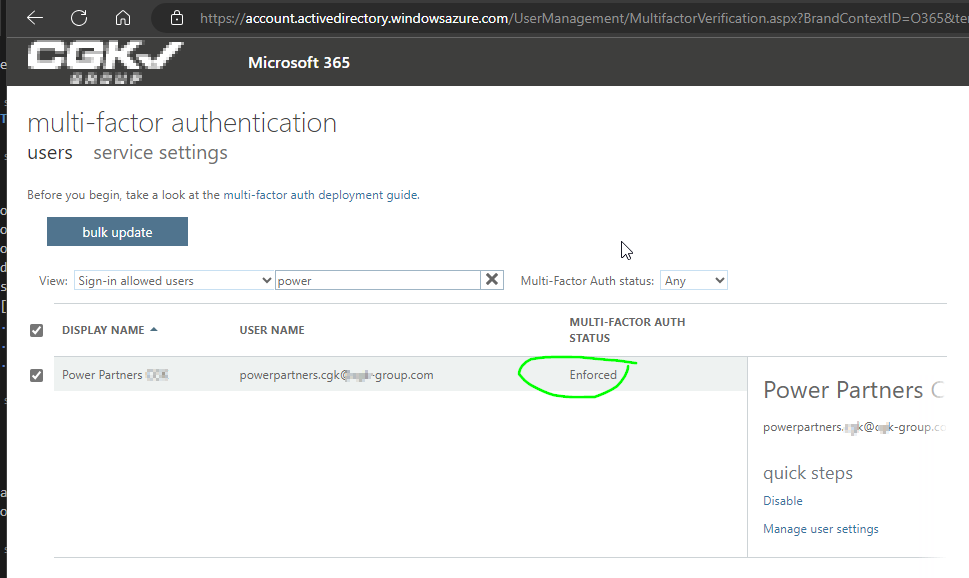
With your Power Partners user, log into https://partner.microsoft.com/
-
Go to Microsoft 365 Admin
-
Go to Active Users
-
Find the service user
-
Go to Multifactor Authentication
-
Set "Enabled"
-
Set "Enforced"
Alternative Way to enforce MFA
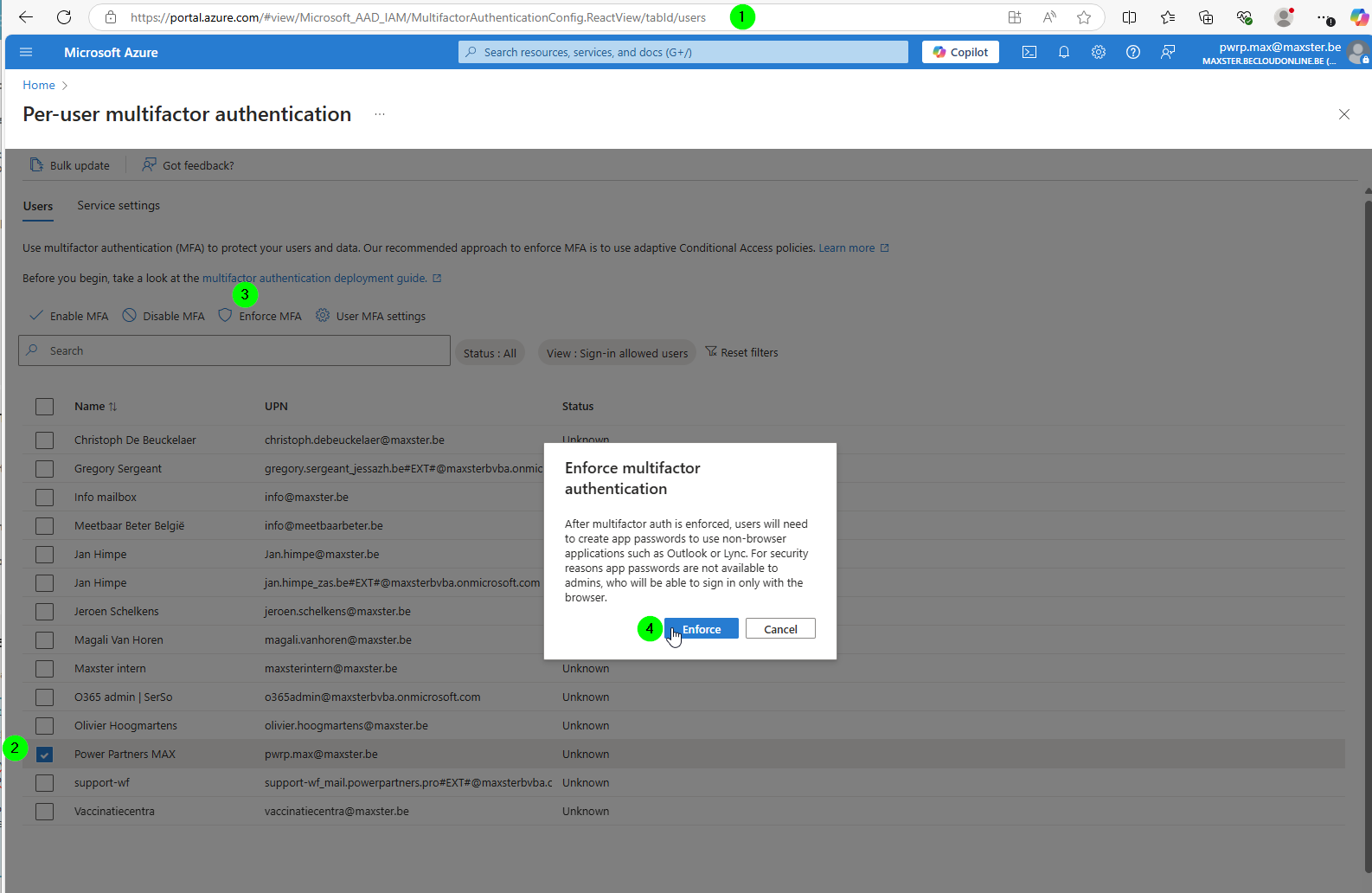
-
go to https://portal.azure.com/#view/Microsoft_AAD_IAM/MultifactorAuthenticationConfig.ReactView/tabId/users and log in
-
select the tech user
-
click on Enforce MFA
-
select Enforce
NOTE: you might have to re-set the OTP the next time you log in.
Guest User
In order to configure email notification from Power BI Datasets, we need guest user.
In Microsoft Entra ID, using your Power Partners user
-
Invite External User
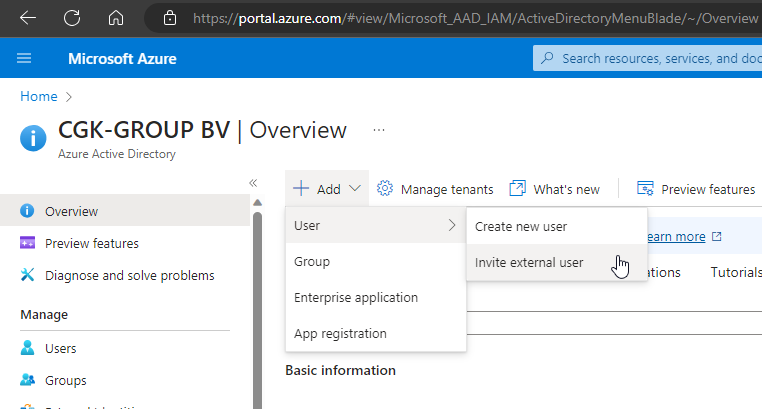
-
Invite
support-xx@mail.powerpartners.pro -
Send a copy to your Power Partners account
-
Accept invitation by copy-pasting the link to an In Private browser window
-
Use the PW from 1Password
Edge Browser Profile
-
Open Edge
-
Click on Profiles
-
Other profiles
-
Add profile
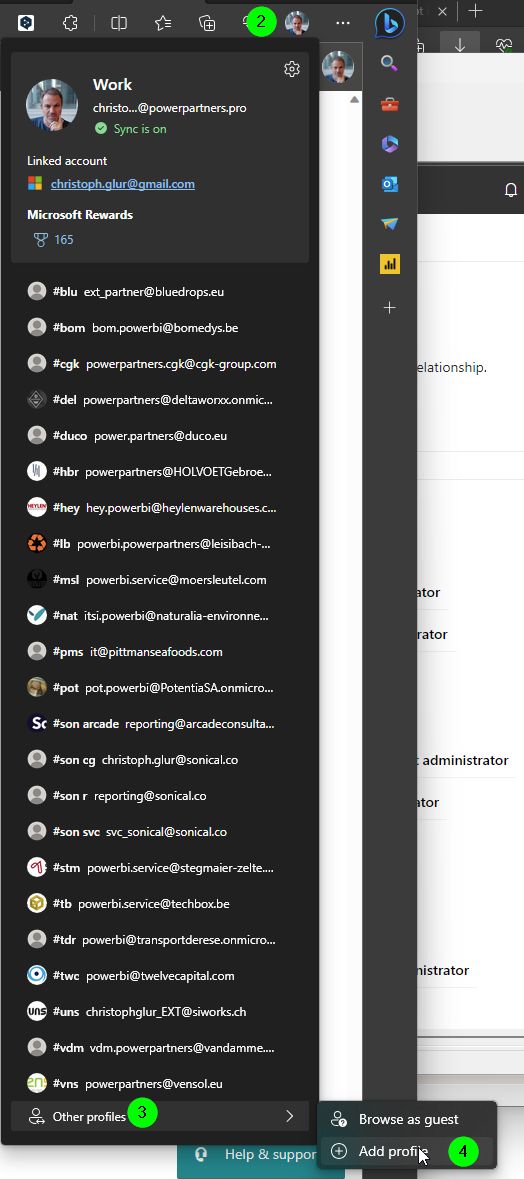
-
Add new account
-
Sign in to sync data
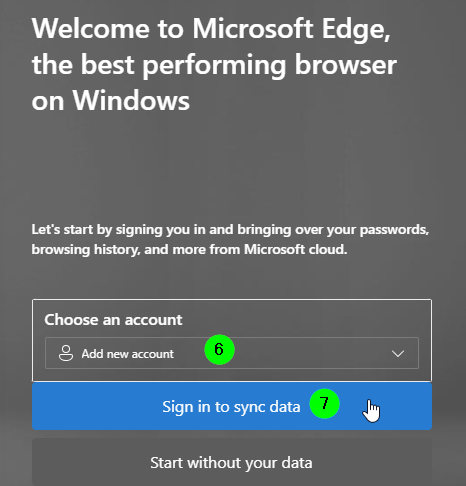
-
Sign in with the tech user
- Open Edge
- Click on "Other Profiles" > "Add Profile"
- Add new Account
- Sign in to sync data
- Call it
#xxx - Sign in, go to the account, and set MFA
- Select "Other App"
- Sync MFA token from 1password
- Add 1Password extension to the browser
- In the 1Password extension, set client as a default
- Remove other companies
Pax8 - License Ordering
Prerequisites:
- Pax8 access
- The client has accepted the Reseller Relationship from Pax8
- The client has accepted the Reseller Relationship from Power Partners
Order Azure Subscription
-
In https://partner.microsoft.com get the Microsoft ID (previously called Tenant ID) and copy it away for later reference
-
In Pax8, create a customer for the client
-
Order an Azure subscription
- Enter the Microsoft ID
- Microsoft Contact: Christoph Glur
- Microsoft Contact Email:
support-xx@mail.powerpartners.pro - Desired email address for owner/admin role for Azure subscription: Tech User we created in Entra
- Enable Azure Cost Management & Billing (ACM): Yes
- Does the customer have an existing Azure Plan subscription?: No
- Microsoft Customer Agreement: steps 2 and 3
-
Once you received confirmation from pax8 that the license has been deployed, log into https://portal.azure.com and find the license
-
Rename it to
pwrp xxx pax8, where you replace xxx with the client code
Checklist
-[ ] You can access the license under https://portal.azure.com with the tech user
-[ ] The license is called pwrp xxx pax8
Order Power BI Licenses
In Pax8
-
go to the Company
-
create an Order for Power BI Pro (or Premium if needed), making sure you provide the right tenant ID
Power BI
Assign Licenses
In Microsoft 365 Admin console, accessed through the Partner center
-
Assign the license to the tech user
-
Assign additional licenses to users, as needed.
Create Workspace
On the client profile
-
log into https://app.powerbi.com
-
Create a PBI Workspace
- By default, call it
Power Partners - Add the Group (you previously created in MS Teams) to the Contact List
- Add the Group as a Contributor
- By default, call it
Onboarding Mail
- send a mail to the client's tech contact
Email Template DE Du
Liebe Name,
Wir haben das Onboarding für euren Tenant abgeschlossen. Im Moment gibt es keinen Handlungsbedarf für dich. Aber es ist uns wichtig, transparent zu sein bei dem was wir tun.
- Wir haben einen Benutzer powerbi.xxx@destin-air.com erstellt. Dieser wird von Power Partners benutzt. Dieser Benutzer ist Power BI Administrator und hat Zugriff auf Power BI und die darunterliegenden Daten. Sonst hat dieser User allerdings keine Berechtigungen.
- Wir haben den Gast-User support-zh@powerpartners.pro auf eurem Tenant erstellt. Dieser wird benutzt, um unser Support Team per Email zu informieren, wenn ein Fehler vorliegt.
- Wir haben ein MS Team "Power Partners" erstellt:
- Den Kanal Allgemein werden wir selten benutzen. Falls überhaupt, dann um Fragen zu klären und Files auszutauschen, die euren Tenant nicht verlassen sollten.
- Den Kanal Prod benutzen wir ausschliesslich als Speicherort für Dateien, die von PowerBI benötigt werden. Hier wirst du also zukünftig die Excel Files hochladen, die sich Power BI holt. - Wir haben einen Power BI Workspace "Power Partners" erstellt. Dieser ist momentan noch leer, aber hier kommen dann die Power BI Reports hin. Im Moment haben alle, die Zugriff auf oben erwähntes MS Team haben, auch Zugriff auf den Workspace und die Reports. Zukünftig werden wir dann allerdings auch die Power BI Reports ins MS Teams integrieren.
- Wir haben folgende Lizenzen zugewiesen:
- powerbi.xxx@destin-air.com : Power PPU
- leo.barth@destin-air.com: Power BI Pro - Wir haben eine Azure Subscription im Namen von Company erstellt. Hier laufen die Python Skripte. Ebenfalls werden hier die Rohdaten in einem Datalake und/oder Data Warehouse gespeichert.
Wie gesagt, im Moment besteht kein Handlungsbedarf eurerseits. Aber natürlich darfst du dich auch jetzt schon sehr gerne melden, falls duFragen hast.
Als nächsten Schritt werden wir ....
Liebe Grüsse
Christoph
Email Template EN
Dear Name ,
We have completed the tenant onboarding for Client. There is no action required from your side at this point. But we'd like to be transparent in what we do, so here's a quick summary for your future reference.
- We have created a user powerbi.xxx@client.com. This will be used by Power Partners to run Azure jobs and refresh the dataset in Power BI. It has Power BI Admin rights, but no Global Admin rights. It is also the owner of the Azure subscription (see below).
- We have assigned a Power BI Pro license to the user.
- We have created a guest user support-be@powerpartners.pro on your tenant. It will be used to inform the Power Partners support team in case of data load failures.
- We have created a Power BI workspace called "Power Partners". It is currently empty, but will be used to deploy the Dashboards.
- We have created an Azure Subscription. This will host all Azure resources we will use for the project.
Again, there is no action required from your side right now. But please do not hesitate to get back if you would like more information on any of the above points.
As a next step, we will ....
Best Regards,
Christoph
Email Template NL
Beste,
We hebben succesvol de Microsoft Tenant Onboarding afgesloten.
Er is op dit moment geen actie nodig van jullie kant. Maar we willen graag transparant zijn in wat we doen, dus hier is een korte samenvatting voor jullie toekomstige referentie.
- We hebben een gebruiker powerpartners.xxx@client.com gemaakt. Deze wordt gebruikt door Power Partners om Azure jobs uit te voeren en de dataset in Power BI te vernieuwen. Deze gebruiker heeft Power BI Admin rechten, maar geen Global Admin rechten. Het is ook de eigenaar van het Azure Subscription (zie hieronder).
- We hebben een Power BI Pro Proefversie toegewezen aan de gebruiker.
- We hebben een gastgebruiker support-be@powerpartners.pro aangemaakt op uw tenant. Deze wordt gebruikt om het Power Partners support team te informeren in geval van storingen bij het laden van gegevens.
- We hebben een Power BI-werkruimte gemaakt met de naam "Datasets". Deze is nu nog leeg, maar zal worden gebruikt om de Dashboards te implementeren.
- We hebben een Azure Subscription aangemaakt. Dit zal alle Azure resources hosten die we zullen gebruiken voor het project.
Met vriendelijke groeten,