Configure New Timeseries
To configure new timeseries for #cem open Azure Data Studio, connect to #cem SQL server.
You will need the following 3 tables:
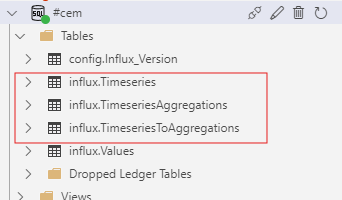
E.g. we want to add a new aggregated KPI for #cem called vermogen hoofdmotor, that is the sum of 3 fields:
-
motor mill
-
motor-power big fan
-
motor-power / -current
influx.Timeseries table
Here you define the base values needed for the aggregated KPI, meaning we fetch the 3 base fields listed above:

influx.TimeseriesAggregations
Here we define the KPI's name, ID, aggregation, and unit:
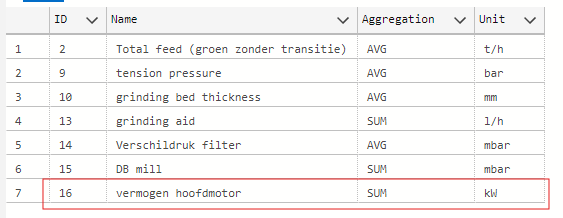
influx.TimeseriesToAggregations
This is our bridge table where we define which base values are summed, averaged etc. for our final KPI:
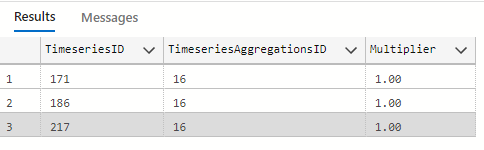
So here we have our 3 key components represented by their ID, that are summed for the final KPI:
1. motor mill - TimeseriesID 171
2. motor-power big fan - TimeseriesID 186
3. motor-power / -current - TimeseriesID 217
The multiplier 1 is used for summing values. If we wish to deduct e.g. motor-power big fan so that our end result was:
we would have to set our multiplier to -1, by which we can subtract this value even when the aggregation method is defined as SUM.