Client Invoice Creation
Process Details
- Part of: monthly-project-invoicing-overview
- Owner: account-manager
- Participants: scrum-master, project-manager, sold-license-manager
- Frequency:
Monthly - Trigger: When scrum-master informs the account-managers that the monthly-timelog-review is ready. Usually on the first Tuesday of each month.
- Inputs:
- monthly timelogs from the monthly-timelog-review
- fixed price orders
- license cost from the license-invoice-preparation
- Outputs:
- Sales Invoices
Background
We create 1 invoice per client per month.
The easiest is if you perform below steps and create an invoice whenever there is a position and no invoice exists yet.
Prerequisite
-
The monthly-timelog-review has been finished
-
The license-invoice-preparation has been finished
Process
Create Invoice
Important!
See the client-specific notes below Client-Specific Notes
- Each account-manager
- gets a list of active clients, by channel (TODO: need to generate it automatically)
- for each Channel
- logs into the right bexio instance
- for each client on the list
- Create the Invoice in bexio, making sure that the following is correct:
- Contact Person / Email (typically
accounting@...orinvoice@...oroffice@...orfinance@..., correct it in bexio contacts if wrong) - Date
- VAT (depending on country of domicile)
- correct bank account depending on Currency
- Note about "Reverse Charge" procedure for foreign companies
- Contact Person / Email (typically
- go to
Teams > Power Partners\Invoicing\monthly\$month$\..._final\by_account_manager\$your.name$\$channel$ - for each Time&Material Timelog PDF of the client (if any)
- creates or adjusts an invoice line, using the appropriate bexio product
- adjusts the from/to
- sets the service period
- sets the correct account
- attaches the time log PDF
- sets the attachment to viewable in bexio
- sets the date to the last day of the previous month
- for each Retainer Timelog
- TODO
- for each Fixed Price Invoice Line
- TODO
- Open the Power BI dashboard (Bericht)
pax dashboardin powerbi.com or in MS Teams - for each licensed product (if any):
- create or adjust the invoice line for the license in bexio
- Select the month (if you are on the 8th of March 2023, select Mar 2023)
- Select the client, one at the time
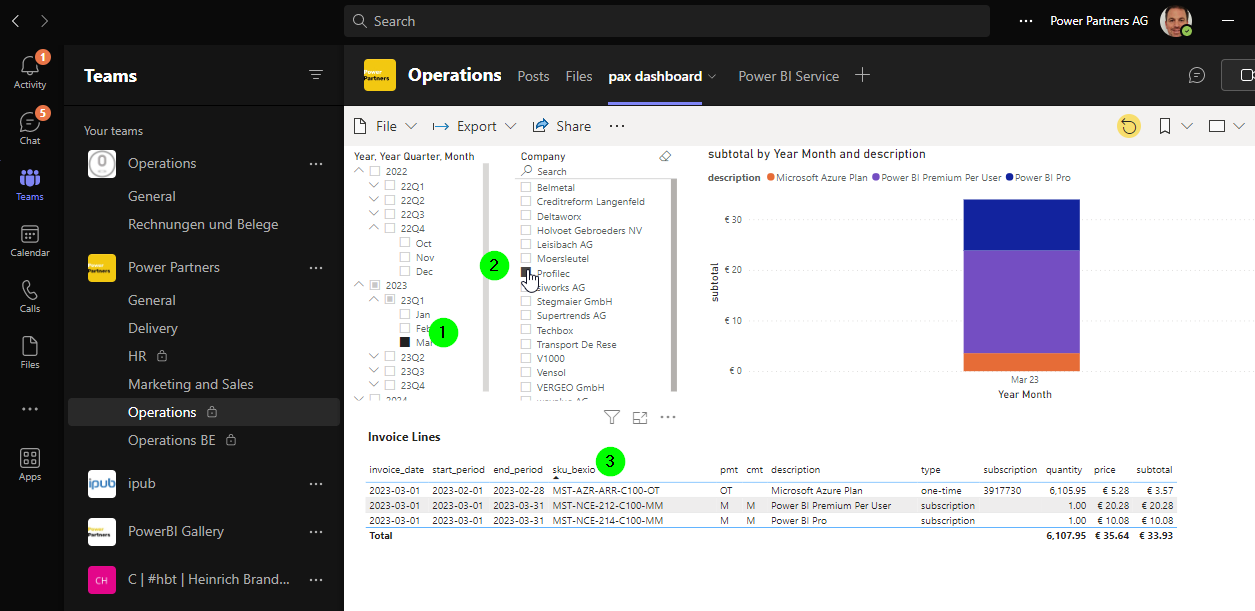
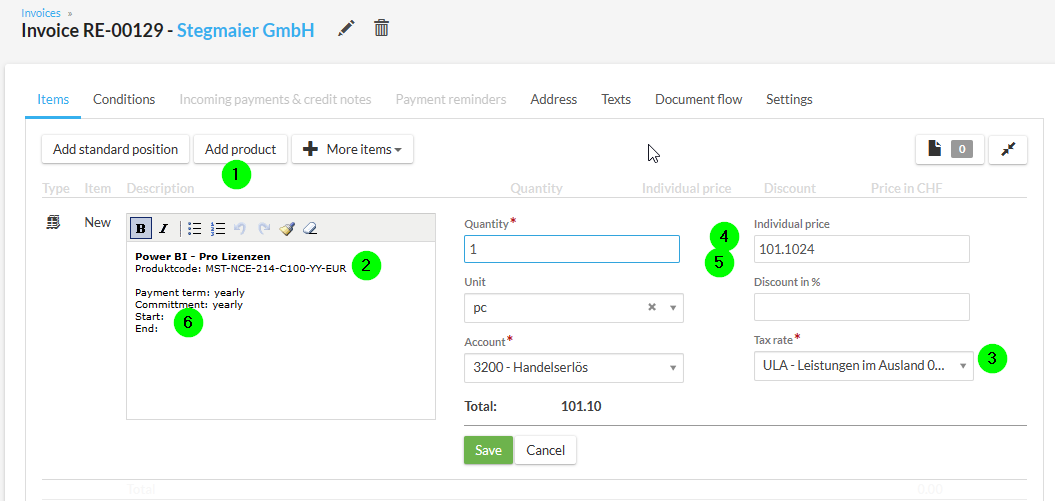
- Create or adjust an invoice line with the bexio_sku shown in the report.
- Import the product
- For AG, you need to add the currency code EUR or CHF to the SKU (product code)
- For BV clients with an address outside of BE, you need to select ULA
- For new licenses with pro rate, you need to adjust the amount
- For Azure, you need to set the amount
- Fill in the details in the product description, according to the template (date, etc.)
- Create the Invoice in bexio, making sure that the following is correct:
Checklist
- There is an invoice for active each client
- There is an invoice line for each Time & Material order
- There is an invoice line for each Retainer order
- There is an invoice line for each Fixed Price order
- There is an invoice line for each licensed product
- Each invoice is sent to the client
Client-Specific Notes
pwrp WF
AZ Jan Portales
invoice send to crediteuren@azjanportaels.be and cc to: tessa.vanpraet@azjanportaels.be
beMatrix
The adress must be: Stedi, Sportstraat 205, B-9000, BE 0867445462
Xsys Global
- Add Order No to the reference: 4501894225
pwrp ZH
stihl
- use the Bestellung-Nr as a reference
Leisibach
- you need to backdate the date to the last date of the previous month
Sonical
-
you need to create all invoices to sonical
-
there should be 1 invoice per client
-
you need to backdate the date to the last date of the previous month
-
typically, you can combine the timesheets into a single invoice (because there is not specific order in bexio)
itsi
- all invoices go to itsi