Monthly Timelog Review
Background
We send monthly invoices for projects with contract type Retainer or Time & Material.
The contract type is set on the planio.Order (aka Issue of type Order).
Process Details
-
Part of: monthly-project-invoicing-overview
-
Owner scrum-master
-
Participants: project-managers, account-managers
-
Frequency: Monthly
-
Trigger: on the first Tuesday of each month
-
Inputs:
- Timelogs from planio
-
Outputs:
- Timesheet PDFs
Summary:
-
scrum-master: triggers the file creation and copies the final PDFs
-
project-manager: checks the numbers for each of his projects
Prerequisites
-
all weekly reports have been checked during the weekly-timelog-review-meeting
-
for project-managers: have Azure Storage Explorer installed
-
the scrum-master has created all the tasks for the timelog review
Process
Involved Roles:
-
scrum-master: Coordinates and triggers report generation
-
project-manager: Checks numbers
-
The scrum-master
- creates tasks for all involved project managers, by copying the template in planio and setting it from "Template" to status "In Progress": https://pwrp.plan.io/issues/4453
- triggers the data refresh by calling this link:
https://pwrp-ops.azurewebsites.net/api/refresh_data_http?code=_XTfsPx-ng4e6wvluC0nJ2aICrKoA3AQ0Zy1dEeUraHPAzFu0uxsLA%3D%3D - triggers the time log generation by calling this link, and by replacing the month for the relevant cycle (e.g. 2024-02):
Create Reports:
https://pwrp-ops.azurewebsites.net/api/monthly_reporting_http?code=1nOwHQkrGckVijHpnZ7LAPG9EmfxBcU2P7Vig39u6hNgAzFuRRyvVw==&month=2024-02&report_type=run_01&refresh=false - informs the affected
Project Managersthat they can now check the Time Logs in Storage Explorer.
-
Each project-manager
- Checks if he is indeed the best project-manager. Else discusses with team members and a different project-manager or account-manager may be assigned.
- Checks his reports in Azure Storage Explorer and fixes problems in Planio on the time logs
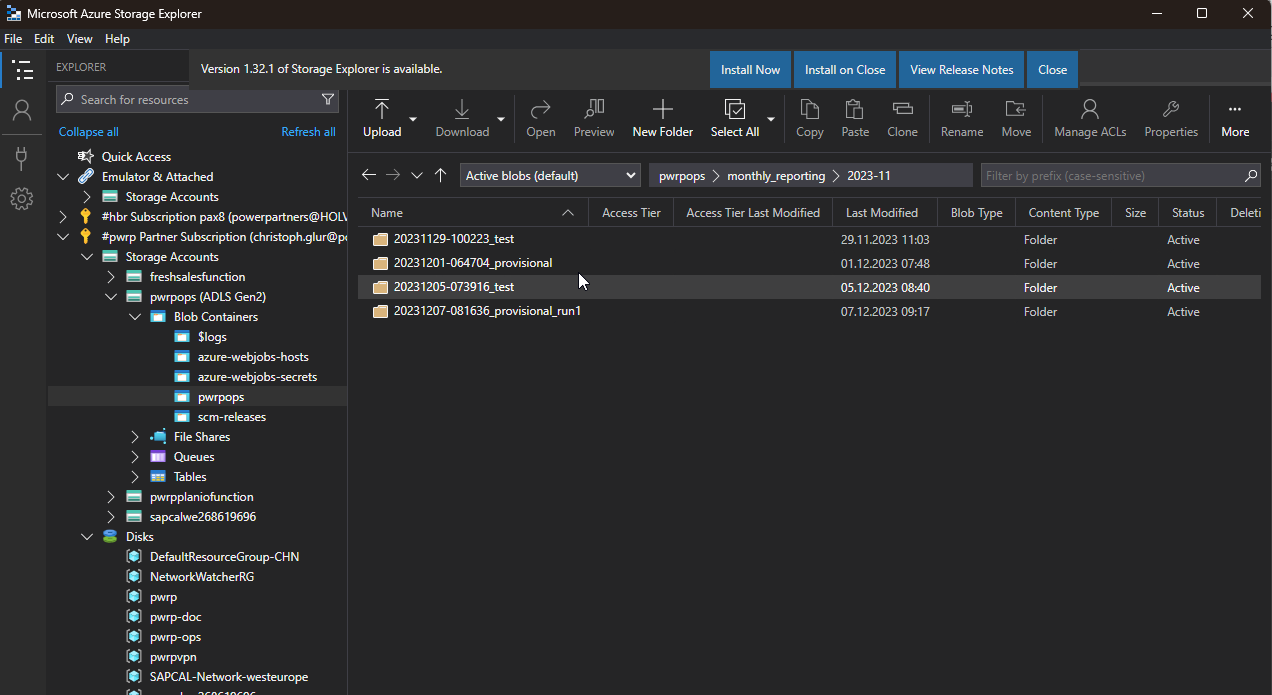
- One can also use the Timelog report
- An easy way to modify the Comment of a time log is to open the following link in the browser:
https://pwrp.plan.io/time_entries/10618/edit(replace the number with the Log from the Worklog section of the report:
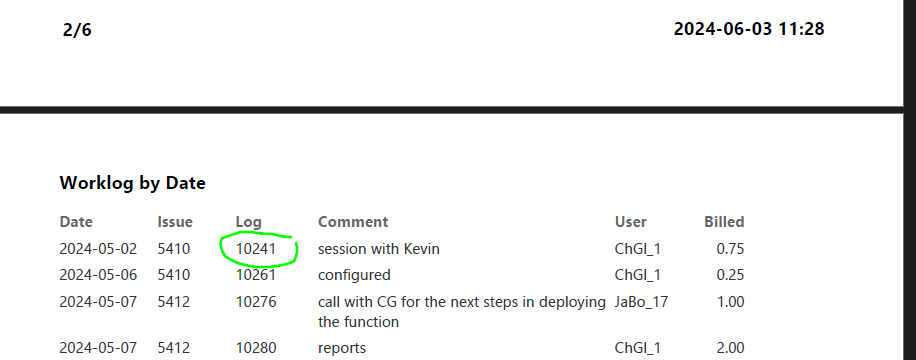
- The project-manager may request to rebuild the reports at any moment. The scrum-master coordinates execution.
-
When all the project-managers have confirmed that their projects are OK, the scrum-master informs the account-managers
-
Each account-manager
- Checks the numbers for each of his clients
- If necessary, they discuss with the project-managers and correct numbers in Planio
- The account-manager may request to rebuild the reports at any moment. The scrum-master coordinates execution.
-
When everything has been fixed, the scrum-master
- triggers final log generation by calling
https://pwrp-af.azurewebsites.net/api/monthly_reporting_http?code=IF_eyt8X16WQPD0ekmrFDFIxx4-bhr8fQMQDtBa0ZsEgAzFuxQr2Lg==&month=2023-10&report_type=final(again, replacing the month) - copies the pdfs to
Power Partners - Invoicing - Invoicing\monthly\yyyy-mm\ - waits until everything is synced
- informs the account-managers that the timelog PDFs are ready
- triggers final log generation by calling