DWH Bouwsoft Configuration
Configuration of Data to be downloaded: config.bouwsoft_Tables
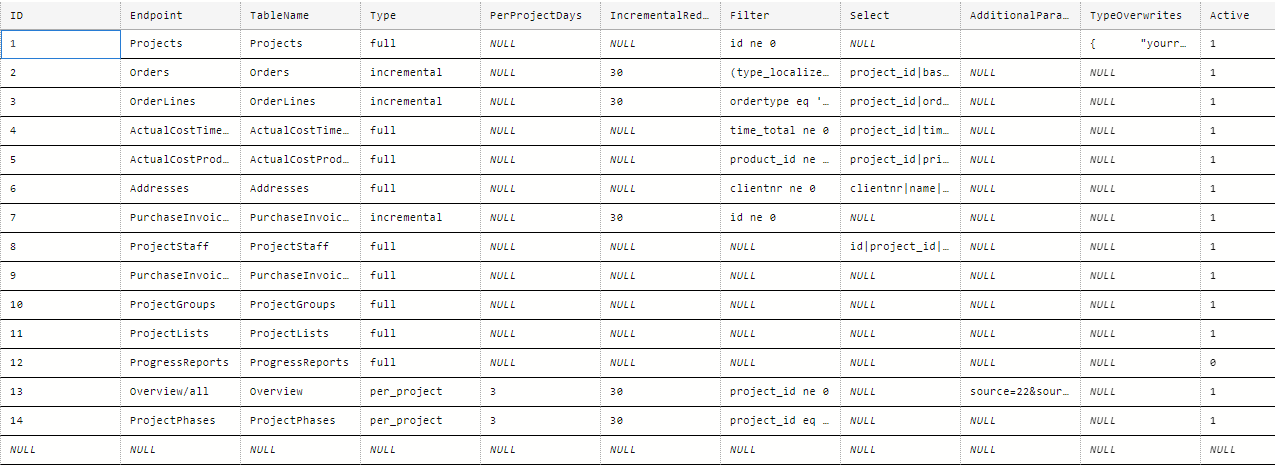
This table contains the configuration of each table to be downloaded.
-
ID: The pipeline downloads tables according to the ID. Make sure that the Projects table is always first.
-
Endpoint: the service endpoint, as shown in Postman or in <Swagger UI>
-
TableName: the name of the table where the data is sinked
-
Type:
full,incrementalorper_projectfull: the table is dropped and the full table is downloadedincremental: This only works for endpoints that deliver ats_lastupdateattribute. The records that have been updated in the lastIncrementalRedownloadDaysare deleted. Then newer records are downloaded. NOTE: this may not proper handle deleted records. If you see that deleted records are staying in the table, you can do the following:- You can increase
IncrementalRedownloadDays - You can switch to
fulldownload - You can switch to a hybrid, e.g. downloading incrementally during the week, and downloading a full download on the weekend (by setting
drop_tableparameter in the pipeline totrue.)
- You can increase
per_project: This allows to download data for which the endpoint requires a mandatory project parameter, such asOverviewandProjectPhases. In the filter, you can add a placeholder$project_id$that will be replaced by the project id.- Example: for ProjectPhases: Filter:
project_id eq $project_id$ - Example: for Overview/all: AdditionalParameter:
source=22&source_id=$project_id$
- Example: for ProjectPhases: Filter:
-
PerProjectDays: this is valid for Type =
per_project. If set to 1, then all projects are downloaded every day. If set to 2, then the oldest half of unchanged projects are downloaded on a single day. As a result, all projects are re-downloaded every 2 days. -
IncrementalRedownloadDays: if set to 30, then all records having been changed in the last 30 days (according to
ts_lastupdate)are being deleted and thus re-downloaded. -
Filter: a filter to be applied to the call to the endpoint.
- NOTE: some endpoints contain defaults if no filter is provided. For example if you call
Projectswithout filter, you get fewer records than if you callProjects?filter=id ne 0 - NOTE: you will have to add the
$project_id$placeholder for Type =per_project
- NOTE: some endpoints contain defaults if no filter is provided. For example if you call
-
Select: a selection of colums/attributes. This follows the bouwsoft API standard, according to which the columns need to be separated with a pipe.
- For example:
project_id|time_total|wagecost|totaldistance_chargetoclient|totaldistance_chargetoclient_backandforth|date
- For example:
-
AdditionalParameters: any additional parameters you would like to pass on. This can for example be useful for downloading Overviews, e.g.
Overview/all?source=22&source_id=13- Example:
source=22&source_id=13 - NOTE: you can combine multiple parameters just as you would in the URL, using &
- NOTE: the
$project_id$placeholder is respected forper_projectdownloads
- Example:
-
TypeOverwrites: This allows you to configure the SQL types used when a new table is created by the AF. You can provide a json configuration that maps attribute names to SqlAlchemy types.
- Example
- Example
-
Active: whether the download is active or not.
Configuration of Triggers
The triggers are defined in ADF.
Pipeline: bouwsoft_pipeline
Parameters:
-
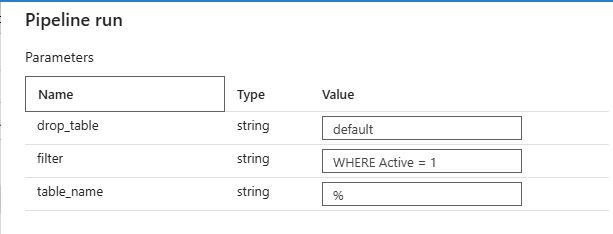
drop_table: you can set this to
true,false, ordefaulttrue: the table will be dropped before starting the download. This is useful for a full load. In a nutshell, this "overwrites" the incremental type from config.bouwsoft_Tables.false: the table will never be dropped. This can in theory be useful for full tables too. It will keep each version of the record, as we add a run_id and run_timestamp column to the downloaded tables.default: this will drop the table or not, based on the mode (i.e. based on the configuration inconfig.bouwsoft_Tables.Type)- incremental:
false - full:
true - per_project:
false
- incremental:
-
filter: an SQL filter clause that allows running the pipeline for a set of tables. This is in relation to config.bouwsoft_Tables. For example:
WHERE Type = 'incremental'WHERE Id IN (1, 3, 5)
-
table_name: an additional SQL filter, so that it's easy to run the pipeline manually for a single table