New Team-Member Onboarding Buddy
This helps new team members to be seamlessly onboarded and introduced to tools, processes and technology.
Owner
- Assigned on a case-by-case basis
Preparatory Steps
In planio:
-
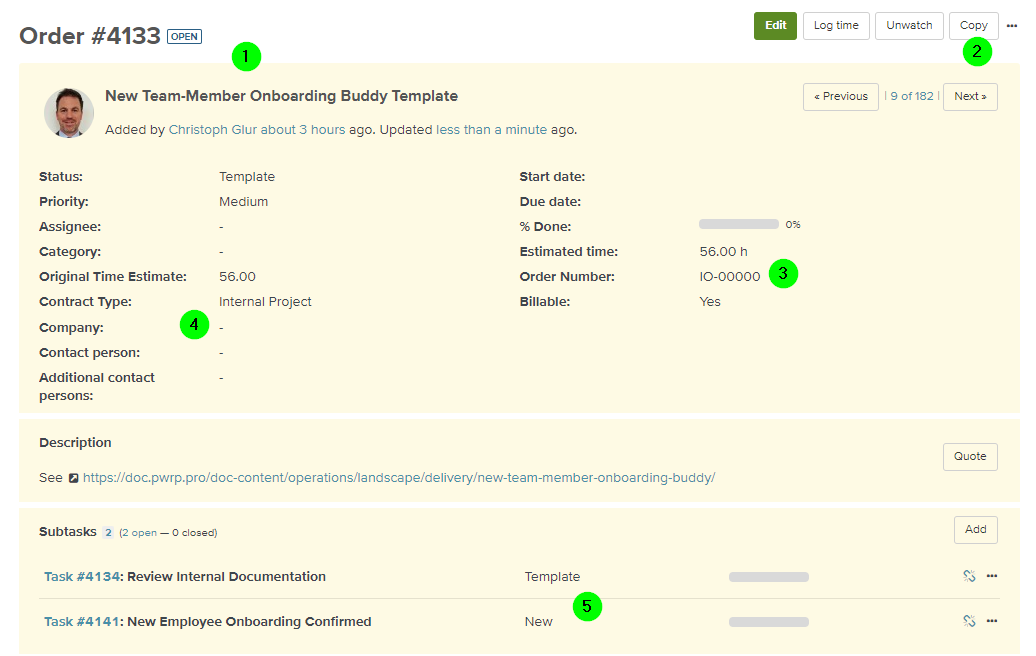
find the template (currently Order #4133)
-
copy the template (this will copy all subtasks)
-
on the Order, set the Order Number
-
on the Order, and all its Tasks set the company (e.g. to pwrp WF)
-
on the Order, and all its Tasks set the status from Template to New
-
adjust all the Tasks depending on the role and individual characteristics
-
add additional tasks as discussed with the team
-
change the template if necessar
Checklist
- An Onboarding Order is created for the employee
- The Order has all relevant tasks
- The Order and the tasks are assigned to the right company
- The documentation (this page) is updated
Responsibilities during Onboarding
The Onboarding Buddy will help the new team member find his way around, get access to resources and people, etc.
-
Introduce the new team member to the infrastructure
-
Define onboarding board
-
Call a daily meeting with the new team member for Q&A, KT and progress tracking
-
Coordinate access with the Security Officer if necessary (e.g. if access is not working)