duco Support
ADF and Devops Pipeline
For duco, we have a "special" setup that requires approval via a DevOps pipeline.
Prerequisite: you need to request access with your sonical account (e.g. christoph.glur@sonical.co) to the devops account / repository. You can access this from Bastjaan Beernaert Bastjaan.Beernaert@duco.eu or Bie.DeBacker@duco.eu .
More background on this: Git flow _ PR-20240109_153613-Besprechungsaufzeichnung.mp4
IMPORTANT:
- Do not reconfigure git!
- Do not work with the tech user!
Step-by-step directions
Once you have access with your sonical account, the workflow is like so:
-
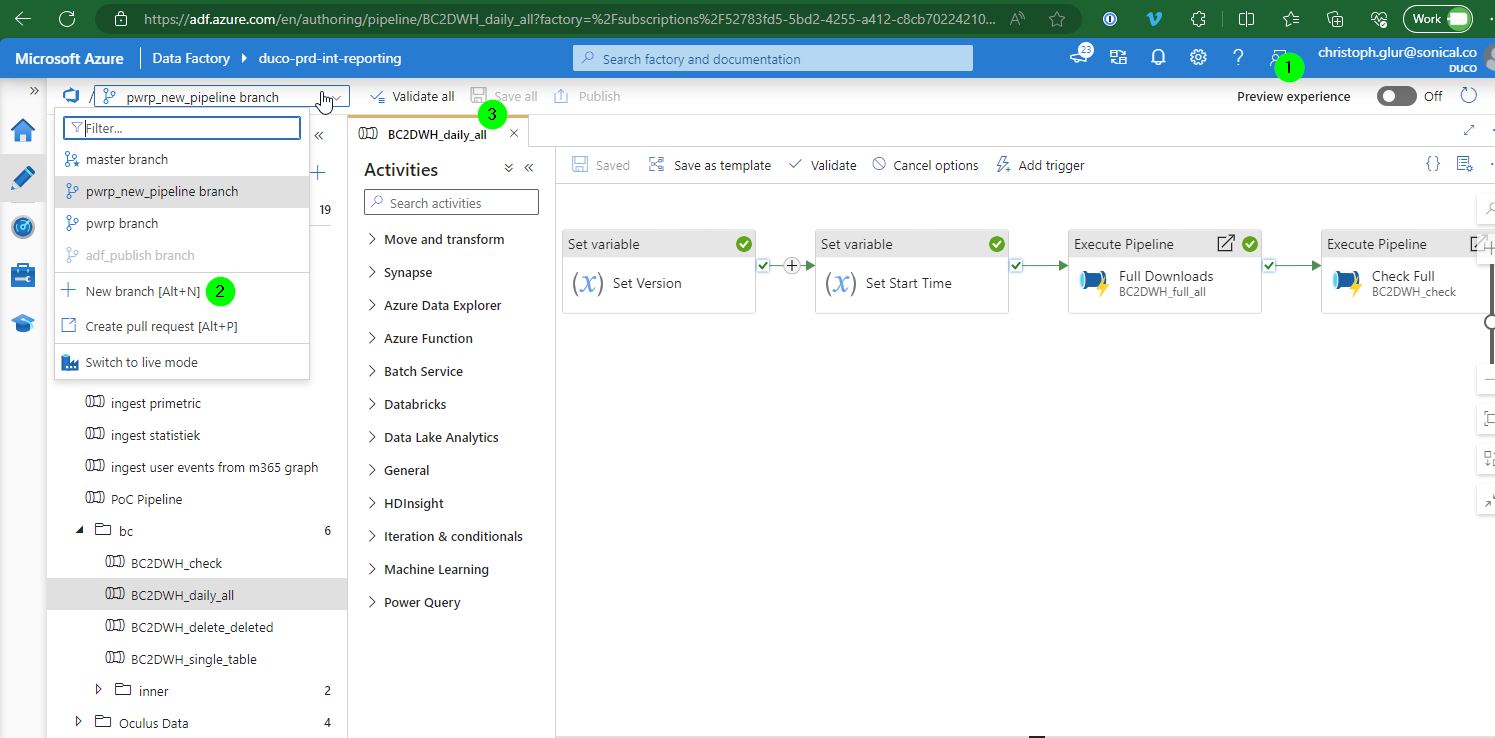
log in to ADF Studio with your sonical account
-
create a feature branch to implement your changes. Branch from the "master" branch.
-
save (aka commit) the changes to the feature branch
-
Go to devops: https://dev.azure.com/veroduco/DucoCloud-Internal
-
Go to Repos > Pull Requests
-
Select
Internal.ADF -
Find the active feature branch with the changes (under Mine or Active)
-
Create a Pull Request
- add the approver (e.g. Bastjaan, or whomever you were in contact with)
-
Make sure the checks run through. Else fix.
-
Wait until the Pull Request has been approved