Data Sources
| System Name | Description | Ref | Data Access |
|---|---|---|---|
| Excel | Credit Card Transactions, maintained manually |
The Excel is maintained manually, initially. Later automations are on the roadmap.
Folder and File structure:
prod
|_ statements
   |_ master.xlsx
   |_ AMEX
   |  |_ 2301_amex.xlsx
   |  |_ 2302_amex.xlsx
   |_ TOPCARD MASTER
   |  |_ 2301_TCM.xlsx
   |  |_ etc.
   |_ VISECA
   |  |_2301_VISECA.xlsx
   |  |_ etc.
   |_ etc.
Note that the folder and file structure of the statements is flexible, and any naming convention can be used.
For example: as a suggestion, each file contains all transactions that appear on a statement. Thus, a single Excel
file can host more than one credit card (partner cards etc, as e.g. with Amex).
One could, for example, split this up and have one file per card.
However, a word of caution: The fewer files you have, the easier it is to make
changes. For example, adding a column in a single file is a task of a few minutes. Adding a column to a hundred files will
take quite some time.
The master.xlsx file has two worksheets:
- Cards
- Categories
The format of the 'Cards' worksheet is:
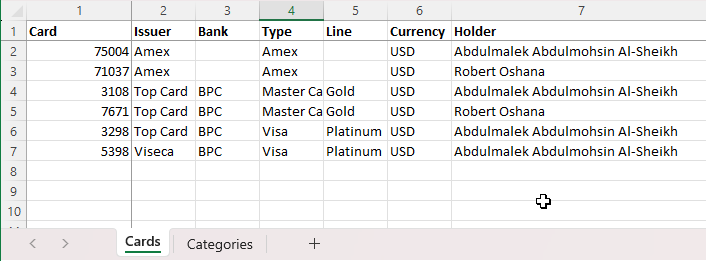
The format of the 'Categories' worksheet is:
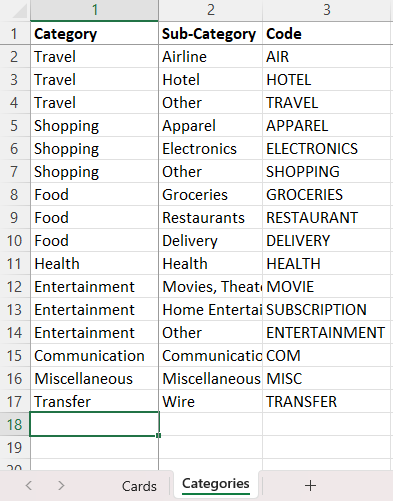
The categories can be defined freely.
Categories can be renamed. If the category code is kept, historic transactions will be re-classified.
If a category is used in a transaction file (see below), but missing in the master.xlsx file, then the
system will dynamically create the provided category from the supplied category code. For example:
- Code in transaction Excel file: HOUSING (not available in master.xlsx/Categories)
- Category in reports: Other
- Sub-Category used in reports: Housing
The format of the transaction files is like this:

Note, again, that the system has been designed with a maximum flexibility in mind.
As a result, some columns are a bit redundant. For example, columns 1 and 2 (Card and Statement)
are repeated for each transaction, allowing to split the Excel files in any way.
The yellow columns are mandatory.
The green columns are optional. If not provided for a given transaction, the system assumes defaults:
- Country: Other
- Spending Currency: USD
- Category: Other