Register an Entra App
Tldr
- API Permissions:
user_impersonation,Report.Read.All, and many more - scope:
https://analysis.windows.net/powerbi/api/.default offline_access - Redirect URL: https://localhost:5000/signin-oidc
References
See also oauth-create-app.
The Entra app allows accessing the reports with a service principal (the Power BI user set up in the previous section).
Tip
If you have the Power BI Automation Server in use for the client, you may re-use that App. Then you just need to add the Redirect URL.
-
Create an Entra
App registration- call it
Power BI Proxy - write down the
Application (client) ID
- call it
-
Set the Authentication
- set the Redirect URI to
https://localhost:44300/ - allow ID tokens and
- set the Redirect URI to
-
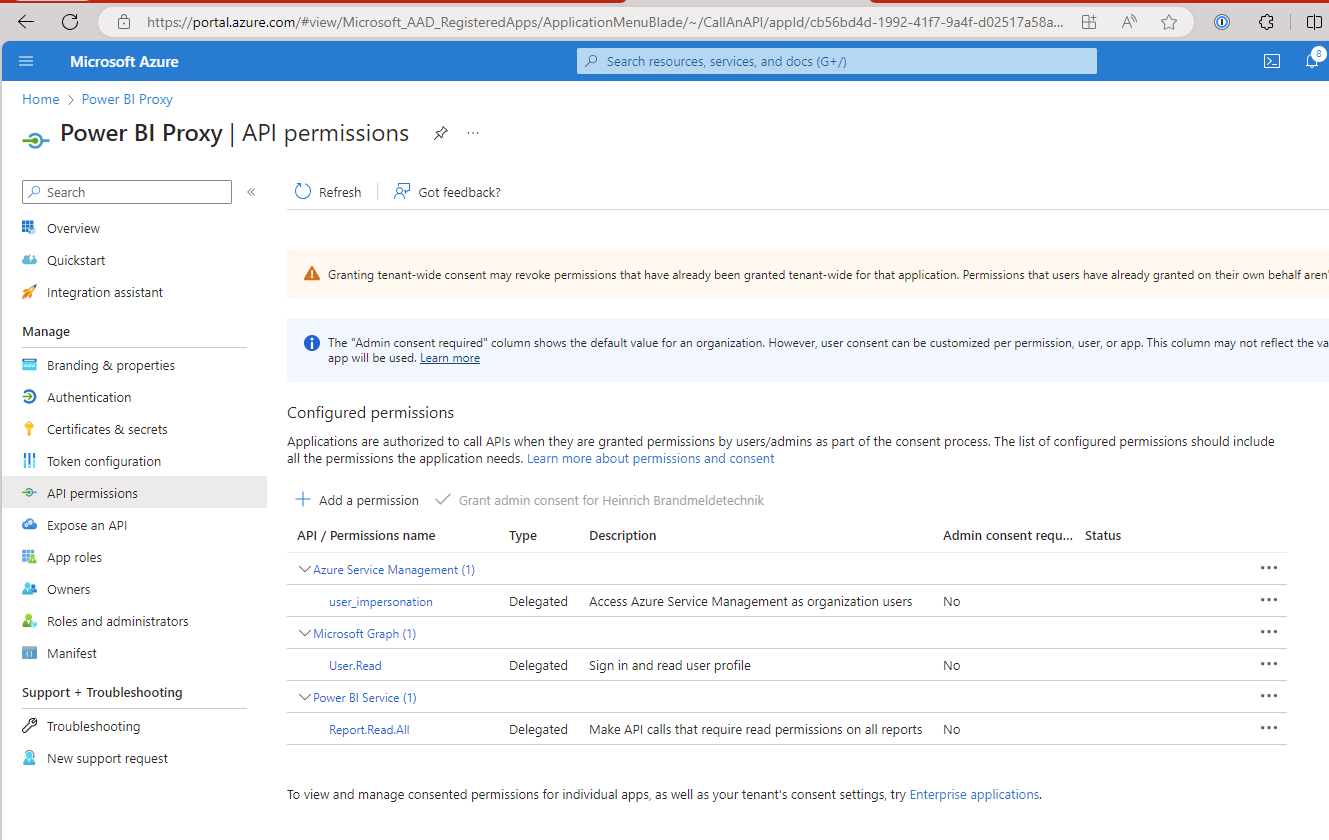
Give it the following
API permissions- Azure Service Management
user_impersonation
- Power BI Service, delegated Permissions
- Report.Read.All
- Capacity.Read.All
- Dashboard.Read.All
- Dataflow.Read.All
- Dataset.Read.All
- App.Read.All"
- Azure Service Management
-
Grant admin consent if necessary. If you don't have the rights, you can
- try to use our Microsoft Partner Access (ask Christoph)
- ask a local Admin from the client
-
Create a Client Secret and write down the
Valueand theSecret ID
Checklist
- you have an app registered
- you are the owner
- the app has a secret
- you have the value of the secret noted down
- the app has the right API Permissions
- the Permissions have been Granted by an admin