Master dataflow issue explanation
Multiple Dataflows and a Master Dataflow
When we work with multiple Excel files that need different transformations:
- Each group of similar files get their own source dataflow
- Source dataflows stay simple and focused on ingestion and basic preparation
When the data needs to be combined for the dataset we need a Master Dataflow:
- We create a Master Dataflow
- The Master Dataflow references the other Excel-based dataflows
- It joins and aggregates the prepared tables into a single consolidated model
This setup is used, for example for #max.
The datasets only connects to the Master Dataflow.
This required a Premium workspace.
Why a Premium Workspace is required
A dataflow workspace must be Premium when any of the following is used:
-
Computed tables
Tables that reference or transform other tables or dataflows.
A master dataflow is always a computed dataflow because it aggregates other dataflows. -
Linked tables
Tables that directly reference tables from another dataflow. -
Incremental refresh
Enabled on any table in a dataflow.
In our setup, the Premium requirement is triggered by computed tables.
Because the master dataflow combines other dataflows, this requirement is unavoidable.
Why this can get expensive
- A Premium workspace license is required because of computed tables in the dataflows
- Every user added to that workspace needs a Premium Per User (PPU) license
This means that as soon as business users are added for dataset access, licensing costs scale per user.
This is not recommended because it is a big cost for the client.
Our recommended solution
Before setting up a master dataflow and moving to a premium workspace, the recommended approach is to combine the dataflows directly in the dataset.
In this setup:
- We keep the regular Excel-based dataflows
- The dataflows and the dataset remain in the same workspace
In the PBIX file, we:
- Connect to the different dataflows using Power Query
- Combine and transform them there (joins, merges, aggregations)
Because all combining logic happens in the dataset:
- No computed tables are used in dataflows
- No Premium-only dataflow features are triggered
- Only standard Pro licensing is required
Trade off
This approach usually results in a slightly longer dataset refresh time.
Because combining happens at dataset refresh instead of during dataflow refresh.
As long as refresh duration stays acceptable and report usage and performance are not affected.
This is the preferred and recommended approach, as it keeps:
- The setup simpler
- Licensing costs lower
- Premium usage out of scope
Solution with premium workspace
Only when the resfresh times become to long and the report performance is becoming to slow, we move to a premium workspace.
We create 2 workspaces, one for the dataset and one for the dataflows.
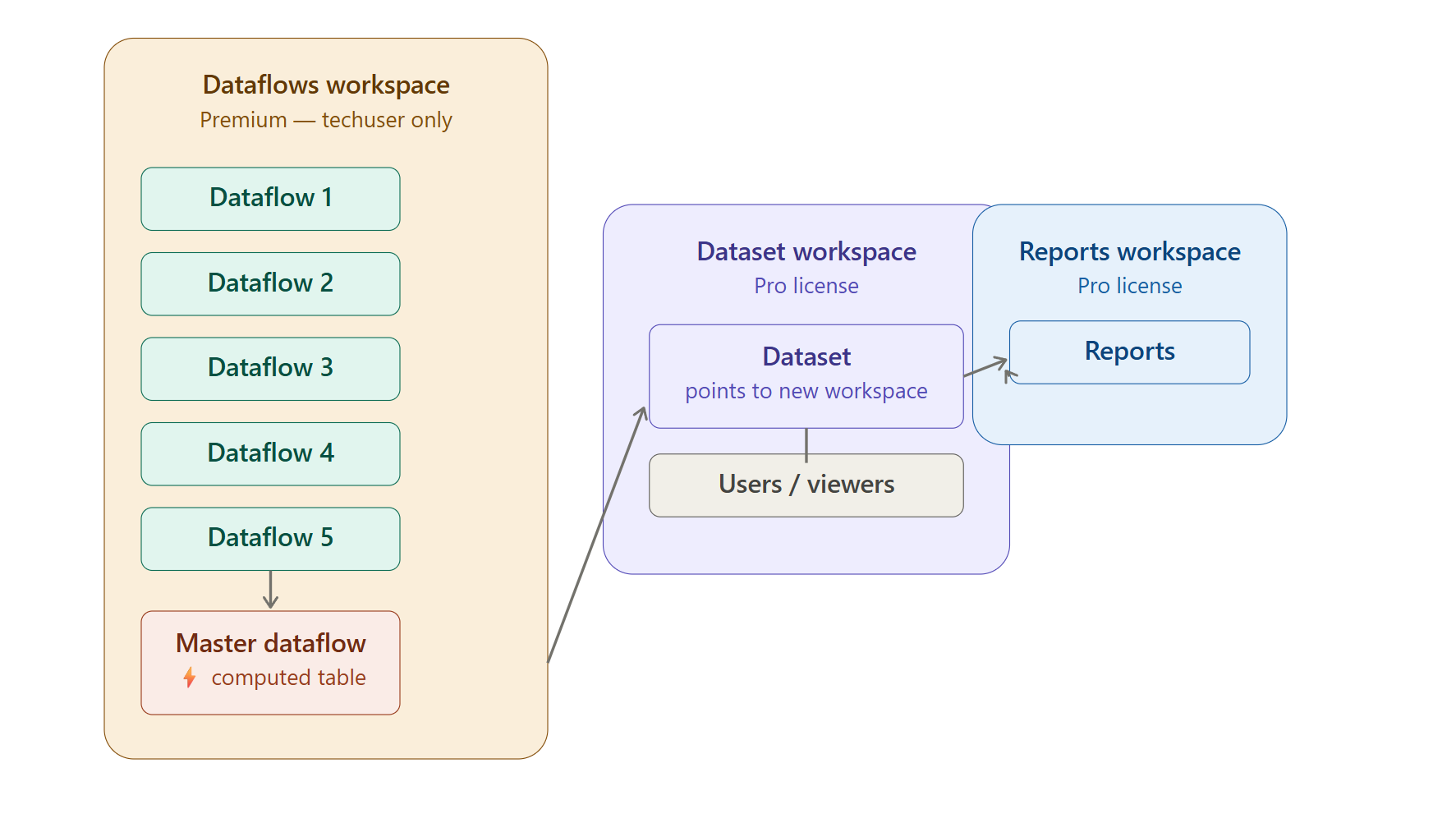
Dataflow Workspace (Premium)
Contains:
- All Excel-based source dataflows (Gen1)
- The master dataflow
Access:
- Only the techuser account
- One Premium subscription
Dataset Workspace
- Datasets connected to the Master Dataflow
- Consumers of the reports that need viewer/contributors acces to the dataset
- PowerBI pro workspace and the users have acces to the data