Order Insights Framework
This document explains three key analytical use cases to understand revenue, backlog, and planning using order data.
Case 1: Open Orders (Today – Future View)
Objective
Understand how much revenue (€) is already secured but still needs to be delivered and invoiced.
Key Concept
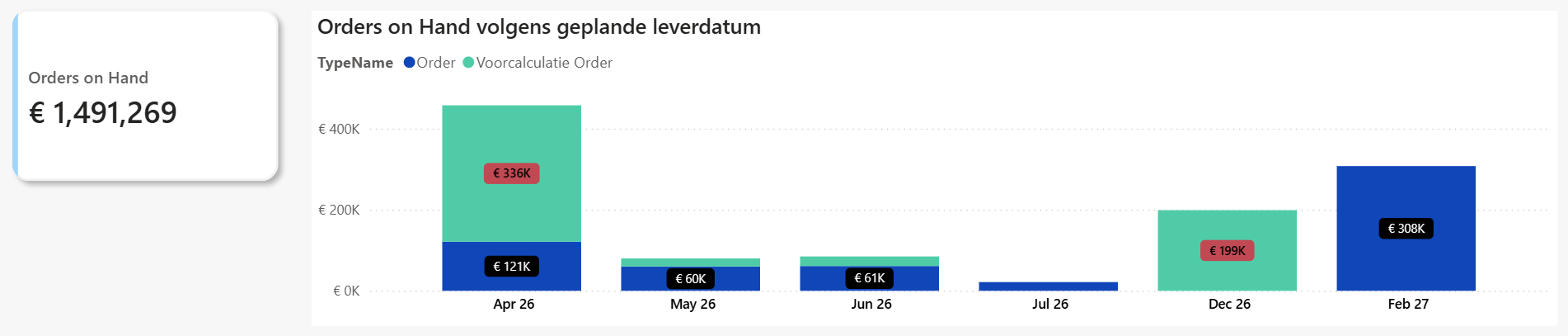
Open Orders represent guaranteed future revenue:
- The client has signed the agreement
- The revenue is not yet invoiced
- Delivery still needs to happen
How to Identify Open Orders
An order (line) is considered open if:
- Status = "Open"
OR - Ordered Amount - Delivered Amount > 0
Characteristics
- Snapshot-based
- The value changes daily
- Forward-looking
- Focus is on future delivery
Key Insight
The most important dimension is:
- Promised Delivery Date
This allows:
- Resource planning
- Revenue forecasting
- Operational confidence
Example
| Delivery Period | Open Orders (€) |
|---|---|
| 2026-04 | €450,000 |
| 2026-05 | €60,000 |
| ... | ... |
| Total | €1,491,269 |
Case 2: Open Orders (-1Y, -2Y, -3Y Historical View)
Objective
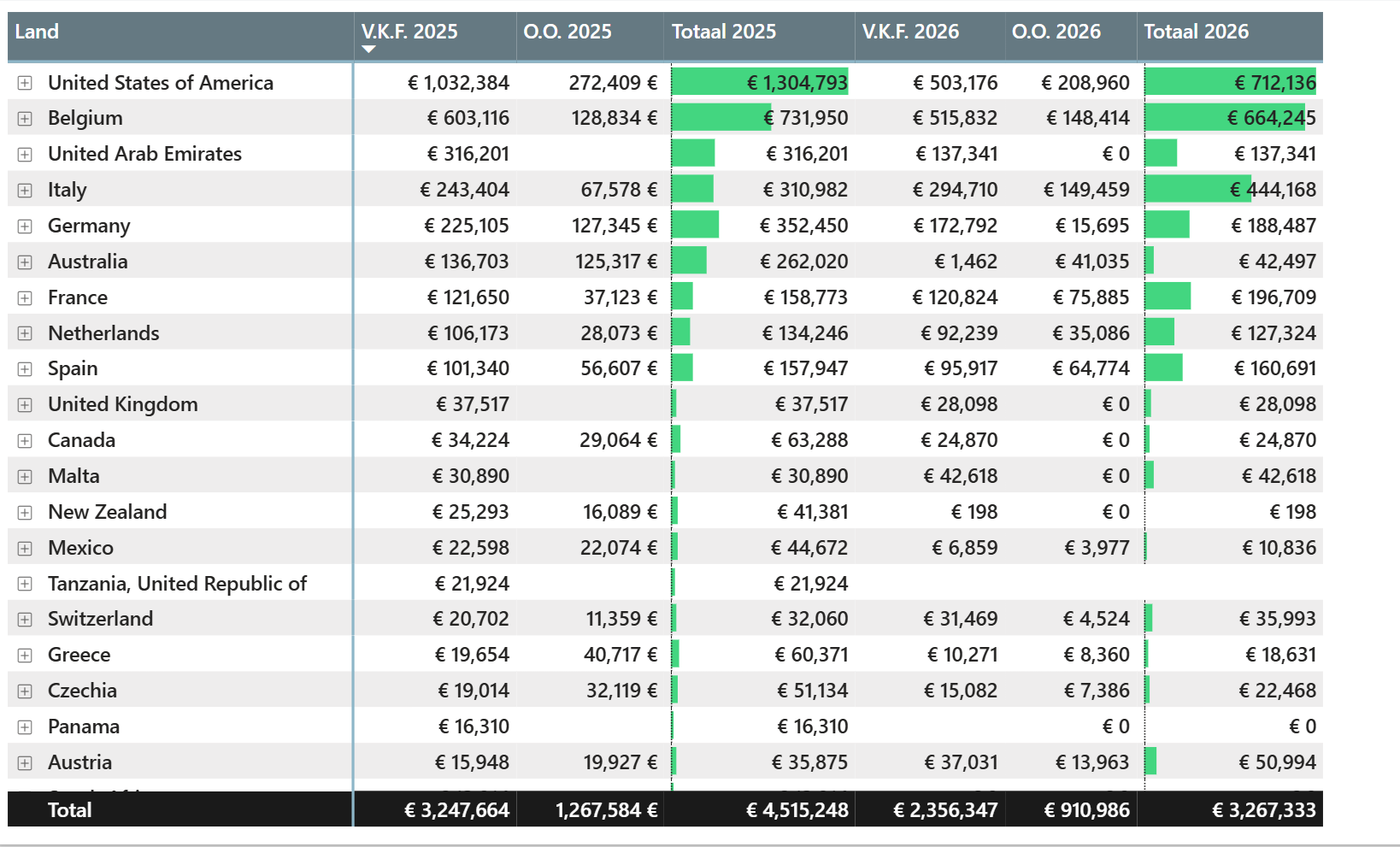
Compare current open orders with historical open orders:
- 1 year ago
- 2 years ago
- 3 years ago
Challenge
We cannot rely on:
- Order status (likely "Closed")
- Delivered quantities (already completed)
Solution
Determine if an order was open at a given point in time using:
- (A) Order Date → when the deal was signed
- (B) Shipment Date → when the order was delivered
Rule
An order is considered open for any date between:
Order Date ≤ Analysis Date < Shipment Date
Internal Reference
This logic is non-trivial to implement (especially in DAX).
For a full technical deep dive, refer to our internal blog post:
https://doc.pwrp.pro/departments/delivery/knowledge-base/pbi/dax/Open-Orders.html
This approach was validated internally (thanks to Christoph) and is essential for correct historical reconstruction of open orders.
Key Insight
This allows reconstruction of historical snapshots of open orders.
Use Cases
- Seasonality analysis
- Year-over-year comparison
- Industry patterns (e.g. Umbrosa, Blue Drops)
Example
Case 3: Order Book / Project Pipeline / Backlog
Objective
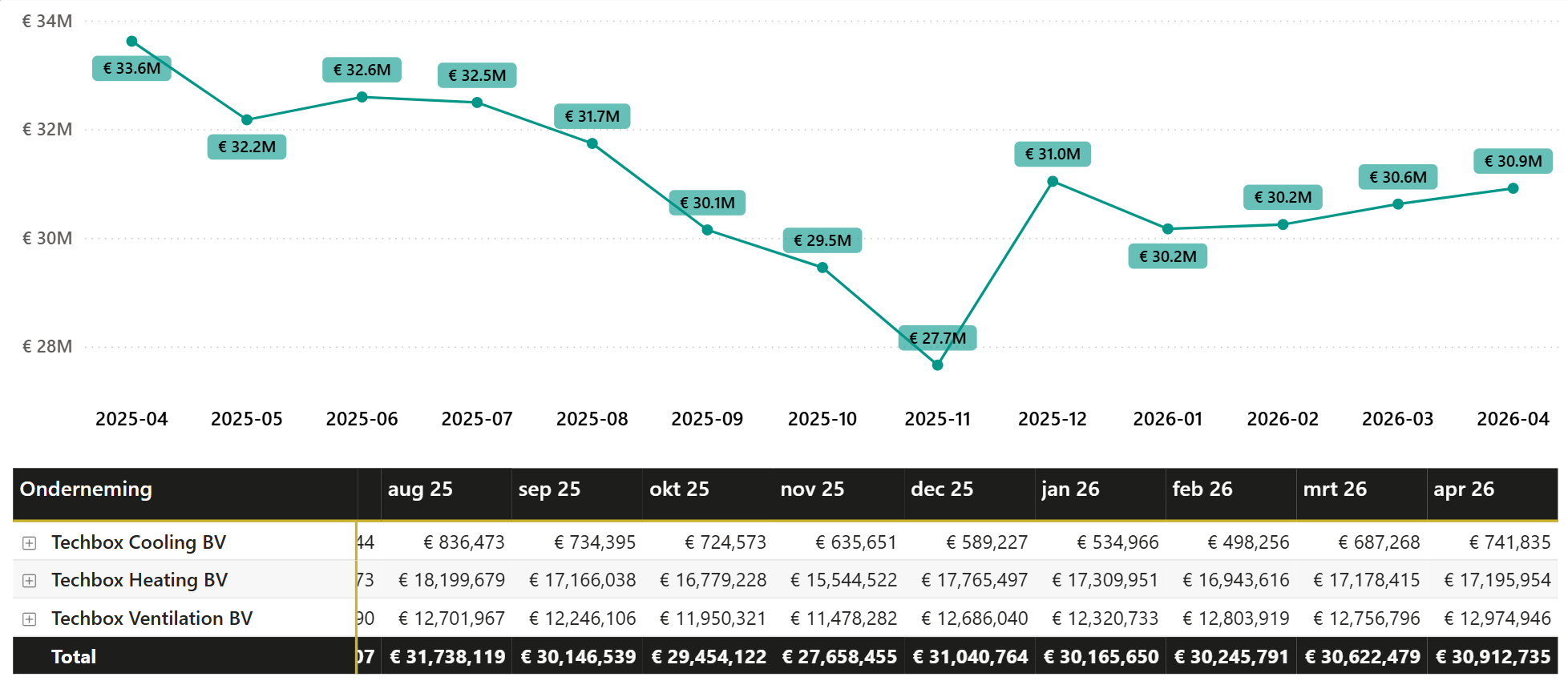
Track how much work remains over time and identify trends.
Key Concept
The Order Book (Backlog) is the difference between:
- (A) Sold Orders (Cumulative)
- (B) Invoiced Orders (Cumulative)
Formula
Order Book = Running Total Sold - Running Total Invoiced
Characteristics
- Time-series analysis (weekly/monthly)
- Typically analyzed over last 12–18 months
- Focus on trend, not individual contracts
Key Insight
Helps answer:
- Are we growing?
- Are we building backlog?
- Are we delivering faster than we sell?
Example
Summary
| Use Case | Focus | Time Perspective | Key Value |
|---|---|---|---|
| Open Orders (Today) | Revenue | Future | Short-term planning & certainty |
| Open Orders (Historical) | Comparison | Past | Seasonality & benchmarking |
| Order Book / Backlog | Trend | Over time | Strategic & operational planning |
Final Takeaway
Combining all three perspectives provides:
- Full visibility on revenue pipeline
- Better forecasting accuracy
- Improved resource planning