Perspective: Portfolio
sequenceDiagram
    actor T as Tenant
    participant HW as Heylen Warehouses

    T->>HW: signs
    Note over HW: CONTRACT
    loop Every month
        Note over HW: INVOICE
        HW->>T: sends INVOICE
        T->>HW: pays INVOICE
    end
    T->>HW: renews CONTRACT
    Note over HW: EXTENSIONS
KPIs
Indices
A CONTRACT can be on multiple Rental Spaces, so a payment cannot always be allocated to a single Rental Space.
| Index | Meaning | References |
|---|---|---|
| \(s\) | RENTAL_SPACE | -> CONTRACT -> POOL_SPACE -> BUILDING |
| \(c\) | CONTRACT | -> TENANT -> BUILDING |
Variable Overview
| Abbreviation | Meaning |
|---|---|
| \(R\) | Rental Income (Revenues) |
| \(RLT\) | Remaining Lease Term |
| \(OR\) | Occupancy Ratio |
| \(ER\) | Expiration Ratio |
| \(S\) | Space |
| \(AR\) | Outstanding Rent (Accounts Receivables) |
WALT
Weighted Average Lease Term
Perspective: Portfolio
KPQ: How healthy is my portfolio?
It calculates the rental income of a portfolio
Where:
-
\(R^{ p.a.}_c\): The current annual rental income from CONTRACT \(c\)
-
\(RLT_c\): The Remaining Lease Term \(RTL\) of CONTRACT \(c\), in number of months.
If the average lease term goes up, the WALT will go up. So the WALT is a measure of risk for a portfolio, namely:
-
vacancy risk
-
exposure to rental prices
Occupancy Ratio
Where:
-
\(S\): Space, in \(m^2\)
-
\(S^{total}\): total space (leased and un-leased)
With:
- \(S= \sum_s S_s\)
Total Rental Income
Expiration Ratio
Where:
-
\(ER\): Expiration Ratio
-
\(S^{exp24m}\): Space expiring within the next 24 months
With:
- \(S^{exp24m} = \sum_{c \epsilon E24} S_c\) where \(E24\) is all the contracts expiring within the next 24 months.
Rent Collection
Where:
-
\(OA \;\%\): Outstanding Amount Percentage
-
\(AR^{rent}\): Account Receivables from Rent/Outstanding Amount
-
\(R^{p.a.}\): Current annual Rental Income, based on the current conditions in the contracts.
With:
- \(R^{p.a.} = \sum_c R^{p.a.}_c\)
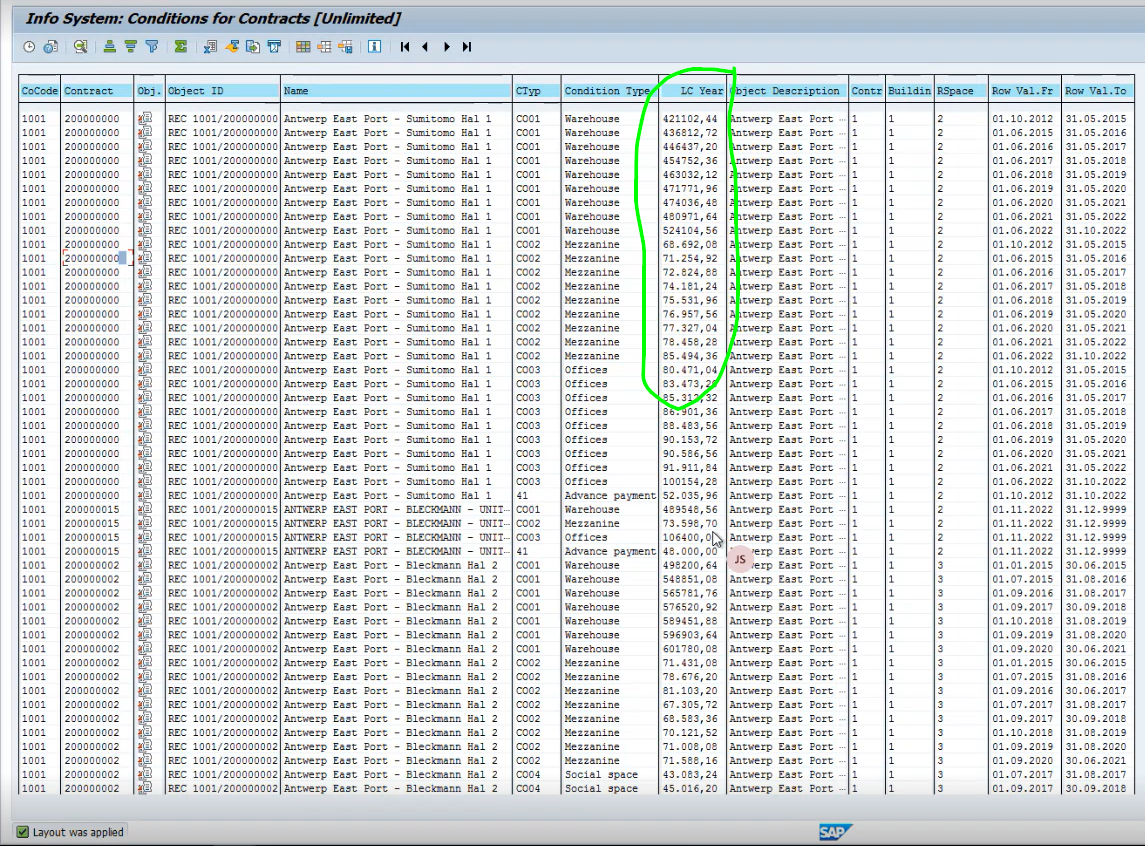
NOTE: For \(R^{p.a.}\), we have a report in SAP: REISCDCN (Real Estate Information Systems Condition Contract or similar).
Mapping
Entities -> Variables
| Entity | System | Description | Used for |
|---|---|---|---|
| BUILDING | SAP REFX | Dim | |
| POOLED_SPACE | SAP REFX | Dim | |
| RENTAL_OBJECT | SAP REFX | \(S^{total}\) | |
| CONTRACT | SAP REFX | \(S^{leased}\) \(S^{exp24}\) \(R\) \(RLT\) |
|
| CONDITION | SAP REFX | A condition on a contract | |
| MEASUREMENT | SAP REFX | e.g. M2, defined on a RENTAL_OBJECT | |
| TENANT | SAP REFX | Dim | |
| INVOICE | SAP FICO | \(AR\) |
-
A Contract can be defined on one or more ROs
-
Each RO can have one or more Measurements
-
Each Measurement has a type (e.g. Warehouse, Office, Land)
-
...and a unit (e.g. M2)
-
The Measurements can change over time (e.g. if surface is measured after built)
For example, The Warehouse had originally 20'660.82 m2, but then changed to 10'6423600 on 2022-11-01, when actually measured.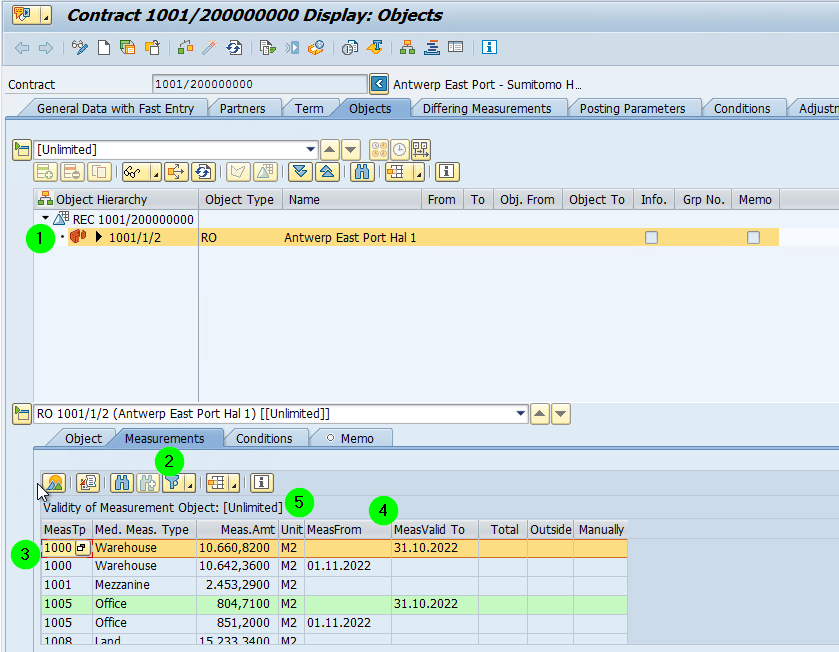
-
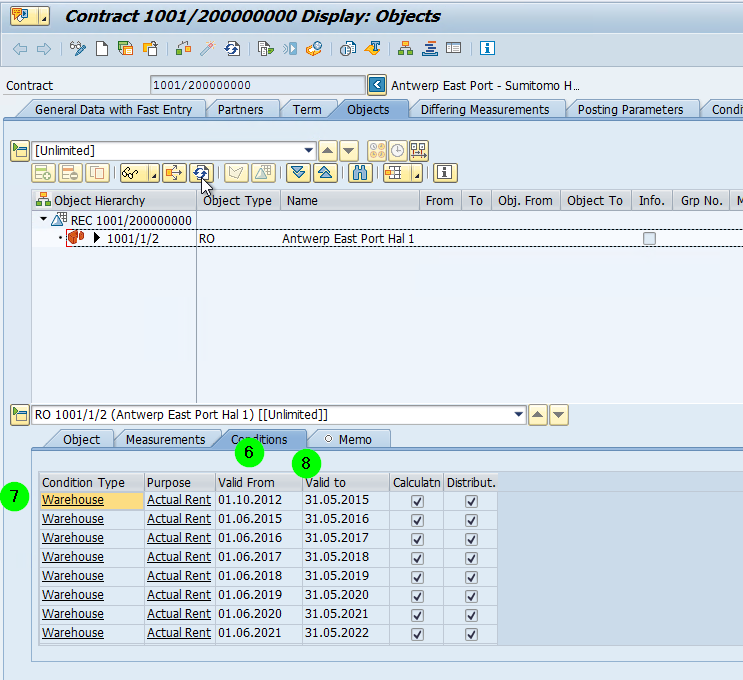
A contract has Conditions. A condition defines, for example, how the rent is calculated, e.g. if indexed
-
A Condition has a type,
-
... and a purpose and - like measurements - a validity range
-
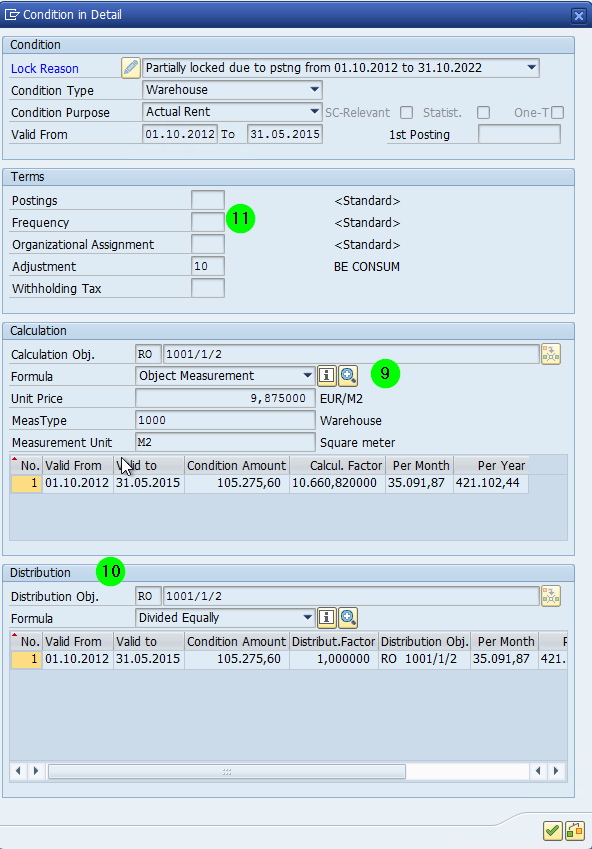
... and a Formula
-
If the Formula is Object Measurement, then the Condition Amount = Unit Price * Calculation Factor, where the Calculation Factor = the specified measure.
-
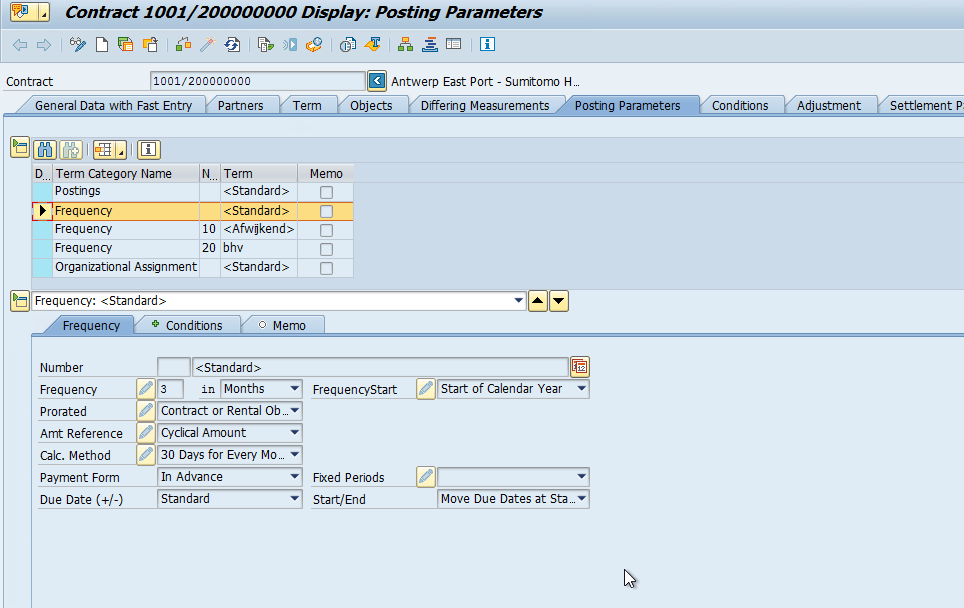
A Condition can have a frequency. If no frequency is provided, then the default posting frequency is taken.
-
The frequencies are defined under "Posting Parameters". They can also change over time.
-
If the Amt Reference is "Cyclical Amount", then the amount Condition Amount needs to be paid every n months (e.g. 3)
-
If the Amnt Reference is is "Yearly Amount", then the Condition Amount needs to be paid every year.
-
The Distribution Factor is something else: It defines how a cost that is posted on the Building is distributed amount the Rental Objects
-
A Condition can also be an Advance payment. In this case, the Calculation Factor is 1
Variables -> Entities
Variable Entity System
| Abbreviation | Meaning | Entity |
|---|---|---|
| \(R_c\) | The current rental income, either \(p.a.\) | CONTRACT |
| \(RLT_c\) | Remaining Lease Term | CONTRACT |
| \(S_i\) | Space | RENTAL_SPACE |
| \(S^{exp24m}_c\) | Space expiring | CONTRACT RENTAL_SPACE |
| \(AR_c\) | Accounts Receivables | INVOICE CONTRACT |
Property Type
In SAP, this is called Measurement Type Name
-
Warehouse
-
Mezzanine
-
Built-in Mezzanine (removable)
-
Office
-
Social
-
Land
-
Parking Spaces
ADM (Analytical Data Model / Star Schema)
erDiagram
    FactRent {
        money Amount
    }

    DimDate {
        dte Date
    }

    DimContract {
        dte StartDate
        dte EndDate
    }

    DimRentalObject {
        int Surface
        str PoolSpace
        str Building
        dec Surface
        type PropertyType "WH, Mezzanine, Office, Social"
        address Address
        text Plot

    }


    DimContract ||--o{ FactRent: for
    DimDate ||--o{ FactRent: InvoiceDate
    DimRentalObject ||--o{ FactRent: for
    DimContract ||--o{ FactRent: for
Lineage
graph LR

    SAPF[fa:fa-cloud SAP FICO  -]
    SAPR[fa:fa-cloud SAP REFX  -]

    CON((fa:fa-plug<br>PBI<br>SAP Application<br>Connector))
    style CON fill:#FFD700,color:black

    DM((fa:fa-stream<br>Datamart))
    style DM fill:#FFD700,color:black

    DS((fa:fa-star-of-life<br>Dataset))
    style DS fill:#FFD700,color:black

    SP[fa:fa-folder Sharepoint  -]

    R(fa:fa-chart-pie Report  .)
    style R fill:#FFD700,color:black

    SAPF-->|Financial<br>Data|CON
    SAPR-->|Real Estate<br>Data|CON-->DM-->DS-->R
    SP-->DM
Systems
SAP
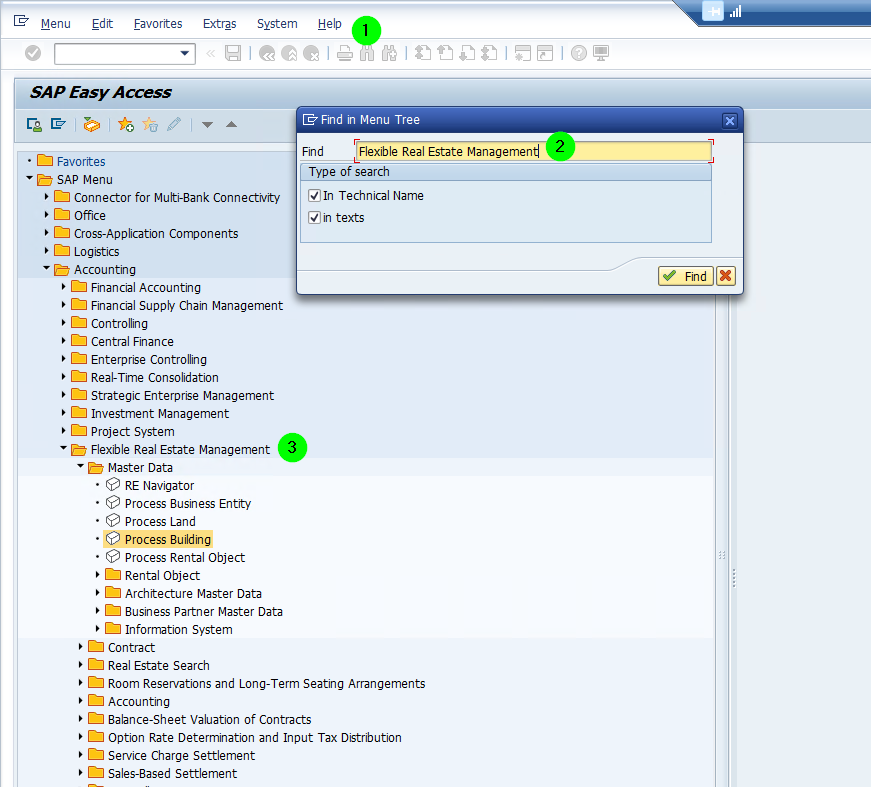
In SAP, all the data comes from REFX. Namely
-
REFX: Accounting > Flexible Real Estate Management
-
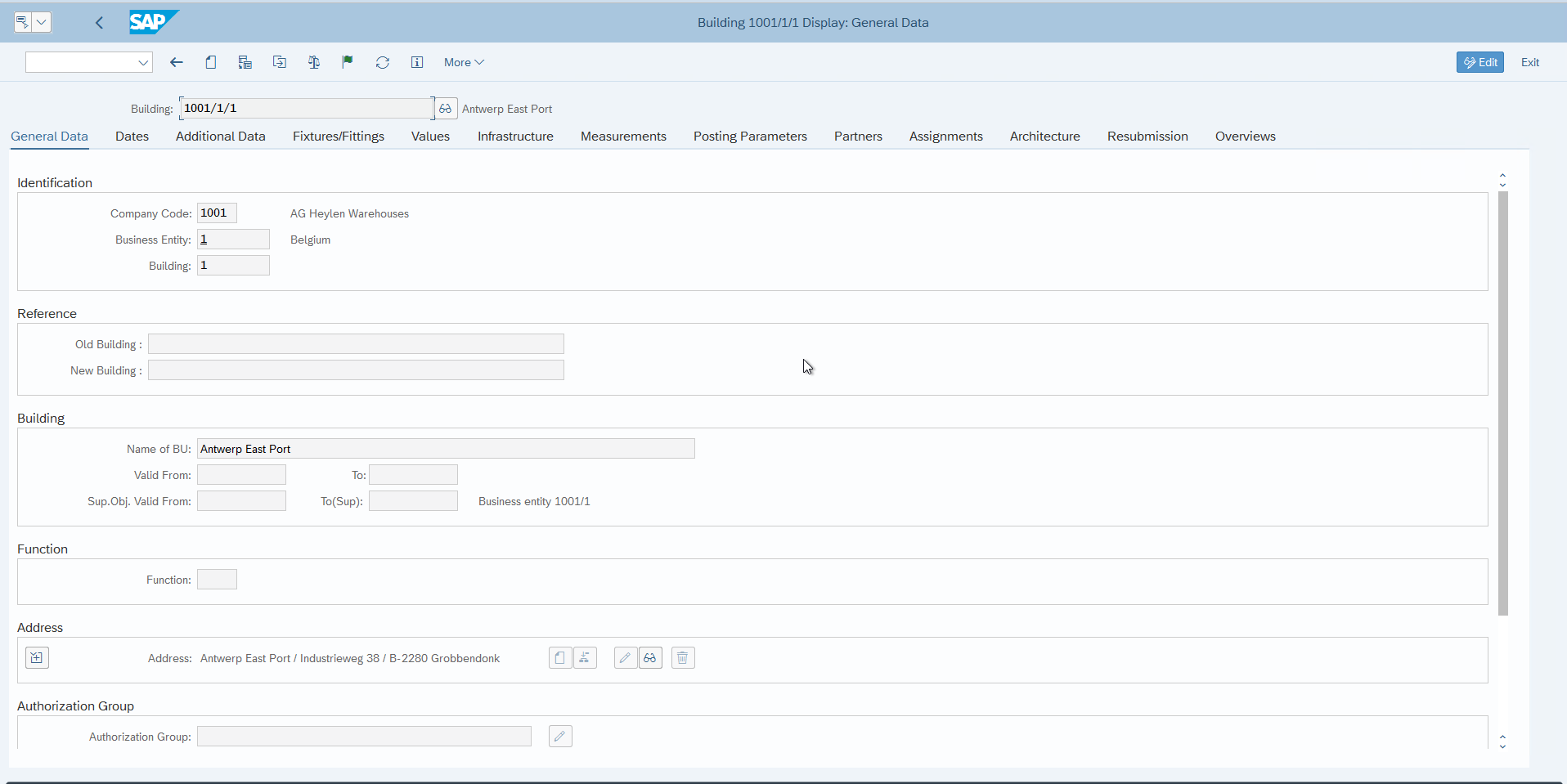
Buildings: Accounting > Flexible Real Estate Management
- Company Code:
- 1001 (Heylen AG)
- Business Entity:
- 1 = Belgium
- 2 = Netherlands
-
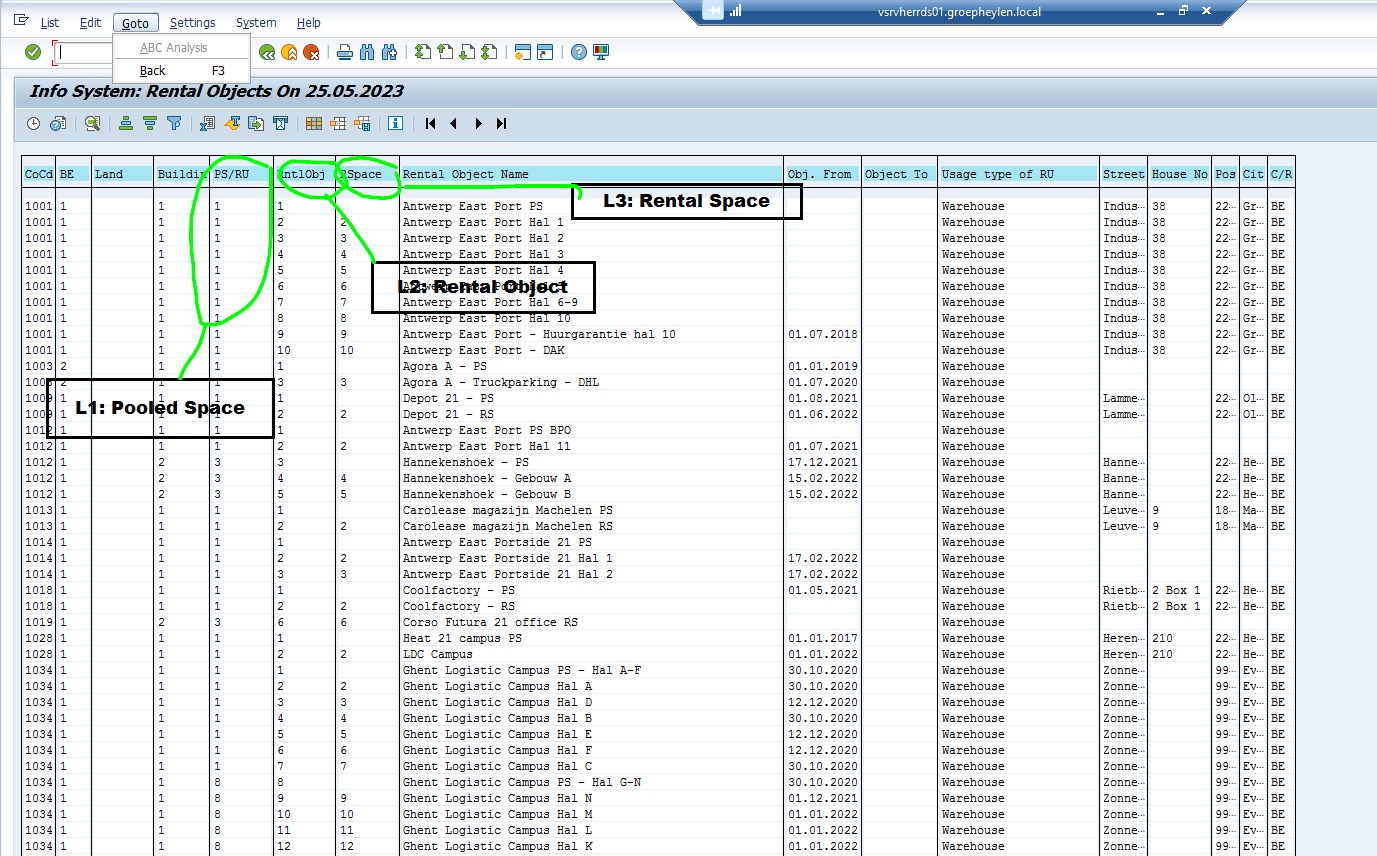
Pooled Spaces and Rental Objects: There is a single view with both.
2. SAP automatically allocates the measures (e.g. m2) from Pooled Space to Rental Objects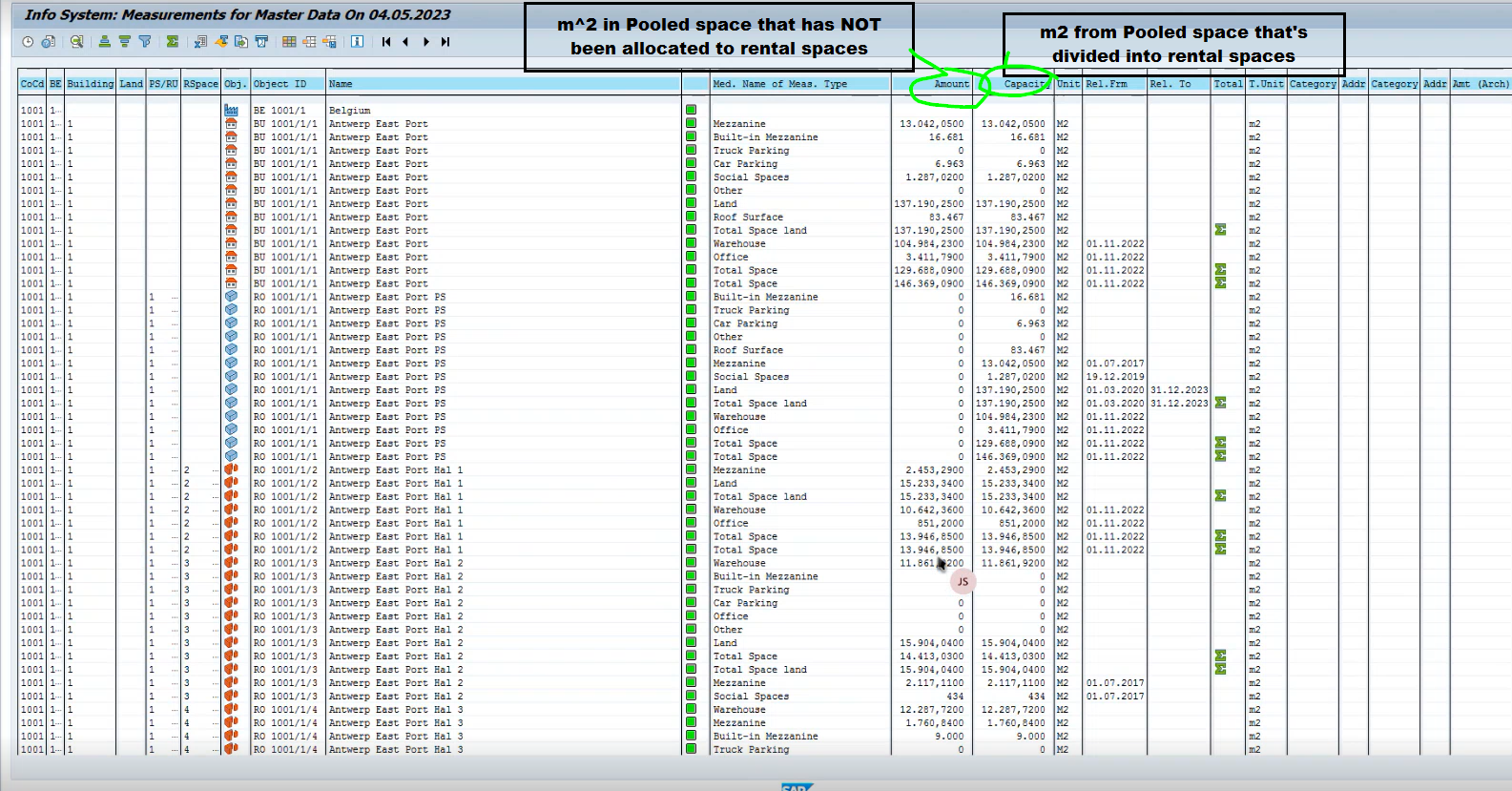
We need:
-
Master Data
- Buildings / REISBU (Accounting > Flexible Real ... > Information System > Buildings)
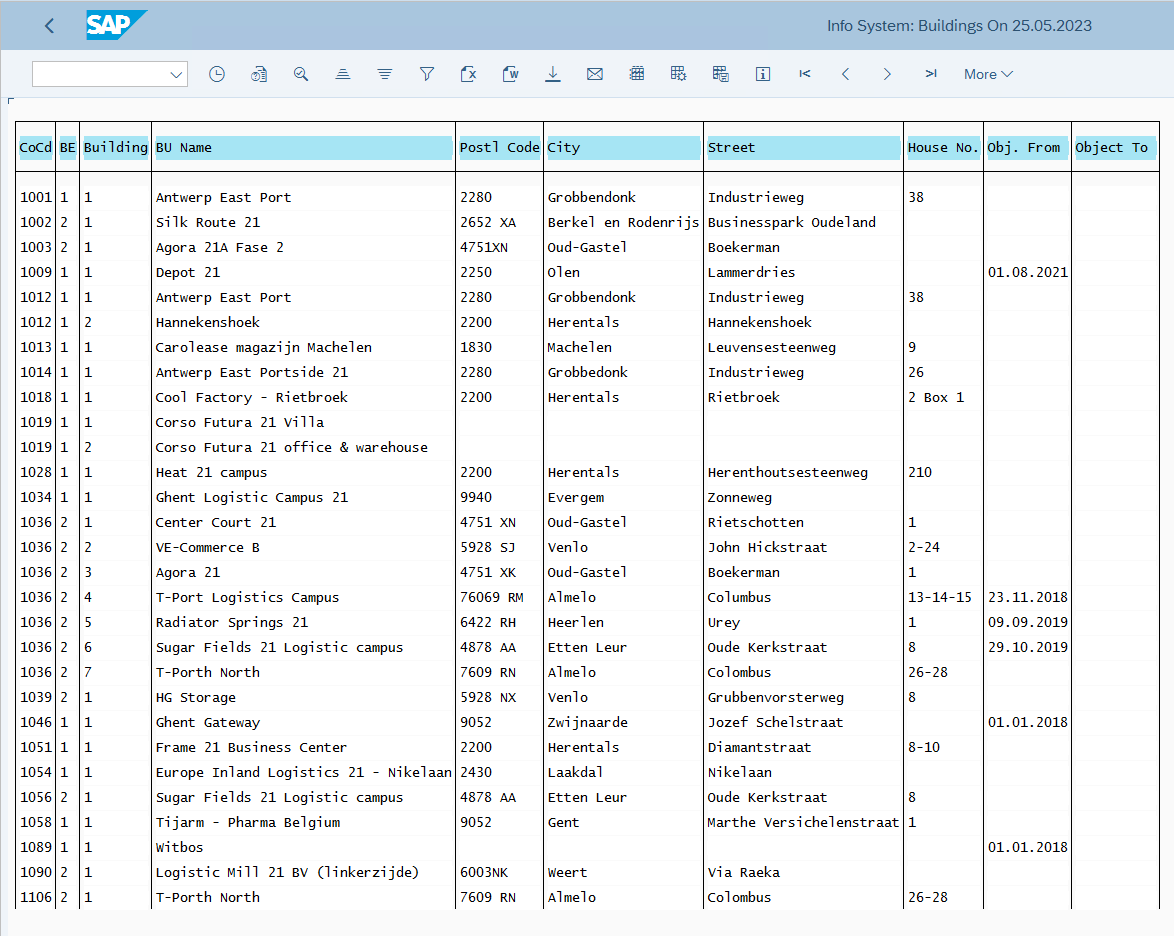
2. Rental Objects (REISRO) and Pooled Spaces (Accounting > Flexible Real ... > Information System > Rental Objects)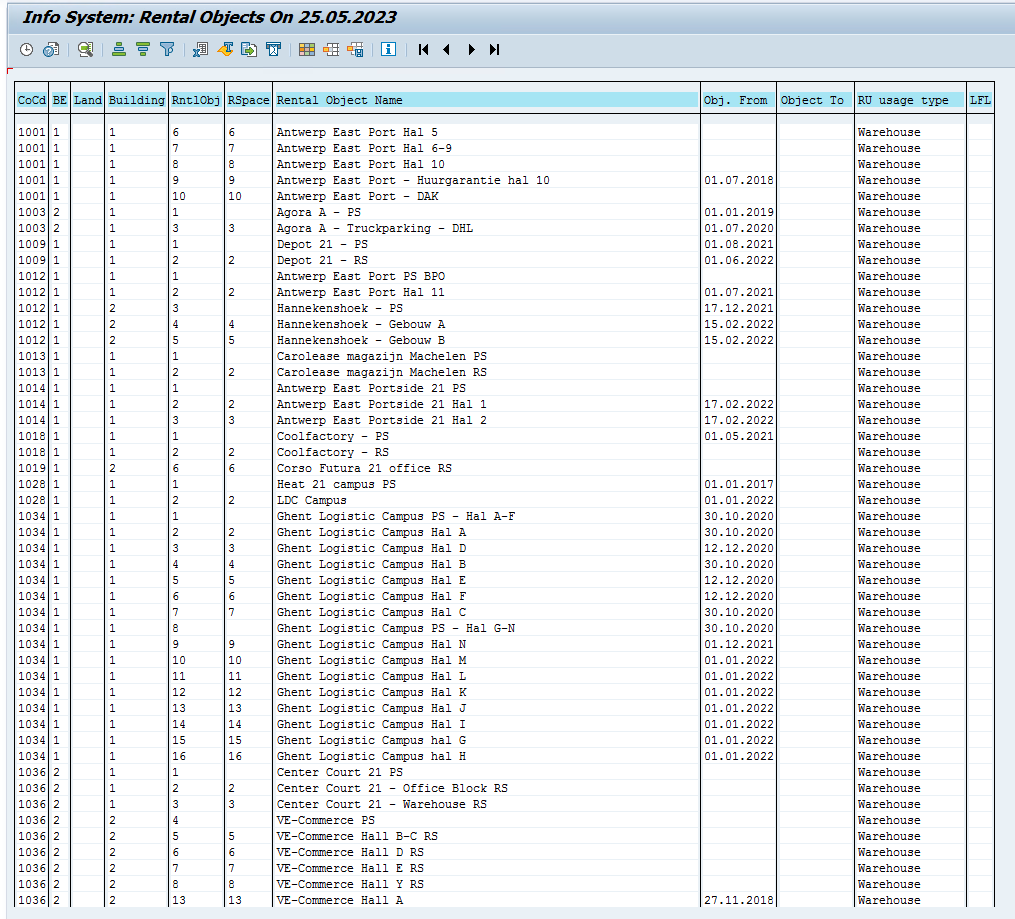
3. Contracts (REISCN) -
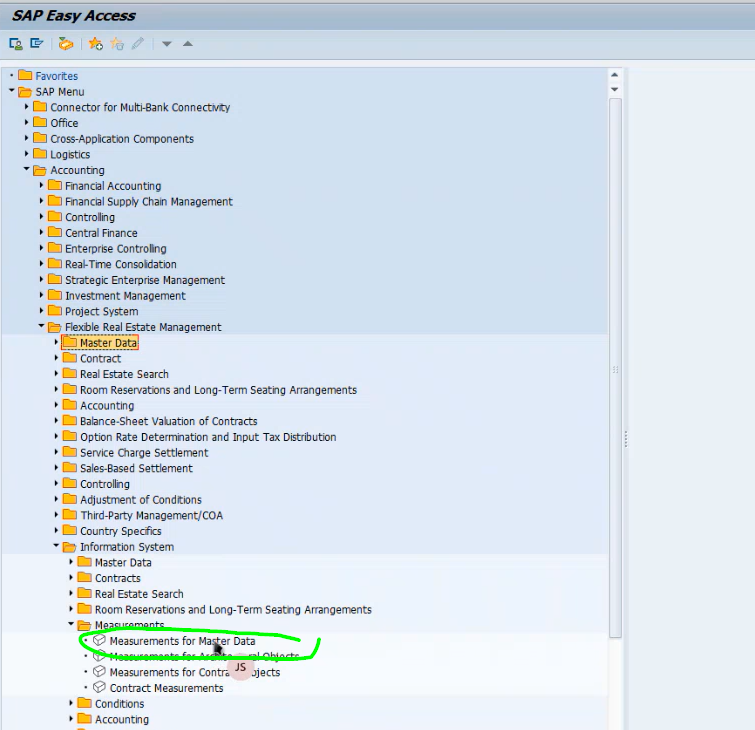
Measurements for Master Data, e.g. REISMSBD
- the capacity from the rental objects
2. the measurements for the contracts e.g. REISMSCN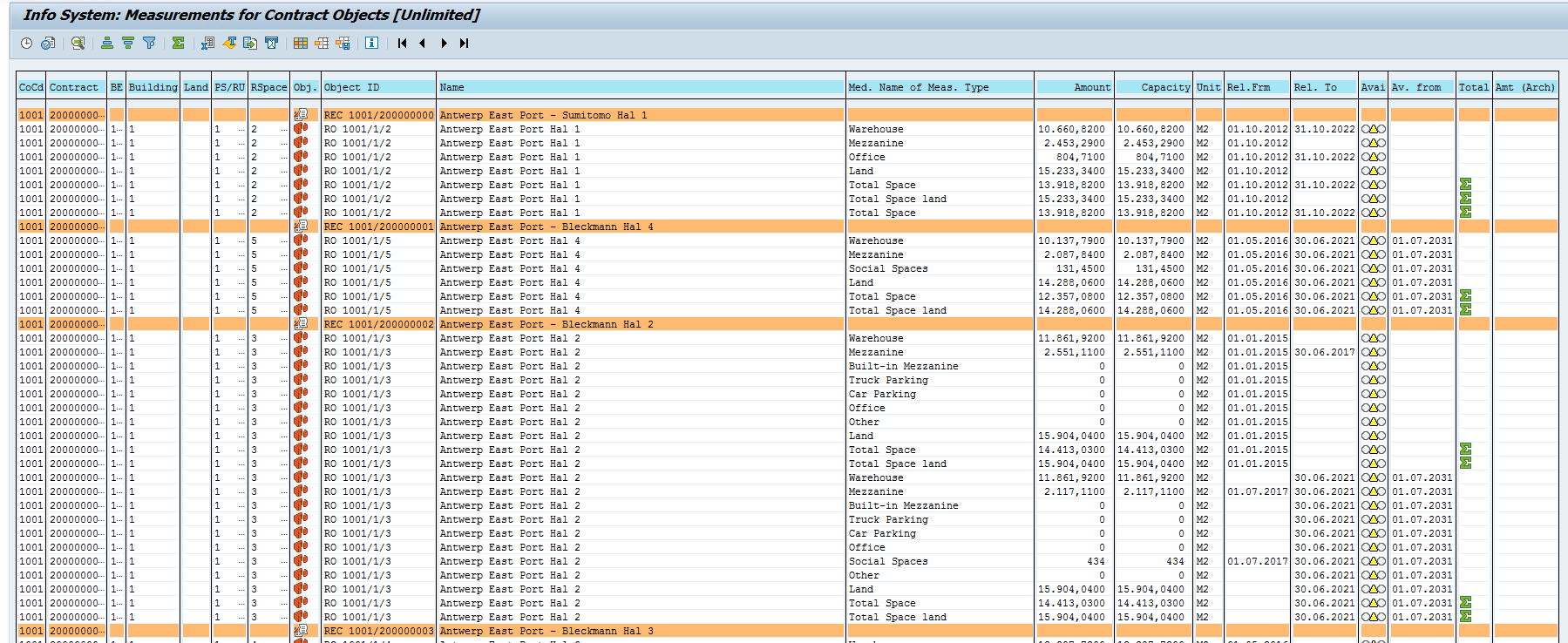
-
Conditions on Buildings and Contracts (REISCDBD, REISCDCN), especially the LC Year
-
Rental Objects -> Pooled Space
-
Measurements -> repeated (m2, etc.)
-
Capacity -> m2
-
Amount:
- Measurements for Contract Objects
- Difference between
- Conditions f