Get a Refresh Token
Tldr
Authorization flow: auth code flow
References
See here for details: oauth-auth-code-flow
The following works:
URL to generate code:
https://login.microsoftonline.com/common/oauth2/authorize?client_id={{client_id}}&response_type=code&redirect_uri=https://localhost:44300/&response_mode=query
-
In the client's edge browser profile:
- replace {{client_id}} with your client id
- call this url and authenticate. Grant consent if you are asked (unlikely).
- copy the new url from the address bar, and paste it into Notepad++
- copy the code

-
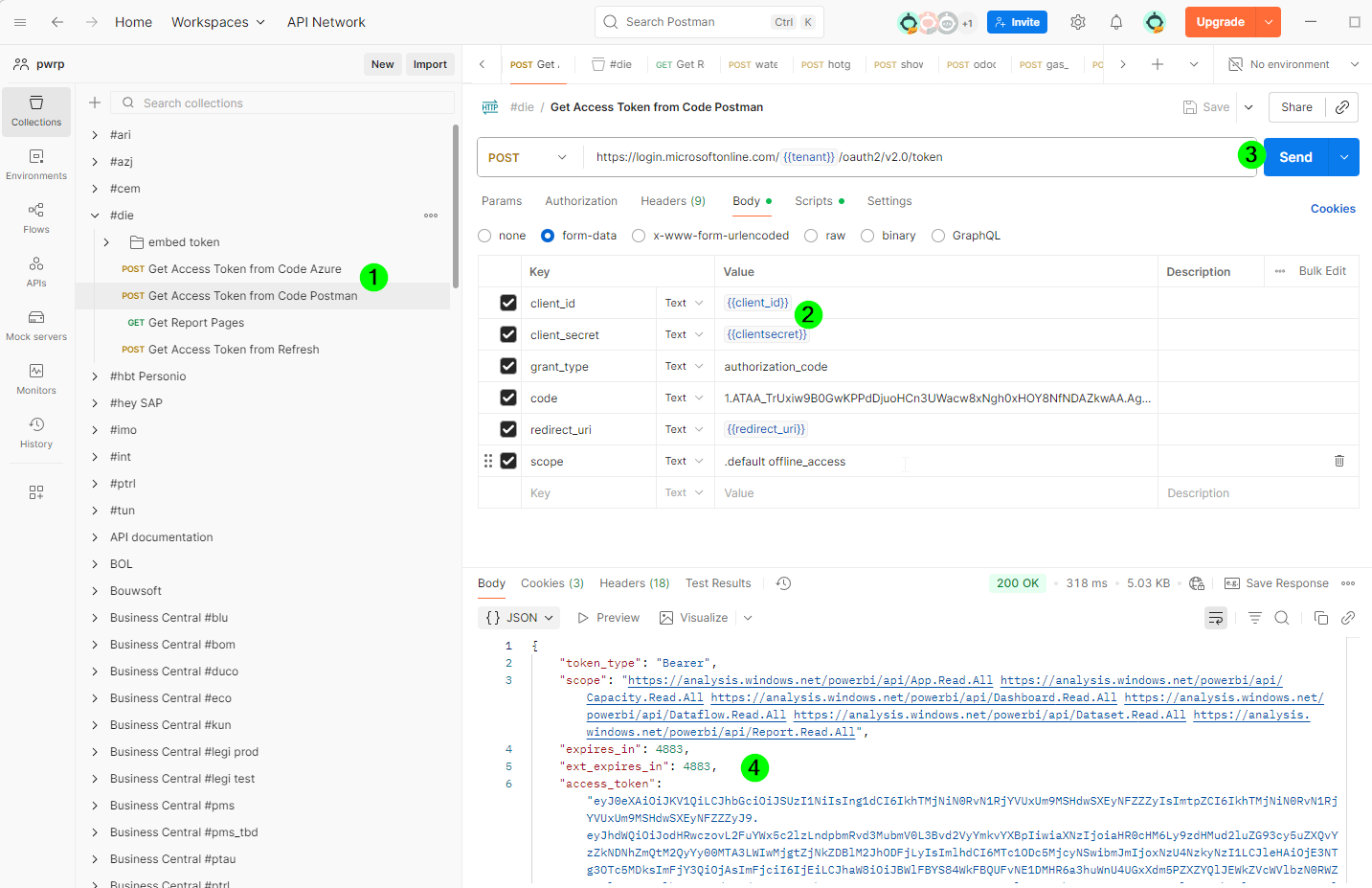
In postman:
-
Do this twice, once for a refresh token for postman (to debug), once for a refresh token for Azure, to store in the KeyVault.
Get an Embed Token
To test if everything works, we are getting an embed token from the Power BI REST API, in postman.
-
Copy the embed token folder from another client
-
replace the workspace id and the report id in the URL
-
replace the datasetId in the body
-
Send
-
If everything worked, you will get a token
Checklist
- You have a refresh token for Postman. It is stored in the collection variables
- You have a refresh token for Azure. It is stored in the response of the request, for later use
- You can get an Embed token in Postman