Create Task
- Applies to: Project Manager Delivery Team Member
- Frequency: ad hoc
- Trigger:
- Project Manager:
- when planning a project
- or a sprint
- Delivery Team Member:
- before starting to work, whenever there is no task available
- Project Manager:
Prerequisites
For Delivery Team Members:
- You have discussed the task with your Project Manager or your Account Manager
Steps
Create the Task from the Order
This is applicable only if the task is part of an order.
Option 1: Create the Task in the Order
-
go to the Order in planio, e.g. by using the Agile Board
Orders (by channel) -
in the Order, in the section
Subtasks, click onAdd -
fill in the details (see below)
Option 2: Set Parent field
Alternatively, you can create a task and set the field "Parent", as described below.
General Steps to Create a Task
-
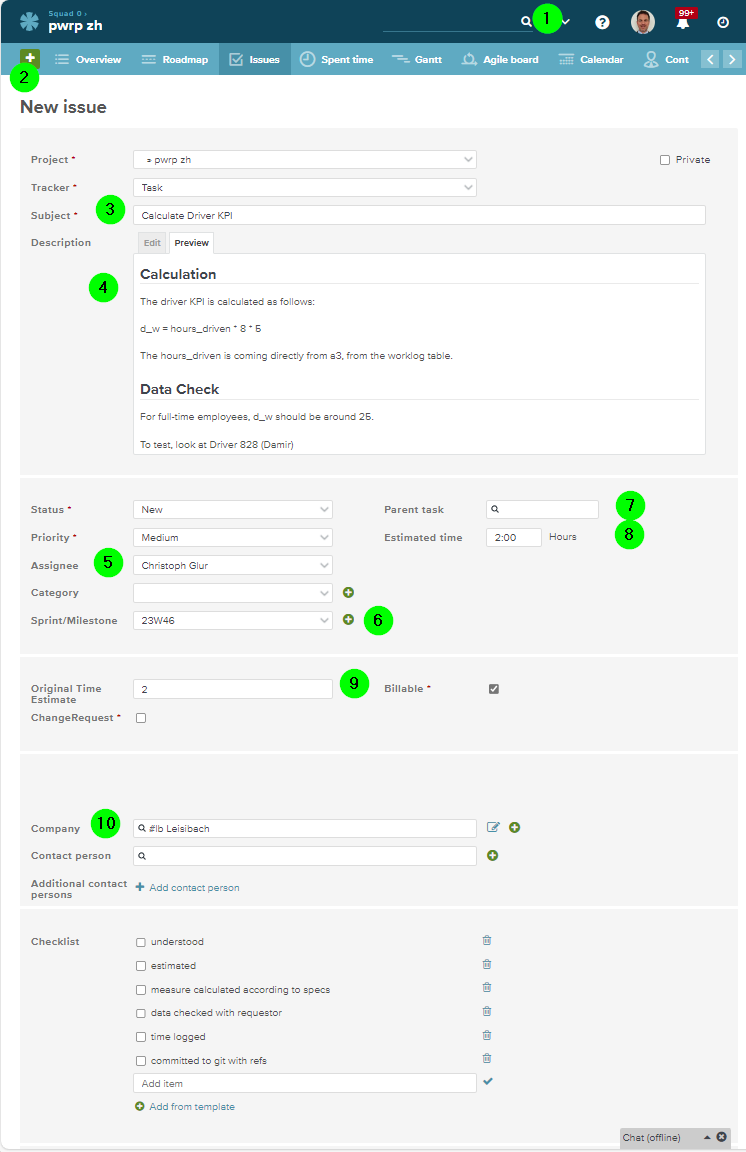
in planio, go to the right Channel (aka planio.Project)
-
click on + and select
Issue -
Write a subject that summarizes well what needs to be achieved
-
In the Description, write details. Do not repeat specs that are available in the Order, but refer to them. Add also conditions, test cases, and more information that will help to clarify the task. If you are a Project Manager that writes the task for a Delivery Team Member, then adapt the level of detail to the experience and project-know-how of the team member.
-
Assign the task if know who will work on it
-
Set the Sprint, if known.
-
Set Parent to Order, if the task is part of an Order, else leave empty. Note the following:
- you can search for [#code] to quickly find the order of a client in case you don't know the Order Number.
- do not link to anything else than an Order. We do not want to have sub-tasks.
-
Set the
Estimated time. If you cannot estimate the task, talk to the Project Manager - or as a Project Manager talk to the Team Member. -
Set the
Original Time Estimate(initially the same as theEstimated time) -
Set the
Company -
Save
-
Once the time is estimated, the Task can be moved to
Defined
Checklist
For the Task to be moved to Defined, the following need to be fulfilled
- Estimate set
- Original Estimate set