Extensions
Object IDs
BC has a concept of Objects (Pages, Queries, Reports, Codeunits, Table Extensions, and more).
Each object - both base objects as well as objects defined in extensions - has a code. For example, the Sales Invoice Header table has Object ID 112. Object IDs are unique within the object type and per environment (so e.g. there can be a Page and a Query with object id 50000). The most common.
ID Ranges
- 0–49,999: Base application – Microsoft only; don’t use in extensions. https://learn.microsoft.com/en-us/dynamics365/business-central/dev-itpro/developer/devenv-object-ranges
- 50,000–99,999: Per‑Tenant Extensions (PTEs) and training/test. Use this for tenant‑specific customizations in BC online or on Docker/sandboxes. https://learn.microsoft.com/en-us/dynamics365/business-central/dev-itpro/developer/devenv-object-ranges
- 100,000–999,999: Localization objects for specific countries/regions – not available to partners. https://learn.microsoft.com/en-us/dynamics365/business-central/dev-itpro/developer/devenv-object-ranges
- 1,000,000–69,999,999: RSP (Registered Solution Program) range for ISV solutions. Microsoft currently advises new publishers not to request RSP and to prefer the App range. https://learn.microsoft.com/en-us/dynamics365/business-central/dev-itpro/developer/devenv-object-ranges
- 70,000,000–74,999,999: App (AppSource) range for marketplace apps. This is the recommended range for new publishers. https://learn.microsoft.com/en-us/dynamics365/business-central/dev-itpro/developer/devenv-object-ranges
We are typically using range 50'000-99'000.
On Prem
- In SaaS, this range is free for tenant-specific extension development.
- On-prem, however, it's not free—you must use an uploaded license file (.flf) and pay for the objects you create in this range.
Dependencies and ID Ranges
Warning
We don't fully understand this topic.
In some cases, we received obscure permission warnings. These were then fixed by setting our id range to the one of the dependency. But we don't fully understand this topic.
How we manage id ranges
-
We use range 50'000-99'000 for our extension.
-
We need to coordinate with the integration partner for the range to use.
-
In case of on prem, the client/integration partner might need to buy a license for the range.
-
In case of obscure permission errors, this can typically be solved by using the same range as the dependency
AL Naming Conventions
The following conventions are standard for pwrp. You can use them as instructions for a VSC copilot agent:
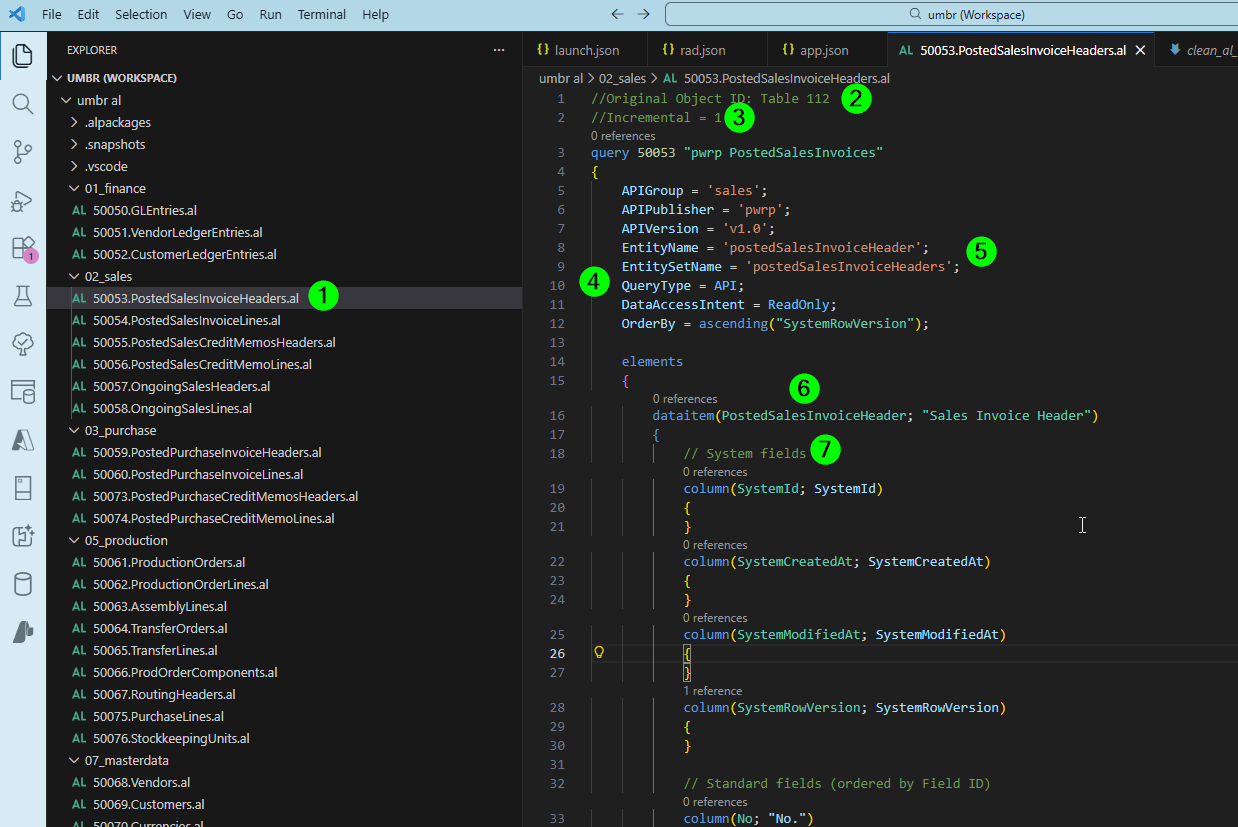
-
the file name should be ObjectID.EntitySetName.al, according to the Object ID specified inside the al file, e.g. 65010.PostedSalesInvoices.al
-
the file should start with a directive indicating the original Object ID, for example "//Original Object ID: Table 112" for PostedSalesInvoices
-
the second line is a directive "//Incremental = 0" or "//Incremental = 1". If not given, use a default according to these rules: if the file is in the APIGroup masterdata or items, then use Incremental = 0, else use Incremental = 1. If given, keep the existing value.
-
all al queries should be API queries, and have the following:
- APIGroup = '{{folder name, e.g. finance or purchase}}';
- APIPublisher = 'pwrp';
- APIVersion = 'v1.0';
- EntityName = '{{entity name}}';
- EntitySetName = '{{entity name plural}}';
- QueryType = API;
- DataAccessIntent = ReadOnly;
- OrderBy = ascending("SystemRowVersion");
-
the EntityName and EntitySetName should be CamelCase, no underscores, starting upper case
-
the dataitem name should be CamelCase, no underscores, starting upper case, e.g. PostedSalesInvoiceHeaders. Multiple upper case letters should stay that way (e.g. AmountLCY instead of AmountLcy, or DimensionSetID instead of DimensionSetId)
-
in the dataitem section, there should be a clear order of fields:
- first be the System fields (SystemID, SystemCreatedAt, SystemModifiedAt, SystemRowVersion which are always mandatory, plus potentially additional fields like SystemCreatedBy). Add the system fields if missing.
- then, there should be the standard fields, ordered by Field ID according to the standard BC. Do not add any new fields, just order the existing ones.
- finally, there should be the custom fields.
-
add the field id as a comment
-
date and type should be quoted, e.g. "date" and "type" and other reserved words should be quoted as well.