Azure Function Introduction
Azure Functions are a serverless compute service provided that allows you to run code in the cloud without worrying about infrastructure management. For example, we can use Azure Functions to download data from an API and store it in a DWH, without needing a server.
Azure Functions supports multiple programming languages, including Python. At Power Partners, we use Azure Functions for many python libraries, such as py-odoo, py-exact, and many more. We also use Azure functions for the BC Financial Accelerator product, to download data from Business Central to a DWH.
Azure functions are developed in Visual Studio Code.
Azure Functions integrates seamlessly with other Azure services, such as Azure Data Factory.
Monitoring and diagnostics: Azure Functions provides built-in monitoring and logging capabilities, allowing you to gain insights into the execution of your functions. You can view metrics, track logs, and troubleshoot issues to ensure the smooth operation of your Python functions.
Function App versus Function
Function Apps define a group of functions sharing some configuration.
Triggers
Azure functions can be triggered by schedule or by an HTTP call. At Power Partners, we use both.
To trigger an Azure Function with an HTTP call, you need to use a key (simple protection to avoid external parties to trigger).
There are different key levels:
- master
- default
- function
The easiest is to get the fully configured URL from the function:
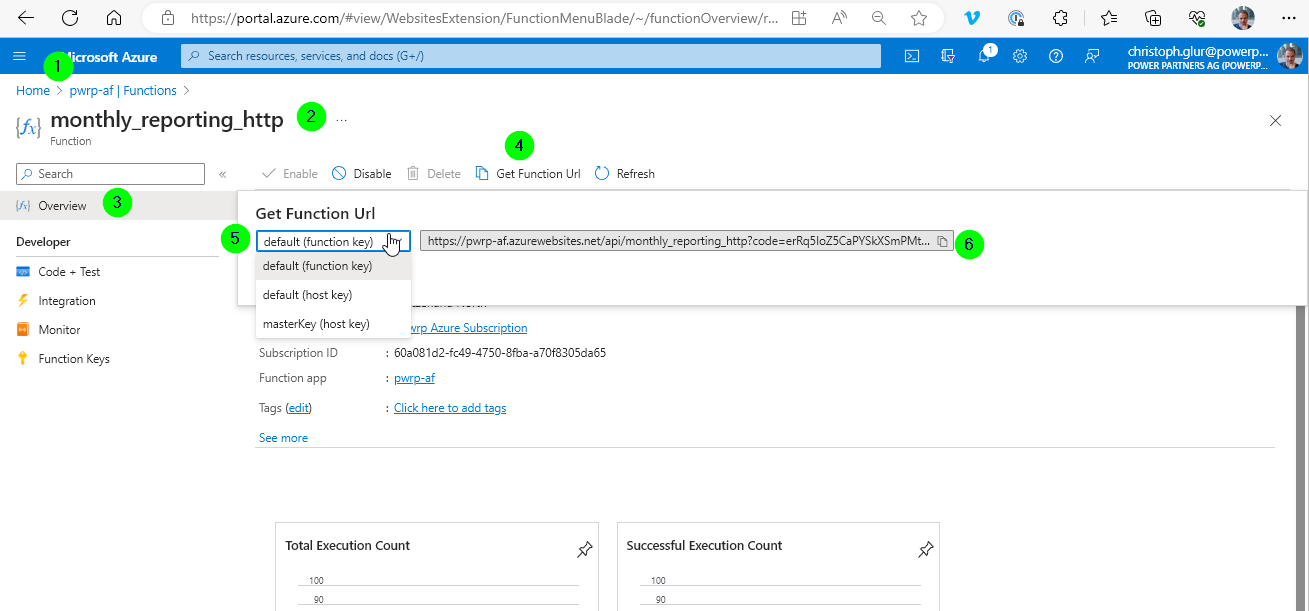
-
in Azure Portal, go to the Function App
-
select the HTTP function at hand
-
go to Overview
-
click on Get Function URL
-
select the key you want to use
-
copy the URL
-
paste the URL to the address bar to trigger a function
Requirements
Azure Functions requires an Azure Storage account to write logs to.
Tools
We use Visual Studio Code to develop azure functions. There is a VSC extension. The VSC extension allows creating new Azure functions, and to deploy them to the cloud.
Testing
There is also an Azure Function Core Tools. You can install on your machine. It will emulate azure functions and allow debugging azure functions locally. However, running azure functions locally is far from being lightweight. For this reason, we typically avoid it. Instead, our azure functions are designed as a super light-weight wrapper around the business functionality. We then test the business functionality by using python unit tests, avoiding the heavy azure function infrastructure.
For an example, see e.g. py-bouwsoft, py-exact, and many more.
Building
The Azure Functions are built on the server. However, you trigger the build process from VSC.
Python Version (view and change)
You define the python version when you create the function app. We currently recommend 3.10.
You can change the python version of an azure function like this:
-
in the Azure portal, open Cloud Shell (Power Shell) https://learn.microsoft.com/en-us/azure/cloud-shell/quickstart?tabs=azurecli
-
display the current python version
az functionapp config show --name blu-bc-af --resource-group bluedrops-bc --query 'linuxFxVersion' -o tsv -
if you get a message that the resource group couldn't be found, then select the subscription
- show the subscriptions:
az account list --output table -
select the subscription: `az account set --subscription
-
change the python version like so:
az functionapp config set --name blu-bc-af --resource-group bluedrops-bc --linux-fx-version 'PYTHON|3.10' -
check that the setting worked by calling again:
az functionapp config show --name blu-bc-af --resource-group bluedrops-bc --query 'linuxFxVersion' -o tsv