Client Credentials Authorization flow
Reference
https://learn.microsoft.com/en-us/entra/identity-platform/v2-oauth2-client-creds-grant-flow
Tldr
- Prerequisite: a registered App in Microsoft Entra that has the correct permissions. Get the
client_id, theclient_secret, theredirect_uriand thescopefrom the app -
in the browser, call
https://login.microsoftonline.com/common/oauth2/authorize?client_id={{client_id}}&response_type=code&redirect_uri={{redirect_uri}}&response_mode=query&prompt=consent
replacingclient_idandredirect_uriaccording to your App. You will receive an authorization code. You might need to remove the prompt=consent in case you don't have Admin rights and did not change the permission. -
in postman, POST
providing the following form data:
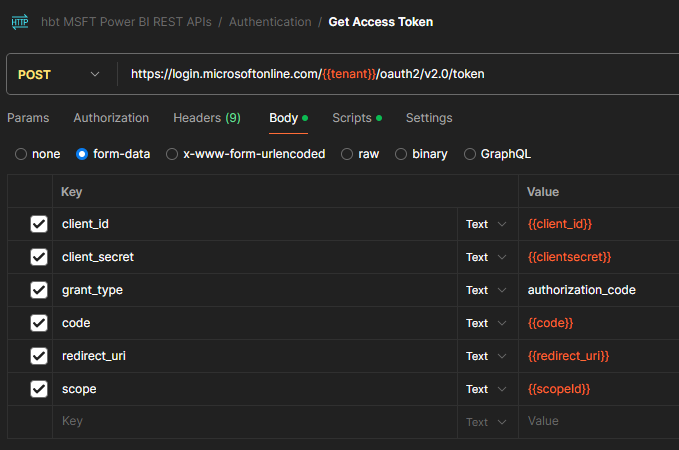
The scopes are:- for azure:
https://management.azure.com/.default offline_access - for Power BI:
https://analysis.windows.net/powerbi/api/.default offline_access - for BC, the scope is:
https://api.businesscentral.dynamics.com/.default
- for azure:
-
the grant_type is
authorization_code(NOTE: for BC this isclient_credentials) - copy the
access_tokenand therefresh_token. Store the refresh_token in departments/delivery/knowledge-base/azure/key-vault/key-vault
In this flow, we don't have an authorization code. Instead